Morten Ross

Forum Replies Created
-
I have tried that plugin already, but it either breaks Matomo with WP whitescreen, or the plugin is not showing in Matomo UI.
Found it – use “Action URL” – “Does not contain” – “&unfilter=1”
Forum: Plugins
In reply to: [IndexNow Plugin] API key not found in plugin@stylishjm kindly described the solution a week ago.
Thanks for your guide – works like a charm! The IndexNow Simplest access to hidden settings is yourdomain.com/wp-admin/options.php.
Bing Webmaster Tools IndexNow page is showing submitted URLs almost immediately after submission, with WordPress as the source. However in Home, IndexNow is still showing as missing/critical in Recommendations, so I guess that could linger for some time.
Absolutely beyond me why the plugin authors have left out this very key component in the Installation documentation and FAQ. Especially after so many people requesting answers. But then again, the authors completely ignore this forum.
- This reply was modified 10 months, 1 week ago by Morten Ross.
The challenge is only with crawlers and scrapers, as they are excessively digging deep into meaningless queries, which means that any crawler or scraper could and will without warning drown the server with tens of thousands of requests per hour. I got 58k Scrapy query GETs from just one IP address within 20 minutes, so at any point there could be hundreds of IPs wanting to scrape/crawl. I had 400K query GETs from google within a short time, before I was able to limit via the hosting provider. From Vietnam Posts and Telecommunications Group I got hit by thousands of IPs running query GETs from more than 600 subnets, which took forever for me to ban.
My challenge is to limit unknown bots. I’ve never had an issue with Scrapy, so I did not have any user agent or pattern block in place.
Can the rate limiting be set to a pattern – like ‘&unfilter=1’ – this is the hallmark of a crawler or scraper if it appears from same IP in short succession, as no user has the time to filter, read, and the re-filter the content.
This is a duplicate of https://ww.wp.xz.cn/support/topic/rate-limiting-for-query-gets-2/#post-18429909.
When I refreshed this post, pending moderation, it was gone, so I opened another without the URLs, which I thought was the cause for the removal. It was not my intention to have duplicate, so the other one can be closed.
Forum: Fixing WordPress
In reply to: WordPress is not generating the srcset attribute correctlyI’ve had this folder structure since installation in 2006, so perhaps later versions changed this.
I have looked back to before I used current plugin, which was Woothemes, and it had the same problem then – ie these from 2018, where all the first 40 or so images have the problem: https://www.ross.no/locations/ecuador/.
I guess I will have to hire a developer to get to the bottom of this.
Forum: Fixing WordPress
In reply to: WordPress is not generating the srcset attribute correctlyJust to clarify – did you understand the description of the issue by the theme developer?
To answer your update – I assume you mean the wp-content folder an not the upload folder?
For the 20231218-DSC_4451-1-5.5.jpg, the following files are on disk, yet srscset fails – all images have these (the *uai* are created by theme afterwards, based on user device) after the upload finishes and server has processed, but only some fail srcset:
20231218-DSC_4451-1-5.5-scaled.jpg
20231218-DSC_4451-1-5.5-scaled-uai-720×480.jpg
20231218-DSC_4451-1-5.5-768×512.jpg
20231218-DSC_4451-1-5.5-700×467.jpg
20231218-DSC_4451-1-5.5-345×195.jpg
20231218-DSC_4451-1-5.5-220×150.jpg
20231218-DSC_4451-1-5.5-2048×1365.jpg
20231218-DSC_4451-1-5.5-198×100.jpg
20231218-DSC_4451-1-5.5-1536×1024.jpg
20231218-DSC_4451-1-5.5-144×144.jpg
20231218-DSC_4451-1-5.5-120×120.jpg
20231218-DSC_4451-1-5.5-1200×800.jpg
20231218-DSC_4451-1-5.5-1024×683.jpgAs an example I have found a category with majority with this error : https://www.ross.no/category/plants/aizoaceae/
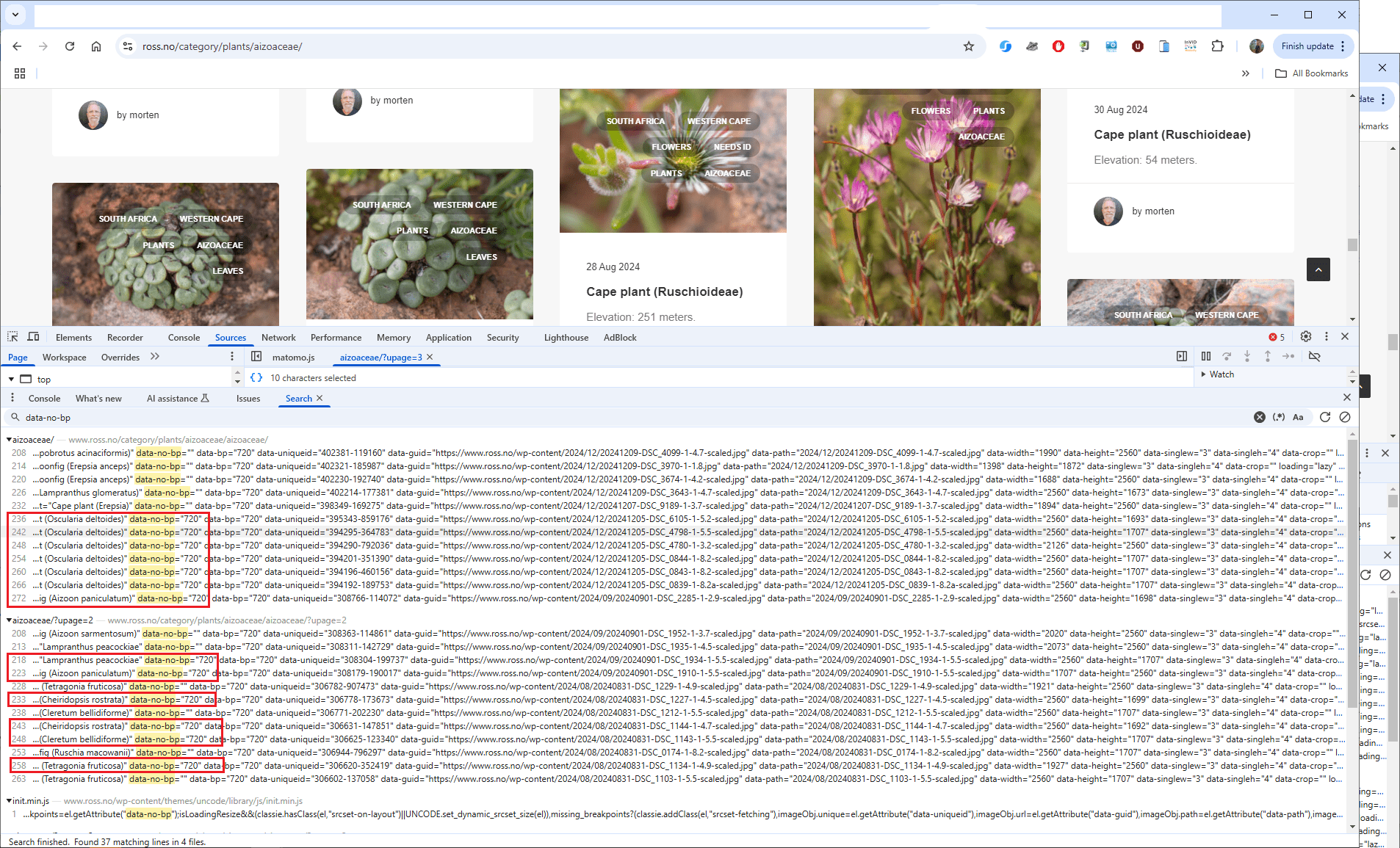
Comparing this image with srcset error:
https://www.ross.no/wp-content/2024/12/20241205-DSC_6105-1-5.2.jpg:
20241205-DSC_6105-1-5.2-scaled.jpg
20241205-DSC_6105-1-5.2-scaled-uai-720x476.jpg
20241205-DSC_6105-1-5.2-scaled-uai-516x341.jpg
20241205-DSC_6105-1-5.2-scaled-uai-258x171.jpg
20241205-DSC_6105-1-5.2-scaled-uai-2064x1365.jpg
20241205-DSC_6105-1-5.2-scaled-uai-1440x952.jpg
20241205-DSC_6105-1-5.2-768x508.jpg
20241205-DSC_6105-1-5.2-700x463.jpg
20241205-DSC_6105-1-5.2-350x232.jpg
20241205-DSC_6105-1-5.2-348x348.jpg
20241205-DSC_6105-1-5.2-220x150.jpg
20241205-DSC_6105-1-5.2-2048x1355.jpg
20241205-DSC_6105-1-5.2-1536x1016.jpg

with this image that does not have the error
https://www.ross.no/wp-content/2024/12/20241207-DSC_9189-1-3.7.jpg
20241207-DSC_9189-1-3.7-scaled.jpg
20241207-DSC_9189-1-3.7-scaled-uai-720x973.jpg
20241207-DSC_9189-1-3.7-scaled-uai-516x697.jpg
20241207-DSC_9189-1-3.7-scaled-uai-258x349.jpg
20241207-DSC_9189-1-3.7-768x1038.jpg
20241207-DSC_9189-1-3.7-700x946.jpg
20241207-DSC_9189-1-3.7-350x473.jpg
20241207-DSC_9189-1-3.7-348x348.jpg
20241207-DSC_9189-1-3.7-220x150.jpg
20241207-DSC_9189-1-3.7-1515x2048.jpg
20241207-DSC_9189-1-3.7-1137x1536.jpg
Forum: Fixing WordPress
In reply to: WordPress is not generating the srcset attribute correctlyHere is the full explanation from the theme developers:
After some investigation, I found the problem.
For some reason, WordPress is not generating the srcset attribute correctly. So the bug is not related to Uncode. When calculating the srcset, the function exits here:
https://lopezb.d.pr/i/6sTEaX
That function is in a core file of WordPress, in wp-includes/media.php. The problem is that the variable $src_matched is false for some images. This shouldn’t happen, and I don’t have an idea why it happens, so I don’t have a solution for this. And trust me, this is the first time since the dynamic srcset was introduced that I have seen something like this. I was the one who developed this feature almost 4 years ago, so I know it very well.
The problem is that WordPress doesn’t offer a filter to skip that check.
You can verify that the function fails by deactivating Uncode and pasting this code in functions.php of your theme or child theme:
$srcset = wp_get_attachment_image_srcset( 213166, 'full' );var_dump( $srcset );
It prints ‘false’, instead of the correct srcset value (213166 is the ID of one of those problematic images).
Alternatively, you can try to force that variable to true using a hook. If you want to try, at your own risk, here’s the code you can paste in the functions.php of your child theme:
https://pastebin.com/raw/MpSMrAmZ
I don’t know what consequences using that filter might have.Forum: Fixing WordPress
In reply to: WordPress is not generating the srcset attribute correctlyI think we misunderstand each other, as I do not experience any scrset error using the image URL, and I never use it. This is only done for testing here. As this test did not reproduce the error we need to check further.
For all other uploads I drag and drop to Media uploader without clicking ‘Select files’, as I have more than one image to attach.
Is there a possibility of comparing what is stored in the database for an image with this error to one that does not have this issue? My point in mentioning the scaled part, is that this is an extra processing step, and perhaps sometimes this step is not fully executed. There must be a discrepancy somewhere, and as copying the file itself did not reproduce, then there is the database.
Forum: Fixing WordPress
In reply to: WordPress is not generating the srcset attribute correctlyAs the theme developers have not seen this before, and I use large images which is likely not commonly done, which result in WP creating a scaled 2560px copy, it might only happen when WP is creating a “new” scaled image.
I tried to check every 14k images for the srcset value, but what I got from Perplexity did not work. This could at least make me get a complete overview of whether or not this issue is only for *scaled images.Forum: Fixing WordPress
In reply to: WordPress is not generating the srcset attribute correctlyLet’s not focus too much on the URL to image, as this is only done for the testing purpose here to use the original image of the posts where the problem is. 100% my uploads are done with dragging images from local NAS to the media uploader.
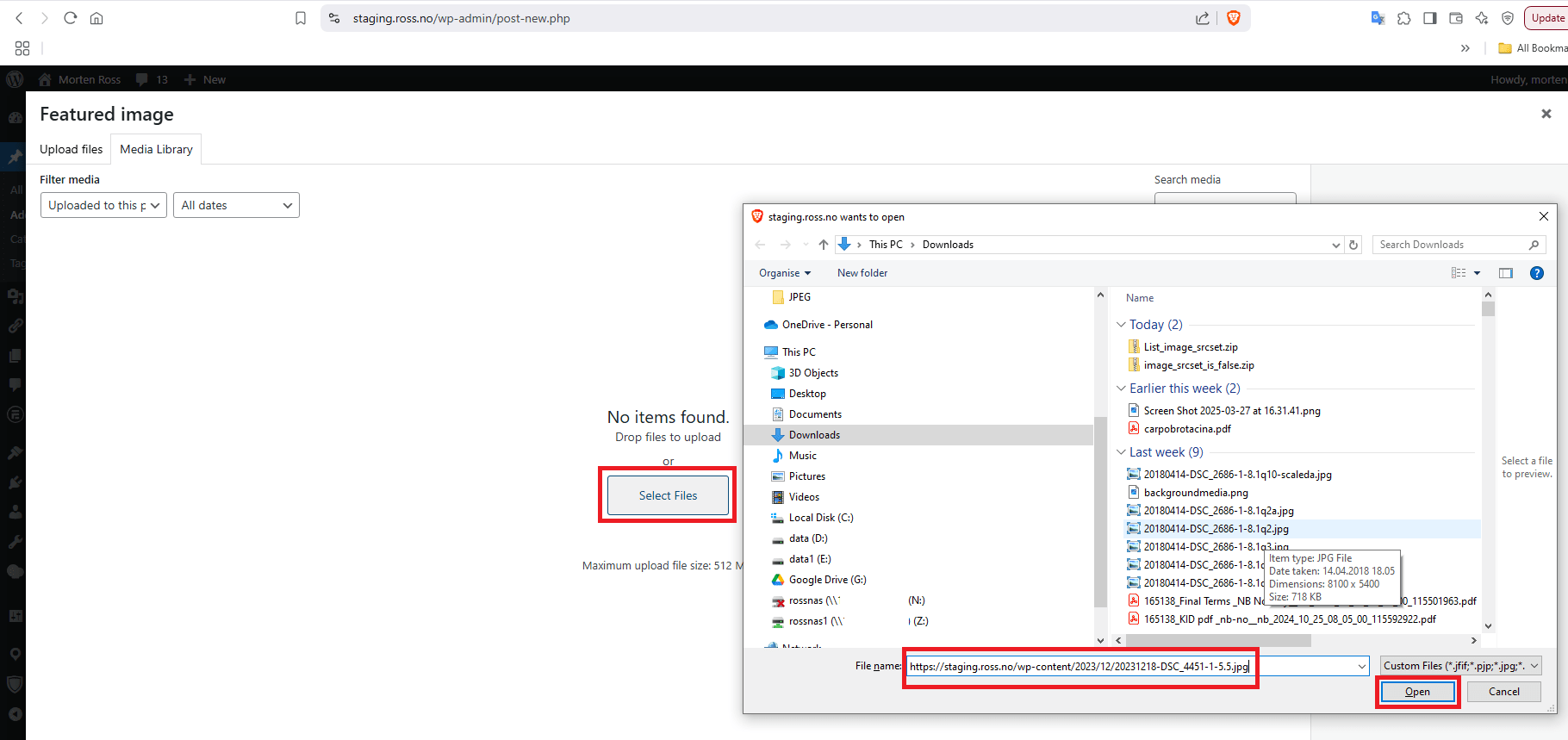
This is the UI:
 Forum: Fixing WordPress
In reply to: WordPress is not generating the srcset attribute correctlyIn Edit Post, I select ‘Set featured image’, or ‘Add Media’, then ‘Filter media’, ‘Uploaded to this post’, click ‘Select files’, and paste the image URL.
In normal production work-flow, I simply drag and drop images from NAS drive.
Forum: Fixing WordPress
In reply to: WordPress is not generating the srcset attribute correctlyI incorrectly assumed that the the function used the post ID to access the featured image, thus all attempts returned false.
With this out of the way the above test result in the expected output:
string(434) "https://staging.ross.no/wp-content/2023/12/20231218-DSC_4451-1-5.51-scaled.jpg 2560w, https://staging.ross.no/wp-content/2023/12/20231218-DSC_4451-1-5.51-700x467.jpg 700w, https://staging.ross.no/wp-content/2023/12/20231218-DSC_4451-1-5.51-768x512.jpg 768w, https://staging.ross.no/wp-content/2023/12/20231218-DSC_4451-1-5.51-1536x1024.jpg 1536w, https://staging.ross.no/wp-content/2023/12/20231218-DSC_4451-1-5.51-2048x1365.jpg 2048w"So using the original image attached the post where this fails and uploading this again to a new post generates a new original image, that has no such problem, and what you also experience.
So the question is what is wrong with the original image, or how WordPress is identifying it as being erroneous? The file itself is OK, otherwise using it for a second upload would also inherit this problem.
Where do we go next?