suitsjen

Forum Replies Created
-
Forum: Fixing WordPress
In reply to: Media Library “Attach” search does not return page titled “About”That sounds reasonable. Thanks again for your time, Threadi!
Forum: Fixing WordPress
In reply to: Media Library “Attach” search does not return page titled “About”Thanks for sticking with me, Threadi. That makes sense, but one of my clients told me that when she searched for “Art, graphics & signage” in an attempt to attach a different image to a different page, the About page was in the results. I can replicate that (see below). Why would it appear for a totally unrelated search, but not the actual file name?
I’m afraid the code doesn’t help me much as I am not a developer.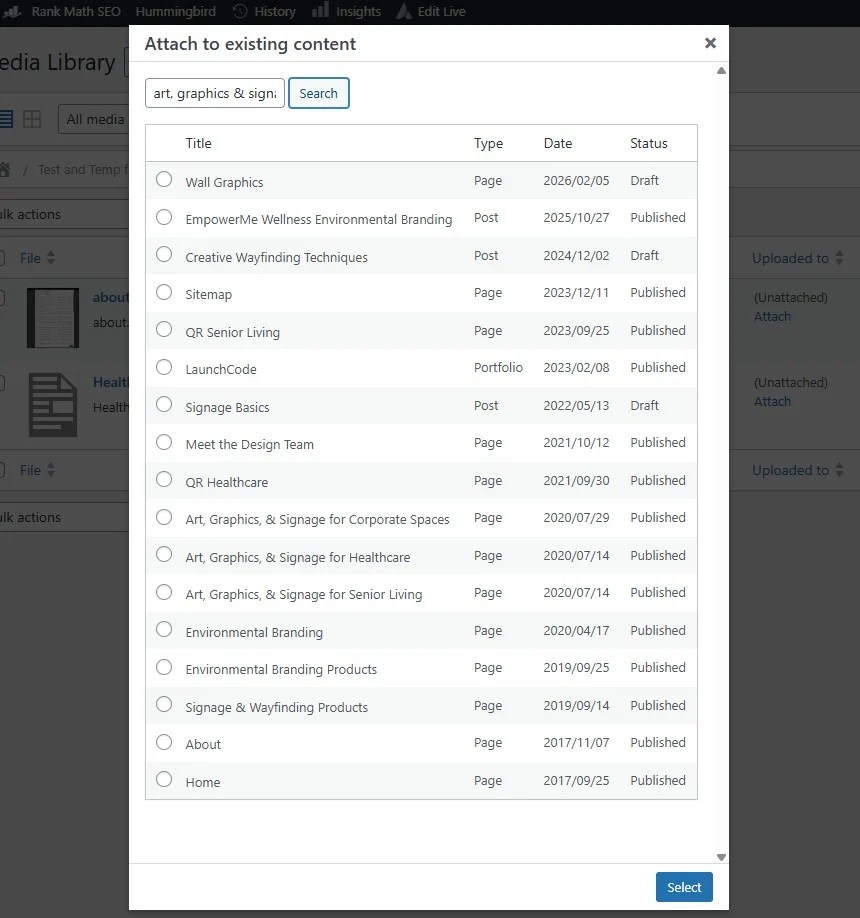 Forum: Fixing WordPress
In reply to: Media Library “Attach” search does not return page titled “About”Thank you, Threadi. That makes sense, but I’m not sure what you mean by “the term appears in too many records.” None of the suggested pages has “about” in their titles. They probably have the word “about” somewhere in the content of those pages since it is a common word, but none of the titles have the word “about” in them. Doesn’t the search look through titles only?
Forum: Fixing WordPress
In reply to: Media Library “Attach” search does not return page titled “About”Hi Threadi,
Thanks for your comments. No other post, page, or portfolio is named anything close to “About.” Here is a screenshot of what it looks like when I try to search for “About.” It doesn’t even look like it’s trying. The search works for other pages, so I’m not sure what is going on with this page.
I thought about the browser thing so I tried this in an incognito window, without success.
Thank you! I resolved the problem by switching WordFence to learning mode and then back to fully enabled. After that, I could save my post from the Live Editor.
I will change payment gateways. That is the only viable option, since the problem lies with PayPal, and it is not responsive.
I did reach out to PayPal and provided them with the error code and some additional information. They basically responded with something along the lines of this is our policy and it won’t change and they closed the conversation. I don’t think they are right. I think there is some setting in the fraud filters or chargeback area that isn’t visible to me in my account. I am having our treasurer increase my permissions so that I can see all that is there.
This is the response from PayPal to my reaching out to tech support:
Once PayPal’s automated fraud filters identified the payments as potentially unsafe and, for security reasons, prevents them from being completed.It’s important to know that these risk checks are part of our fraud-prevention systems. They are automated, cannot be overridden, and are not something that the potential recipient of the payment (your charity) can change or influence. These filters are in place to protect both donors and charities by reducing the risk of fraudulent or unauthorized activity.
I realize this can be frustrating, but please know that these measures are designed to safeguard your account and your donors.
This conversation has been closed.
We had a customer report it to us and send us a screenshot of the error message. I don’t know if she used a debit or credit card. I then tried to check out a $25 product and I got the error. I was using a credit card. This is the error that we received when we tried to check out:
Failed to process the payment. Please try again or contact the shop admin. [UNPROCESSABLE_ENTITY] The requested action could not be performed, semantically incorrect, or failed business validation. https://developer.paypal.com/api/rest/reference/orders/v2/errors/#PAYEE_BLOCKED_TRANSACTION
Note: Two of the hundreds of failed transactions were actually processed, and we have a request for a refund on one of them. That could be a problem, but why prevent all credit card transactions?Well, there aren’t any new failed transactions, but my site is not processing credit card transactions at all. It is throwing error messages when someone tries to check out. In checking the log, this is included in one of the errors:
“Declined by fraud tool (Fraud Protection / Chargeback Protection) due to potential fraud risk. Please review your fraud settings.”
PayPal’s response to my support ticket is to inform me that these fraud protections are in place for our protection. They then closed the support ticket. So, I guess they are okay with my not being able to process any transactions? This is frustrating, as it seems to be beyond my control and we are losing money every day that we can’t process payments on our website.I have installed Cloudflare Turnstile. It seems to be working, but then I only just turned on Advanced Card Processing last night. I’ll give it another few days before celebrating.
@mialewp I can’t because we don’t have an envato code. We use Filebird as packaged with our theme, Avada.
A video won’t show anything. The video would only show someone clicking on a folder and nothing happening. This happens with folders that are open when we open the media folder. We click and click on open folders and they are stuck open. This occurs for several different people on different devices.
Yes, I’m clicking on them like that. Many of them work, but if one is open when I navigate to the page it will not collapse. Clicking on it does nothing.
Will this be corrected in the next update?
Thank you! Glad you are already on this.
- This reply was modified 1 year, 5 months ago by suitsjen.