TerranceDC

Forum Replies Created
-
Forum: Plugins
In reply to: [WOW Slider] Wrong SliderI’m using the free version, so I’m not sure where I’m supposed to get a reg key.
I downloaded the updated version of the Wow Slider app. Do I need to download the plugin again as well? The last email I got from your support department advised me to download the previous version of the plugin (2.7.1 instead of 3.0).
So, which is it? Do I need to download the previous version of the plugin, or is the latest version of the plugin corrected now?
As it stands, I tried creating a Wow slider with a new installation of the app, downloaded from the link provided. Just to make sure, I downloaded the Wow Slider plugin again, and reinstalled it.
And I got the exact same results. “Wrong slider.”
At this point, I don’t know what else to do. I’ve followed the direction given on how to upload new sliders, and have yet to get it to work correctly. I’ve changed permissions on directories to make everything leading to the Wow Slider directory readable and writable. So far nothing has worked.
It’s a shame, because I like the idea of Wow Slider. I like the idea of having a desktop app that I can use to create slideshows outside of WordPress, and upload to WordPress when I’m satisfied with them. But the execution doesn’t seem to work very well.
The best I can say is that I’m glad I’m using the free version. If I’d had this much trouble with it after paying for it. I’d be a lot more upset.
Thankfully, the only thing I’ve lost is time. And I think it’s time to deactivate this plugin and move on. There are plenty of alternatives out there. And who knows? Maybe someone out there has tried the same concept and gotten it right, or soon will. This, however, ain’t it. So, I’ll keep looking.
Forum: Plugins
In reply to: [WOW Slider] "Wrong Slider"I am using the most recent version WOW Slider WordPress plugin, having just upgraded to version 3.0 of the plugin.
I am using the latest version of WordPress, version 3.5.1.
I also upgraded to WOW Slider for Windows version 3.0, running on Windows 7.
I am unable to import sliders using the “Add New Slider” function in WordPress. When I try to upload a slider, I get an error message at the top of the page that says “Wrong slider.”
When I try to import a slider using the “Import from folder” function, I get the following error message:
Warning: Invalid argument supplied for foreach() in /usr/www/users/terrance/wordpress/wp-content/plugins/wowslider/api.php on line 109
Warning: Cannot modify header information – headers already sent by (output started at /usr/www/users/terrance/wordpress/wp-content/plugins/wowslider/api.php:109) in /usr/www/users/terrance/wordpress/wp-includes/pluggable.php on line 876
The sliders I’ve already uploaded work fine, but I can’t upload any new sliders.
I must add that I’ve been trying to use WOW Slider for a short while now, and I’ve never been able to get it to work the way it’s supposed to.
Forum: Fixing WordPress
In reply to: WP totally missing after making a new postThere are a couple of things that I noticed that might be going on. If you’re host has upgraded to a new version of PHP, and you’re using the WP-Cache plugin, then you’ll get a blank page when you post something new. I turned off WP-Cache, and that took care care of the problem. There is a fix here, but I haven’t tried it yet.
Forum: Fixing WordPress
In reply to: Export from WordPressI desperately need help with this. I’m regularly getting shut out of my blog by my host, due to database issues. I have the latest version of WP running. I have the latest version of wp-cache installed and running. I’ve eliminated plugins to the point that I only have two that engage the database: Brian’s Recent Comments and Nicer Related Posts.
I desperately need to export my content from WP so that I can at least test it on some other platforms. I know that’s not a popular move around here, and I haven’t gotten a lot of help here the other times I’ve asked, but it’s something I need to do to determine how things might work in another environment.
Changing hosts isn’t going to do it. I’ve changed hosts before (I’m on my third now) and tried different configuerations of WordPress with and without plugins at each host. I’ve had the same problem every time; no matter what host, no matter what plugins I do or don’t use. I can’t keep going from host to host.
I’ve tried the wp-export plugin, after searching Google to find instructions on how to get it to work in the newest version of WordPress. I couldn’t get it to work. I got an error message and my browser hung up so bad I had to restart it. I’ve tried the existing script, but haven’t been able to get it to work either. And neither of the two options above are supported anymore anyway.
I tried the newer wp-export-to-wiki plugin, and had the same problem.
I’m down to attempting to export my database and then import it onto a local WP install on my computer and then see if I can get the plugin to work.
After that, if it doesn’t work, I’m going to have to hire someone to do it for me.
Forum: Fixing WordPress
In reply to: Is There An Easy Way for WordPress to Export to MT?Perhaps you’re right. But I’m not sure what the reason would be for not offering an export function for an open source software that nobody makes any money from. Even the guy who basically created WordPress said as much.
There’s no need to “lock” anyone in to WordPress, it stands on its own merits. No one makes or loses money if you use WordPress or not. We do this because we love doing it. We don’t have any propietary storage formats or obscufated code, anyone is free to do anything with the data they want, and they do.
So, why not offer an export functionality if there’s nothing proprietary about it? What’s gained by not offering it? Based on the previous post, linked above, there are or were plans to add that to a version of WordPress and the code assigned.
I know from my previous experience that services like Typepad do offer export functions. I exported my content from there and imported the MT-formated export file into WordPress. I think MT has a similar export function. Maybe they’re the only ones
So maybe the trick is to go back to the other blogwares and see if they have any tricks for importing from WordPress. My guess, however, is that it’s going to be difficult or impossible if there no output from WordPress to import in the first place.
My point in asking was merely to see if there was any way I could carry out my experiment without having to go to the lengths of becoming a developer myself, and that perhaps someone in the community might have an answer.
Forum: Fixing WordPress
In reply to: Problems with Slow QueriesAn update. It’s not a table for a plugin that’s causing the problem. I realized today it’s a WordPress database table. I’ve optimized it, but I’m guessing if I drop the table something bad will happen.
This is the snippet of code my host sent me tonight.
# User@Host: terrance[terrance] @  [209.68.2.83]

# Query_time: 11  Lock_time: 0  Rows_sent: 94  Rows_examined: 772405

SELECT cat_ID, cat_name, category_nicename,category_parent,

                COUNT(wp_post2cat.post_id) AS cat_count,

                DAYOFMONTH(MAX(post_date)) AS lastday,

MONTH(MAX(post_date)) AS lastmonth

                FROM wp_categories LEFT JOIN wp_post2cat ON (cat_ID =

category_id)

                LEFT JOIN wp_posts ON (ID = post_id)

                WHERE cat_ID > 0

                 GROUP BY cat_ID HAVING cat_count > 0 ORDER BY cat_name

asc, post_date DESC;
According to my host, this one took 11 seconds to run. There have been instances when it takes 90 seconds. When it takes too long, my host locks my database for 2 hours in order to let it reset. Evidently, the problem is 700,000 rows checked and 94 sent.
I’ve been emailing back and forth with them. They can’t tell me what’s causing the problem or how to fix it. All they can tell me is that this is the query I need to work on. I have no idea what to do with it or how to fix it. I’ve tried optimizing the database and the table itself, but that doesn’t seem to have solved the problem.
My host is on me to fix the problem. I have no idea how. If there isn’t a solution soon, Im’ not sure whether I’m going to have to just take the blog and two years worth of content down and start all over again from scratch.
If there’s anybody who can help me, or has any idea what needs to be done, I’d really appreciate it. I’ve reached the end of my meager knowledge of databases, coding and command lines. I’m quickly approaching the end of my options.
Forum: Plugins
In reply to: Spell check in WordPress 2.0 with WYSIWYGI haven’t found anything that works yet.
I’ve been using the Xhina Here! plugin for Firefox to do my writing/editing. It doesn’t have a spellcheck either, so once I go back to WordPress (with the WYSIWYG editor turned off) I have to use the Google toolbar for spellcheck. It works fine if the WordPress WYSIWYG is turned off.
But that’s adding an extra step to the whole process.
I’m probably going to go back to using ecto as my blog editor, and just use the WordPress interface for updating my theme, adding links, and other admin-related tasks. Yeah, I <i>could</i> just use the quicktags or do the coding myself but I’d rather not even <i>see</i> code when I’m tryin gto write or edit.
Forum: Fixing WordPress
In reply to: Unable to trackback for wordpress 2.0I uploaded the patched files (for those of us who don’t know how the “patch” command works) set the permissions, and I still can’t send trackbacks.
Come to think of it, ever in version of WordPress I’ve used — 1.2, 1.5 and now 2.0 — trackbacks have been broken in the initial release. Every time.
Can someone tell me what to do? I’ve uploaded the patched files to the appropriate directories. Now what? I’ve set the permissions so they can be read, written to and executed. What else do I need to do?
Forum: Requests and Feedback
In reply to: TinyMCE WishlistThis didn’t work for me. I even emptied my cache and did a shift+refresh in the “Write” panel after copying and pasting the code above, and I still didn’t see the iespell button. Maybe it’s because I”m on Firefox <i>and</i> on a Mac.
Anyway, I think the only answer is for me to deactivate the WYSIWYG. That’s a shame, because I thought it was the most obviously beneficial feature in 2.0. Without it, I’m not entirely sure why I upgraded in the first place.
I’m not sure what value WYSIWYG has without spellcheck. As a writer, I’d much rather just write than have to deal with code. I’d prefer not to even see it if I don’t have to. It’s not because I don’t know how to code HTML. I’ve been working on the web for years, and know more than enough HTML code to do what I want. It’s just that now I’d rather deal with content, and it’s easier to write and edit when I don’t have to constantly distinguise content from code.
So, that’s why I was looking forward to the WYSIWYG. It isn’t broken, but it doesn’t have the feature I most want in a WYSIWYG, and it cannot be added in any way that works on the platform, browser and system I use.
Therefore, I shall go back to having to sort code from content, and trying to ignore my external spellcheck when it cites code as misspellings, I guess. As I do, I’ll be wondering why I upgraded in the first place.
Forum: Requests and Feedback
In reply to: TinyMCE WishlistWell, almost.
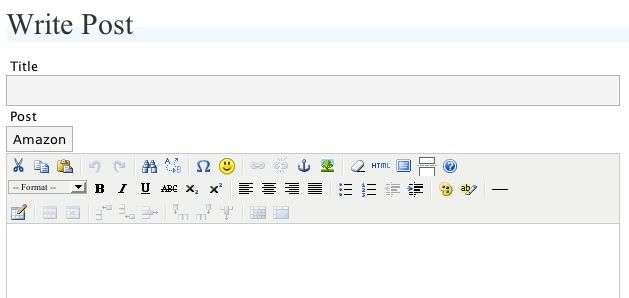
I tried it again. But this time a shift+refresh was what it took to get the rows of buttons to show up. I now have an entire array of features. Except spellcheck, which is what I wanted most. For some reason, the spellcheck button doesn’t show up. Of course, I don’t know what’s wrong. I’ve uploaded the plugin to the TinyMCE directory in wp-includes/js.
If I’m reading the plugin correctly, it’s supposed to show up on the top row. Right after the search-replace button. But it ain’t there.
http://i25.photobucket.com/albums/c70/TerranceDC/wysiwyg.jpg
This is now what the plugin code looks like.
if (isset($wp_version)) {

add_filter("mce_plugins", "extended_editor_mce_plugins", 0);

add_filter("mce_buttons", "extended_editor_mce_buttons", 0);

add_filter("mce_buttons_2", "extended_editor_mce_buttons2", 0);

add_filter("mce_buttons_3", "extended_editor_mce_buttons3", 0);

}
function extended_editor_mce_plugins($plugins) {
array_push($plugins, "table", "fullscreen", "emotions", "advlink", "advimage", "searchreplace", "iespell");
return $plugins;
}function extended_editor_mce_buttons($buttons) {
return array(
"cut", "copy", "paste", "separator", "undo", "redo", "separator", "search,replace", "separator", "iespell", "charmap", "emotions", "separator", "link", "unlink", "anchor", "image", "separator", "removeformat", "code", "fullscreen", "wordpress", "wphelp");
return $buttons;
}function extended_editor_mce_buttons2($buttons) {
return array(
"formatselect", "bold", "italic", "underline", "strikethrough", "sub", "sup", "separator", "justifyleft", "justifycenter", "justifyright", "justifyfull", "separator", "bullist", "numlist", "outdent", "indent", "separator", "forecolor", "backcolor", "separator", "hr", );
return $buttons;
}function extended_editor_mce_buttons3($buttons) {
return array(
"tablecontrols");
return $buttons;
}
?>I think I got it right. According to the TinyMCE documeantion, the button for ispell has the same name as the plugin. I keep moving it around, saving the plugin, going to the write screen and doing a shift+refresh. I even cleared my cache just in case. Nothing. Do I need to do more than add it in the advanced_edit plugin? Do I have to edit tinymce.js too? And how do I do that without breakin it?
I can’t see what’s wrong, any more than I can see why it has to be so hard. If anyone can, I’d appreciate the help. As it is I’ll probably spend the whole day just trying to get this right.
Forum: Requests and Feedback
In reply to: TinyMCE WishlistRecopied and repasted your code, with the above correction.
Got this.
‘
Parse error: parse error, unexpected $ in /usr/www/users/terrance/wp-content/plugins/advacned-wysiwyg.php on line 38
‘I’ve spent the last two hours or more trying to make this work. To be honest, I’d rather have spent that time writing a post or something. It’ll probably take me hours more to get it to work, if at all, given my skill level with the programmming involved.
I think it’s best I give up until someone makes it easy for a non-programmer to do it. As it stands now, I’ll probalby delete the plugin and try to get my WYSIWYG editor back to its original state at intallation. If I can do that, I may be able to jerryrig a spellcheck some other way. I think it will mean reverting back to an older version of Firefox and using an extension.
If there’s anyone on the WordPress development team reading this, I’d like to suggest making the iespell plugin for TinyMCE an included part of the WP installation. It would add a lot of extra value to the
Forum: Requests and Feedback
In reply to: TinyMCE WishlistI either need to become a programer, or stop being an early adopter.
Mike, I’ve tried the code you posted. If I just use the part for the plugins, it works fine.
When I add this
if (isset($wp_version)) {

add_filter("mce_plugins", "extended_editor_mce_plugins", 0);

add_filter("mce_buttons", "extended_editor_mce_buttons", 0);

add_filter("mce_buttons_2", extended_editor_mce_buttons2", 0);

add_filter("mce_buttons_3", "extended_editor_mce_buttons3", 0);

}
I get the following error message.
Parse error: parse error, unexpected T_CONSTANT_ENCAPSED_STRING in /usr/www/users/terrance/wp-content/plugins/advacned-wysiwyg.php on line 17So, I revert back to the original plugin code, then add the plugins for TinyMCE. I have all the buttons now, but I have no idea how to get them on separate rows instead of all in one.
At present, this is what I have in the plugin editor.
if (isset($wp_version)) {

    add_filter("mce_plugins", "extended_editor_mce_plugins", 0);

    add_filter("mce_buttons", "extended_editor_mce_buttons", 0);

    add_filter("mce_buttons_2", "extended_editor_mce_buttons_2", 0);

    add_filter("mce_buttons_3", "extended_editor_mce_buttons_3", 0);

}
function extended_editor_mce_plugins($plugins) {
array_push($plugins, "table", "fullscreen", "iespell");
return $plugins;
}function extended_editor_mce_buttons($buttons) {
return array(
"formatselect", "bold", "italic", "underline", "strikethrough", "separator",
"bullist", "numlist", "indent", "outdent", "separator",
"cut", "copy", "paste", "undo", "redo", "separator", "wphelp");
}function extended_editor_mce_buttons_2($buttons) {
return array(
"justifyleft", "justifycenter", "justifyright", "justifyfull", "separator", "link", "unlink", "anchor", "image", "hr", "separator");
// Add buttons on the second toolbar line
return $buttons;
}function extended_editor_mce_buttons_3($buttons) {
return array(
"table", "sub", "sup", "forecolor", "backcolor", "charmap", "separator", "code", "fullscreen", "wordpress");
// Add buttons on the third toolbar line
return $buttons;
}
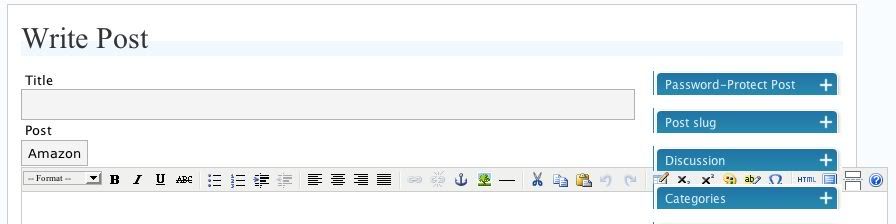
?>This is what my WYSIWYG editor bar looks like:
http://i25.photobucket.com/albums/c70/TerranceDC/wordpress.jpg
Forum: Requests and Feedback
In reply to: TinyMCE WishlistIt depends on your definition of “easy.”
The thing is, to add the TinyMCE editor, you have to be comfortable editing files .js files, etc. I tried it. I downloaded the editor, uploaded the plugin to the TinyMCE plugins directory and added the code in the READ ME file for the plugin to the TinyMCE file.
tinyMCE.init({

	theme : "advanced",

	mode : "textareas",

	plugins : "iespell",

	theme_advanced_buttons3_add : "iespell"

});
I got nothing. I went back to my write screen and I got nothing. No button on my editor. Nothing. Maybe I didn’t add the code to the right place in the file, but the directions are surprisingly short and not specific about where to put the code. It assumes a level a knowledge I don’t have.
So, if you’re a developer, a programmer, etc., this will be easy for you. I’m not. I’m just a writer, for whom a spellcheck would have some value. My solution is either to simply not use the WYSIWYG editor (which is a shame, because it’s a valuable feature) and rely on the spellcheck in the Google toolbar or downgrade to an older version of Firefox so I can use the older spellcheck extensions. At least, until someone updates a plugin or the feature gets added to the next version of WordPress, so it’s easy for a non-developer or non-programmer to add the feature.
Forum: Requests and Feedback
In reply to: TinyMCE WishlistI’ll try it, but editing plugins is somewhat new territory for me.
Forum: Alpha/Beta/RC
In reply to: Spellcheck?Yeah. The WYSIWYG editor isn’t worth much to me without spellcheck. At the moment my only choice is to downgrade to a previous version of Firefox, because Spellbound doesn’t work with Firefox 1.5.
The spellcheck on the Google toolbar inserts weird code into the WYSIWYG editor that you have to go back and delete, otherwise it’ll show up in your post, etc. It works fine w/o the WYSIWYG editor. But then you have to ditch the WYSIWYG. So, a major feature in 2.0 has somewhat limited value. If spelling matters to you.