tillery

Forum Replies Created
-
Forum: Plugins
In reply to: [Firelight Lightbox] PDFs don’t load:@edwinliuxd – I’m actually not quite sure why this isn’t working. I downloaded one of your PDFs, uploaded it to a test site, and added a link, and it opened fine for me. But I see what you’re seeing on your site. Since my site and yours are behaving differently, I suspect it’s something to do with yours, but I’m not sure what.
To test, can you please just create a new page using the WordPress block editor. Add a custom html block, and paste the following into it. Then replace URL-OF-THE-PDF-HERE with the url to one of your PDFs. Don’t add anything else. Then see if it opens (it does for me).
<a href="URL-OF-THE-PDF-HERE">Open</a>You did a lot of troubleshooting, so I’m not entirely sure what to suggest next.
Forum: Plugins
In reply to: [Firelight Lightbox] API for developersJust following up to see if this worked? Also, since I think we (hopefully) addressed the question, I’m going to mark this resolved. But obviously feel free to follow up with more questions if needed.
Forum: Plugins
In reply to: [Firelight Lightbox] Uncaught TypeError in InspectorHi @ws24!
Looking at the error you reported, that’s not actually be generated by our plugin. It looks like the carousel plugin you are using also loads a version of fancybox, and it’s their version generating the error. The error is from the wp-carousel-free plugin:
...plugins/wp-carousel-free/public/js/fancybox.min.js....You may want to reach out to them?
For now, since it doesn’t look like ours, I’m going to mark this resolved. But please feel free to follow up with questions.
Forum: Plugins
In reply to: [Firelight Lightbox] API for developersHi @ganix33 – To clarify, are you just wanting to have it so if a visitor clicks on a button, it will open a modal with your inline content? If so, does this article address your needs?
https://firelightwp.com/wordpress-lightbox-docs/show-inline-content-in-lightbox/In short, you (1) add a unique ID and the fancybox-hidden CSS class to the container that has your inline content, and then (2) link the button to that ID, and add a fancybox-inline CSS class to the button so our lightbox will detect it.
Forum: Plugins
In reply to: [Firelight Lightbox] Where is the Slideshow Speed setting…Very long overdue, but just wanted to follow up and let you know that the slideshow speed setting for Firelight Pro lightbox has been released. You’ll find it below the slideshow button setting in the Lightbox > Toolbar settings.
I see I was misdiagnosing the issue.
In short, you have a regular image block, and you are adding caption below the image with the built in image caption functionality. Then the caption contains a link to a third party page, like Wikimedia. Historically, that link takes you to the Wikimedia page. Right now it’s opening a lightbox with that error.
From your markup, I can see the issue. The caption link you shared shows a a link to a .jpg file. Our lightbox automatically image file links and tries to open them in a lightbox. So it’s perceiving that link as an image on the file type extension, and trying to open it in a lightbox.
Do you know, when this was working in the past, if your caption links were to regular html pages, rather than image files? Links to web pages will work normally.
The simplest way for you to fix this is go to Lightbox settings, then look for the Miscellaneous section, then look for the ‘Exclude’ option. You can add a list of CSS classes to exclude from the lightbox detection. For a caption link, you’d want this:
.wp-element-caption aThat will tell our lightbox to exclude a tags within captions, regardless of what they are linking too. You’ll probably want to append that to the list of existing exclude classes, rather than replacing those. Try that and let us know if it works.
Forum: Plugins
In reply to: [Firelight Lightbox] Another lightbox opens up under Firelight lightboxThanks for following up and glad you worked it out!
That was going to be the first thing I suggested checking.
@junior – Received and replied via email. Will update here again for you and others once through some basic troubleshooting.
Forum: Plugins
In reply to: [Firelight Lightbox] Inline Boxes scroll to topI wanted to add that you did a great job creating those popup bios for contributors! Really nice use of the lightbox.
Forum: Plugins
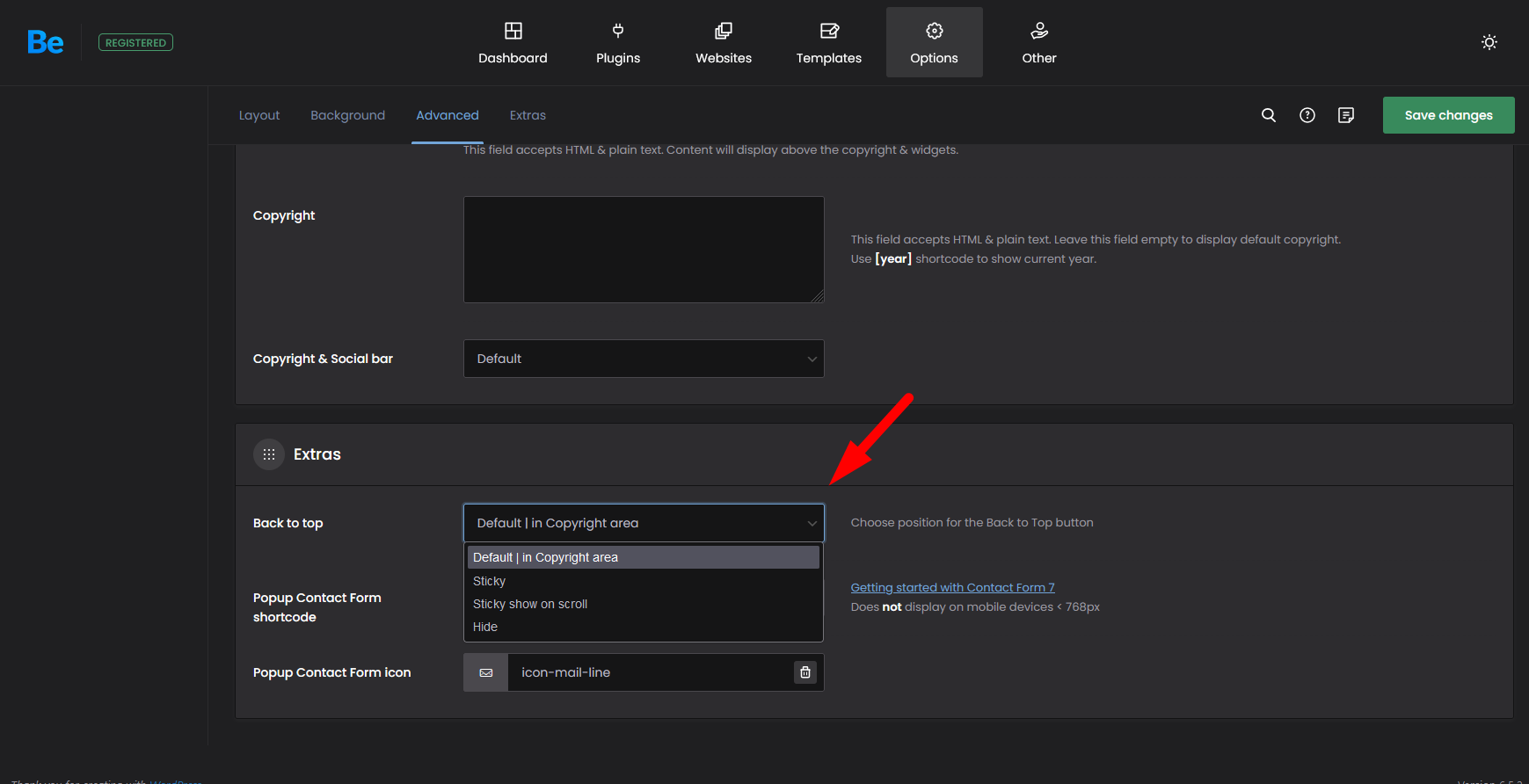
In reply to: [Firelight Lightbox] Inline Boxes scroll to top@marcelle42 – Sorry for the delay. Our developers had tried a few ways to duplicate this issue last week without success. Right now, we suspect it may be related to BeThemes Scroll-to-top button and functionality. We can’t test because do not have access to the theme, which is paid only.
A quick way to test the above would be to disable the scroll to top button momentarily. Looks like there’s an option to ‘hide’ that here: https://forum.muffingroup.com/betheme/uploads/259/FHBYVF9JFS7K.png
Would you be open to trying to disable that to test and confirm if the issue goes away?
If that is the issue, to fix it, we’d need access to a copy of theme to see how their scroll to top behavior gets triggered and see if there’s a way we can prevent that when the lightbox is opened. In that case, we may as you to contact us at firelightwp.com/contact we’ll coordinate with you separately to get a copy.
@junior – Sorry for delayed response. That’s definitely not normal on mobile. Something is misfiring, but it’s hard to understand what would cause that.
We’ll double check mobile devices here to ensure there’s no regression. But I’m assuming there’s something specific to the site, device or browser that we need to identify.
1. Can you see if you can duplicate the same issue if you browse images on this page with your phone: https://firelightwp.com/free-lightbox-v2/? That will tell us if it is site specific.
2. Are you willing to send a link with the page? That way we can test it and see if we see the something on our phones. That’ll tell us if it’s device-specific If you prefer to keep it private, you can send it via firelightwp.com/contact.
– Alternatively, you could test this on a family or friend’s phone, and see if you can duplicate.Forum: Reviews
In reply to: [Firelight Lightbox] Ad open on every page load in editor, can’t removeGreat to hear and thanks for continuing to use the plugin, for the kind words, and for the suggestions. We’ll think about hiding it by default and about the color change. If we do keep it, we might also allow people to hide it directly from the editor so you don’t have to hunt for the option.
Forum: Reviews
In reply to: [Firelight Lightbox] Ad open on every page load in editor, can’t removeHi @chadbush! You can turn that off if you like. Go to Lightbox settings, to the Miscellaneous section, and uncheck the ‘Enable Block Controls’ setting.
We are considering adding lightbox settings to that section in the inspector sidebar that would allow you to customize lightbox settings on a per-image or per-gallery basis. It sounds like you would not be a fan, so we’ll count that as a vote against.Thanks for being a long time user of the plugin. I hope you continue, but if not, we wish you the best.
Forum: Plugins
In reply to: [Firelight Lightbox] CSS to target shadow opacity or colorGreat!
Hi! I think I understand the issue. Can you tell me if you are adding a fancybox class like ‘fancybox-iframe’ to your link? Normally that would be needed to open a link to a third party website.
I added a page to our site that demos a few things here:
https://firelightwp.com/free-lightbox/open-lightbox-from-image-caption-link/
You’ll see two images. The first is added via the core image block. I added/updated a caption as you suggested and added two links. The first link is just to an image on my site and works. We autodetect image links. The second link is to Wikipedia, and if I just add the link, it links to the page, but not in the lightbox.
To get a link to a third party site to open in a lightbox, you need to apply ‘fancybox-iframe’ as a CSS class on the link. There’s now way to do that in the context of an image caption.
So to duplicate, I copied the markup from the frontend, went back to the editor, and copied in the markup using an html block. That allows me to customize the markup. I think updated the wikipedia link to have the fancbox-iframe class, and you’ll see that now opens in the lightbox.
Here’s the html I’m suing in the second image. Note the fancybox-frame classes on the links.<div class="wp-block-image">
<figure class="aligncenter size-large">
<img decoding="async" src="https://firelightwp.com/wp-content/uploads/2025/03/Landscapes-818-020-1024x684.jpg" alt="" class="wp-image-1464">
<figcaption class="wp-element-caption">Some dramatic clouds and light from the setting sun on Catherdral Rock in Sedona Arizona.<br>I’m now adding <a href="https://firelightwp.com/wp-content/uploads/2023/11/Landscapes-818-007-scaled.jpg" class="fancybox image" aria-controls="fancybox-wrap" aria-haspopup="dialog">a link to a separate image</a> to this caption. It should open in a lightbox.
<br>Here's a link to <a href="https://en.wikipedia.org/wiki/WordPress" class="fancybox-iframe">wikipedia</a> with the 'fancybox-iframe' class.
<br>Here's a link to <a href="https://google.com" class="fancybox-iframe">google</a> with the 'fancybox-iframe' class.
</figcaption>
</figure>
</div>—
First can you confirm you’re adding fancybox-iframe in some way if possible? If not, I’m not sure how our lightbox would detect that link and open it.
As a secondary note… the ability to open a third party website in a lightbox can run into cross origin permission/security issues. Many websites do not allow it. Wikipedia does. But google.com does not. To demo that, I added a link to Google with the exact same markup, and you’ll see that one fails.