tmcmarketing

Forum Replies Created
-
Forum: Fixing WordPress
In reply to: newbie with boilerplate short code?hmmm, nothing seems to stick and when i do add something in the boiler template it disappears and there is no sign of it anywhere? i’m just too new to tackle this mountain 😉 …thanks for your help,
i’ll keep poking around maybe i need to find a different feed plugin or a user of fwp. cheers!
Forum: Fixing WordPress
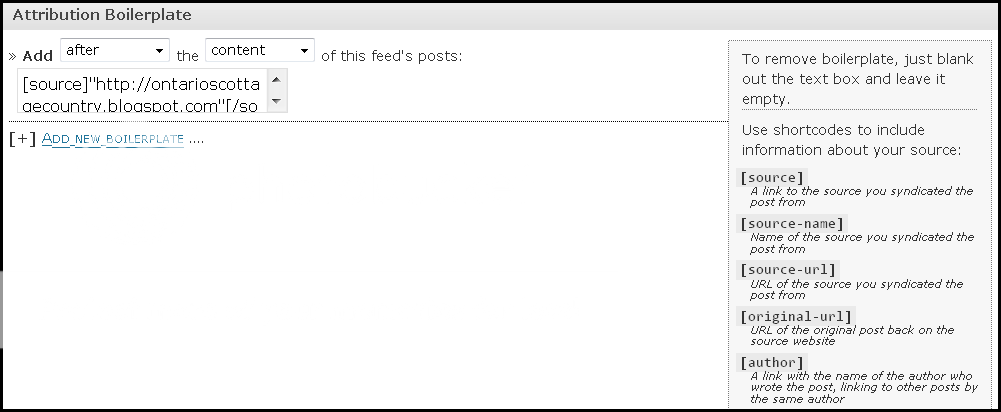
In reply to: newbie with boilerplate short code?i took a snip of the screen and saved it, if this helps…
http://i848.photobucket.com/albums/ab44/tmcmarketing/boiler.png
and i will try what you suggested, with quotes right? and let you know… 🙂
Forum: Fixing WordPress
In reply to: newbie with boilerplate short code?hi,
here is the plugin addy http://feedwordpress.radgeek.com/
from there i also downloaded this add-on > http://projects.radgeek.com/add-attribution-feedwordpress/
they work together but i just can’t grasp what to do next…thank you!
Forum: Fixing WordPress
In reply to: post query…how to show post categories on home page?yes, i think that’s exactly what i want esmi ty but, looking at that page is still way beyond my grasp (sorry).
if you knew of a tutorial that went something like >look for this code ‘…’ and replace it with this code ‘0000’ or a plugin/widget then i’d be good to go, fingers crossed 😉
Forum: Fixing WordPress
In reply to: help please! theme tester – fatal error on my site!!im with hostgator and a newb so to clarify this is what i did and it worked but…
in hg cpanel’s file manager in the www section > plugins > the blue folder > rename > in the open space i put /theme-tester (as mentioned) and it works but in the blue folder plugin window it’s new name is now theme-tester20% and that’s it, none of the other stuff like folder/folder/ that used to be there?……..does that matter?
thanks a bunch, i was panicing!!! 😉
Forum: Themes and Templates
In reply to: page widget link is misdirecting, how do u fix it?i’m totally lost on this one, please help?
here is what’s going on http://babblicious.ca
when i’m in my ‘edit page’ screen entitled ‘babblicious blogs’ my working area shows me exactly what i want but when i view in ‘preview’ it shows me a different page http://babblicious.ca/?page_id=6 (my blog home page) and when i view in ‘page updated view page’ it takes me to my blog home page as well??
what am i doing wrong?
thanks for your help!
gotcha…and it worked, ty, ty!!
i notice that the post title hover colour goes black which is not within my colour scheme of choice. i read it can be changed by adding background:#99cc00; but i don’t know exactly where it goes?
& would you know anything about ? c) from first post?
thanks again!
hi, ty for the first tip. i was able to get rid of the lines but then i got lost 😉
i used paste bin to find the lines you are talking about but i tried it, all of them and now i’m back to none again. i couldn’t see any lines, maybe i did it wrong…?
my newbieness is shining (hand holding is required 😉 ty!!
? c) is answered…okay, i finally found the tryit editor v1.4 on w3s (hard to find something when you don’t know what it’s called 😉 )
…but i’m still not sure on the other two ?’s, yet.
is there a different editor, i don’t really care for the tryit version, i guess i was too quick to post that one.
so far so good, thanks again for the help!
that’s awesome, ty! i’ll get to work on that…and thanks for the ‘code’ warning 😉
okay… http://babblicious.ca and thanks, i’m learnin’ 😉 …i was just going to copy / paste the css sheet too but i’ll wait unless told otherwise. ty!
Forum: Installing WordPress
In reply to: newbie hostgator/wordpress help pleasehi, yes thank you for checking 😉 …i was just on with hostgator for the x#of times later and it’s okay now. have a great day!