vah330

Forum Replies Created
-
Ok, here are some additional screen shots with different credit values. They show the problem. Please look at these results in addition to the previous screen shots. No shortcodes were changed from the previous message, just the credit values.
https://much2.com/news/myCred-display-credit-warnings.zip
Thx
I really don’t know what is going on. It still does not work for me like it should.
I took more screen shots of the output I am getting now, pointing out the problems (2 administrator pages with slightly different myCred amounts, 1 ‘user ID 7′ page).
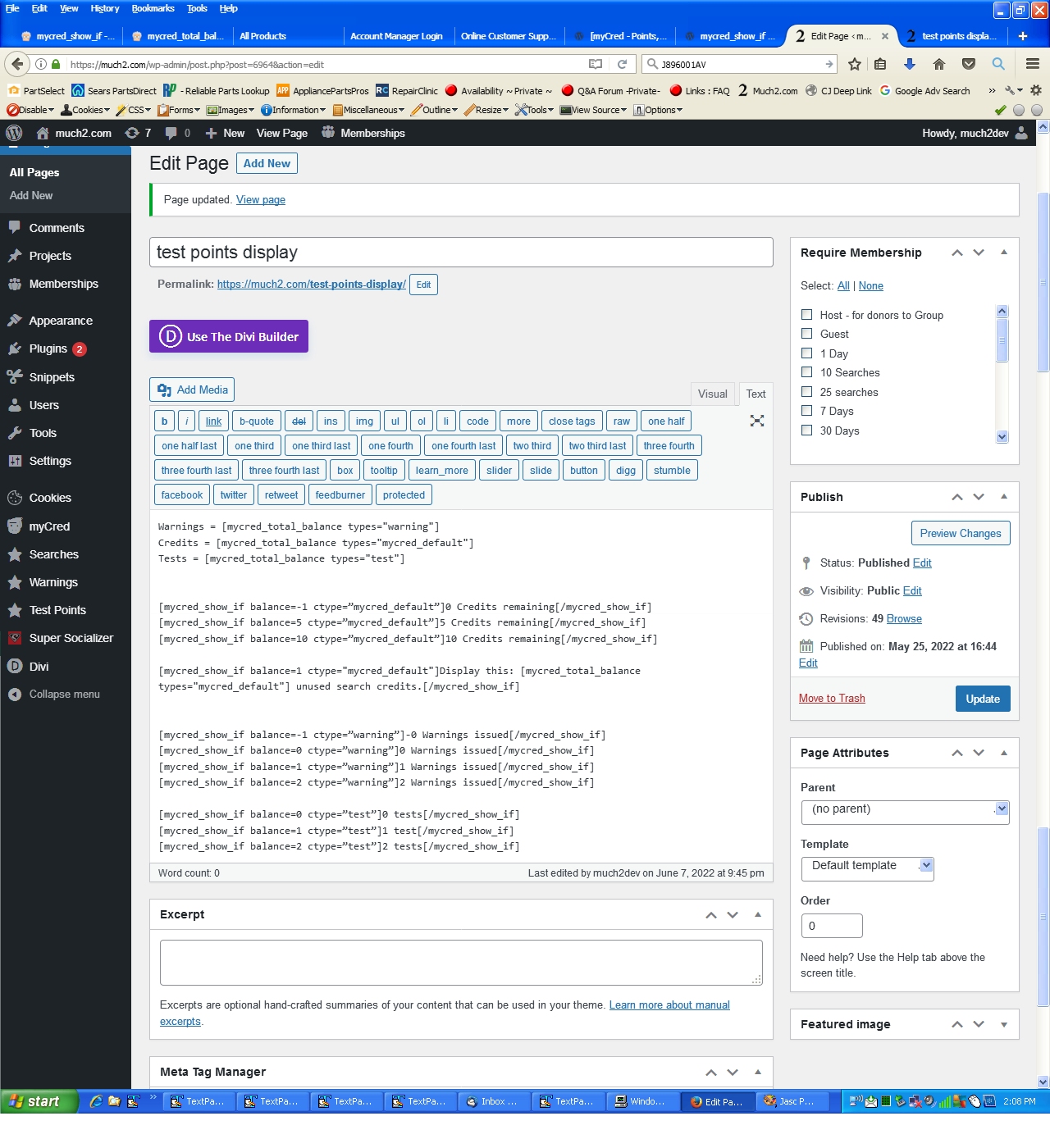
I’ve included a screen shot of the administration page showing the shortcodes in use on the page and also a text file with the actual shortcodes in use.
I also have a screen shot of the plugins’ page showing the myCreds version installed.
It did not work. Here’s what I did:
I updated myCred to the latest version Version 2.4.7. I then uploaded only the newer files from the last .zip file you supplied. (If I uploaded the whole zip file regardless of file age it downgrades the version to Version: 2.4.6.1). You said to have the current version loaded.
In the .zip file are screen shots of the the shortcodes used on the page, the Administrator and User ID 7 page results, and also the user table showing each accounts’ credit balances. I hope that is equivalent to your screencast video request.
https://much2.com/news/myCred%20shortcode%20error.zip
- This reply was modified 3 years, 11 months ago by vah330.
Thanks, I’ll do that again and let you know the outcome. Sorry for all the trouble.
Dan
I don’t know what a screencast video is so I can not supply that. I also don’t know what ‘whole process’ you’re interested in. I put myCred shortcodes on a page, publish it and then look at the page to see the results.
I did not have the most current version of myCred installed. I thought that is what the zip files you were supplying were. I have just updated it to Version 2.4.7.
Should I upload the last zip file you supplied *on top of* Version 2.4.7 ?
Dan
- This reply was modified 3 years, 11 months ago by vah330.
Thanks for the effort but it is still not working for me. I don’t know what’s going on!
I seen your shortcodes added an “user_id” so I also tried that in an additional 7 lines at the end. Here is the code I’m using now:
Credits = [mycred_total_balance types="mycred_default"]
Warnings = [mycred_total_balance types="warning"]
Tests = [mycred_total_balance types="test"]

[mycred_show_if balance=-1 ctype=”mycred_default”]0 Credits remaining[/mycred_show_if]
[mycred_show_if balance=5 ctype=”mycred_default”]5 Credits remaining[/mycred_show_if]
[mycred_show_if balance=10 ctype=”mycred_default”]10 Credits remaining[/mycred_show_if]

[mycred_show_if balance=1 ctype="mycred_default"]Display this: [mycred_total_balance types="mycred_default"] unused search credits.[/mycred_show_if]

[mycred_show_if balance=-1 ctype=”warning”]-0 Warnings issued[/mycred_show_if]
[mycred_show_if balance=0 ctype=”warning”]0 Warnings issued[/mycred_show_if]
[mycred_show_if balance=1 ctype=”warning”]1 Warnings issued[/mycred_show_if]
[mycred_show_if balance=2 ctype=”warning”]2 Warnings issued[/mycred_show_if]

[mycred_show_if balance=0 ctype=”test”]0 tests[/mycred_show_if]
[mycred_show_if balance=1 ctype=”test”]1 test[/mycred_show_if]
[mycred_show_if balance=2 ctype=”test”]2 tests[/mycred_show_if]

only for user_ID 7 below:

[mycred_show_if balance=-1 ctype=”warning” user_id="7"]-0 Warnings issued[/mycred_show_if]
[mycred_show_if balance=0 ctype=”warning” user_id="7"]0 Warnings issued[/mycred_show_if]
[mycred_show_if balance=1 ctype=”warning” user_id="7"]1 Warnings issued[/mycred_show_if]
[mycred_show_if balance=2 ctype=”warning” user_id="7"]2 Warnings issued[/mycred_show_if]

[mycred_show_if balance=0 ctype=”test” user_id="7"]0 tests[/mycred_show_if]
[mycred_show_if balance=1 ctype=”test” user_id="7"]1 test[/mycred_show_if]
[mycred_show_if balance=2 ctype=”test” user_id="7"]2 tests[/mycred_show_if]
When logged in as user 7 the results I get:
Credits = 10
Warnings = 1
Tests = 2Display this: 10 unused search credits.
only for user_ID 7 below:
then nothing.
When signed in as the administrator, that same code displays:
Credits = 0
Warnings = 1
Tests = 2only for user_ID 7 below:
I’m grasping at straws here. Is there any chance the latest zip files you supplied didn’t contain all the current files? I’m sorry to be a pain but I can’t think of any reason we would get different results.
Can the [mycred_show_if shortcodes not retrieve those separate credit values using the ‘ctype’ parameter the same way the [mycred_total_balance types=”warning”] shortcode does using the ‘types’ parameter?
.
OMG. NO it is not working like it should. The [mycred_show_if balance… shortcodes are not working at all now.
Here is the page code I’m using:
Credits = [mycred_total_balance types="mycred_default"]
Warnings = [mycred_total_balance types="warning"]
Tests = [mycred_total_balance types="test"]

[mycred_show_if balance=-1 ctype=”mycred_default”]0 Credits remaining[/mycred_show_if]
[mycred_show_if balance=5 ctype=”mycred_default”]5 Credits remaining[/mycred_show_if]
[mycred_show_if balance=10 ctype=”mycred_default”]10 Credits remaining[/mycred_show_if]

[mycred_show_if balance=1 ctype="mycred_default"]Display this: [mycred_total_balance types="mycred_default"] unused search credits.[/mycred_show_if]

[mycred_show_if balance=-1 ctype=”warning”]-0 Warnings issued[/mycred_show_if]
[mycred_show_if balance=0 ctype=”warning”]0 Warnings issued[/mycred_show_if]
[mycred_show_if balance=1 ctype=”warning”]1 Warnings issued[/mycred_show_if]
[mycred_show_if balance=2 ctype=”warning”]2 Warnings issued[/mycred_show_if]

[mycred_show_if balance=0 ctype=”test”]0 tests[/mycred_show_if]
[mycred_show_if balance=1 ctype=”test”]1 test[/mycred_show_if]
[mycred_show_if balance=2 ctype=”test”]2 tests[/mycred_show_if]
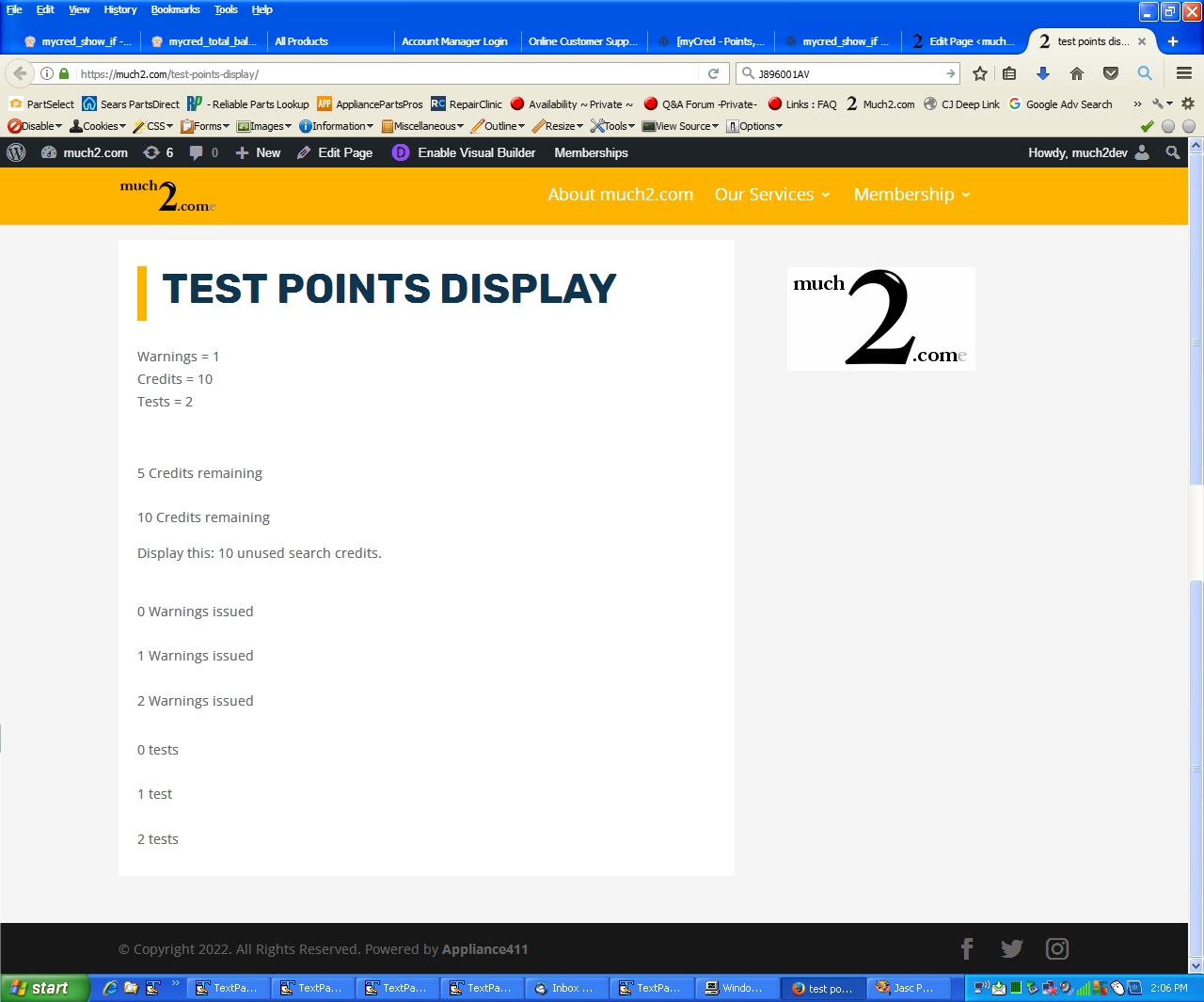
and this is the result:
Credits = 0
Warnings = 1
Tests = 25 Credits remaining
10 Credits remaining
Display this: 0 unused search credits.
0 Warnings issued
1 Warnings issued
2 Warnings issued
0 tests
1 test
2 tests
The [mycred_show_if shortcode isn’t even working for the default credit type now as you can see in the results above.
I’m sorry but you’re not understanding me.
Please give an account
0 default credits
10 warning credits
10 test creditsThen see what those shortcodes display. The warning and test values should still display by those shortcodes. In my case they don’t.
Those shortcodes are only acting upon the default credit value not the other, individual added credit type values. They only use the value of the default credit type in the if… statement. Setting all to credits to 0 does will not illustrative the problem I am experiencing with those shortcodes.
I don’t know how else to try to explain it.
Please give an account
0 default credits
10 warning credits
10 test credits`And see the results on the page with the shortcopdes.
- This reply was modified 3 years, 12 months ago by vah330.
That shows you’re getting the exact same results as I am, not necessarily the correct results.
Please try setting the default credits to 0 (zero) leaving the others as they are and then show me what displays for the shortcodes:
0 Warnings issued
1 Warnings issued
2 Warnings issued
0 tests
1 test
2 tests
In my case none of those will display while they still should as those still have values, only the default does not.
I now see that those other shortcodes are acting upon the default credit type not the other types I have added:
Warnings = 1
Credits = 1
Tests = 2Display this: 1 unused search credits.
0 Warnings issued
1 Warnings issued
0 tests
1 test
—–
Warnings = 1
Credits = 2
Tests = 2Display this: 2 unused search credits.
0 Warnings issued
1 Warnings issued
2 Warnings issued
0 tests
1 test
2 tests
I don’t know what a screencast video is so I’m sure I can’t. I also don’t know what “process” you’re interested in.
I edit a WordPress page with the code I showed and then press “update”. I then look at the resulting page and see the results I also posted. What process?
Here’s the 2 screen shots:
https://much2.com/temp/test%20points%20code.jpg
https://much2.com/temp/test%20points.jpgOk I downloaded and installed the files in mycred (10).zip. It still does not function correctly. This is the page code (updated slightly)
Warnings = [mycred_total_balance types="warning"]
Credits = [mycred_total_balance types="mycred_default"]
Tests = [mycred_total_balance types="test"]

[mycred_show_if balance=-1 ctype=”mycred_default”]0 Credits remaining[/mycred_show_if]
[mycred_show_if balance=5 ctype=”mycred_default”]5 Credits remaining[/mycred_show_if]
[mycred_show_if balance=10 ctype=”mycred_default”]10 Credits remaining[/mycred_show_if]

[mycred_show_if balance=1 ctype="mycred_default"]Display this: [mycred_total_balance types="mycred_default"] unused search credits.[/mycred_show_if]

[mycred_show_if balance=-1 ctype=”warning”]-0 Warnings issued[/mycred_show_if]
[mycred_show_if balance=0 ctype=”warning”]0 Warnings issued[/mycred_show_if]
[mycred_show_if balance=1 ctype=”warning”]1 Warnings issued[/mycred_show_if]
[mycred_show_if balance=2 ctype=”warning”]2 Warnings issued[/mycred_show_if]

[mycred_show_if balance=0 ctype=”test”]0 tests[/mycred_show_if]
[mycred_show_if balance=1 ctype=”test”]1 test[/mycred_show_if]
[mycred_show_if balance=2 ctype=”test”]2 tests[/mycred_show_if]
I added a new myCred type “test” and this is the result now:
Warnings = 1
Credits = 10
Tests = 25 Credits remaining
10 Credits remaining
Display this: 10 unused search credits.
0 Warnings issued
1 Warnings issued
2 Warnings issued
0 tests
1 test
2 tests
I don’t know how I can test it “thoroughly”. You can see that the [mycred_total_balance shortcode is recognizing the defult myCred type as well as both “warning” and “test” types but the [mycred_show_if shortcode is only recognizing the default myCred type.
What else can I do to test?
I have not tested the latest download yet. I will try for Wednesday and let you know as soon as I do.
Dan O.
NO it is still not functioning as I illustrated in my last reply.
The mycred_show_if shortcode works for the base credit/point type but not for additional point types.
Did you test your code with additional point types? (myCred does allow multiple additional point types to be set up via the Add New Type in Settings)
The shortcode works for the base credit type (mycred_default) as shown previously but not for the additional point type (warning) I have instigated.
Please help.
- This reply was modified 4 years ago by vah330.