vj_dobermann

Forum Replies Created
-
Hi @mceban thanks for you help, I wrote the css code and it works perfectly 🙂
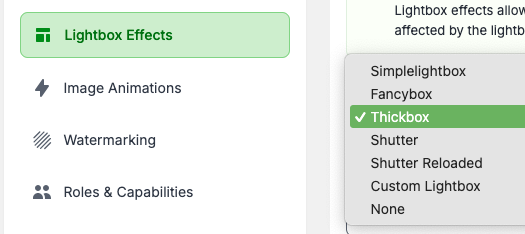
I’ve a lead : on Lightbox Effects tab and on the Lightbox library drop down menu, the “Tickbox” is the only one that has the correct display:
https://dbr-prod.ch/wp-content/uploads/wordpress/capture_imagely.pngall the other gallery have the incorrect display (simplelightbox, Fancybox, Shuter, Shutter Reloaded)
ok thank you, have a nice day 🙂
- This reply was modified 2 years, 1 month ago by vj_dobermann.
Forum: Plugins
In reply to: [Popups for Divi] popup doesnt appearsHi Melridente,
thanks a lot, yes know popups occur 🙂
Forum: Plugins
In reply to: [WP Video Lightbox] How to use a locally hosted video?hi, is it planned to add this feature ?
- This reply was modified 4 years, 2 months ago by vj_dobermann.
it works perfectly 🙂
thank you !
issue solved, the gallery name contained the special caracter “#”, I’ve deleted the gallery and recreate another one and re-upload the pictures.
all works fine
the description tells to add the CSS class ryv-popup but where…?
Could you send show me a screen capture please ?Hi David,
sorry I don’t understand the question, do I suppose to have third party plugin to open the lightbox ?…
Hi,
Thanks for your answer
I tried with a youbtube video but but it still doesn’t work…
this is the code :
[ryv-popup video=”https://www.youtube.com/embed/d07C3ZjCUDw”%5D- This reply was modified 7 years, 9 months ago by vj_dobermann.
- This reply was modified 7 years, 9 months ago by vj_dobermann.
- This reply was modified 7 years, 9 months ago by vj_dobermann.
Hi Cais.
finally I’ve change the theme from Nirvana to Bard and all is working now 🙂
I think that Nirvana theme is very complex and generate this issue.
And the design looks better 😉- This reply was modified 8 years, 1 month ago by vj_dobermann.
Hi Cais,
ok I’ve sent a bug report
Hi Cais,
ok thanks for the info that I was using an old shortcode^^
I erased it and click on “Add Gallery” button to add the album, below the new shortcode :
[ngg_images source="albums" container_ids="2" display_type="photocrati-nextgen_basic_compact_album" gallery_display_type="photocrati-nextgen_basic_thumbnails" galleries_per_page="0" enable_breadcrumbs="1" enable_descriptions="0" override_thumbnail_settings="0" thumbnail_width="240" thumbnail_height="160" thumbnail_crop="0" order_by="sortorder" order_direction="ASC" returns="included" maximum_entity_count="500"]It has not fixed the issue…
Hi Cais,
thanks for your reply.
The permalinks is now SEO friendly 😉
I changed the css style with your code but nothing occurs…
Below the generated code in my page :
<img class="ngg_displayed_gallery mceItem" src="http://www.dbr-prod.ch/index.php/nextgen-attach_to_post/preview/id--1991" alt="" data-mce-placeholder="1" />I’m a bit lost…^^
On the Chrome Developper tools, the html is :
<a class="ngg-album-desc" title="Groovadelic - 30.12.17" href="https://www.dbr-prod.ch/?page_id=5054" style="max-width: 111px"></a>and the css :
.ngg-album-compact h4 .ngg-album-desc {
    overflow: hidden;
    display: block;
    height: 54px;
This exemple is for the first gallery that the title isn’t displayed even the font size is 54px