WebWizards

Forum Replies Created
-
Hi there,
I’m sorry for the very late reply, we did not see your topic here.
Any existing user can be transformed into a vendor by going to their user profile and scrolling down to ‘Vendor Settings’.
You could also import users as vendors in bulk by setting up specific meta data. You would need to set the meta keys:
– marketking_group : must have the value of a vendor group ID (e.g. 123)
– marketking_store_name : store name of the shop
– marketking_store_url : must contain a unique slug of the vendorKind regards,
StefanHi Jean-Paen,
I’m sorry for the very late reply, we did not see your topic here.
An update has been released now for MarketKing that should resolve the -1 error.
Kind regards,
StefanThat’s fine, in that case, can you please open a ticket there in the ‘Pre-Sales for B2BKing’ category ( https://webwizards.ticksy.com/ ) and specify your purchase code in the ticket?
We will then follow up there with the plugin update discussed. Thank you.
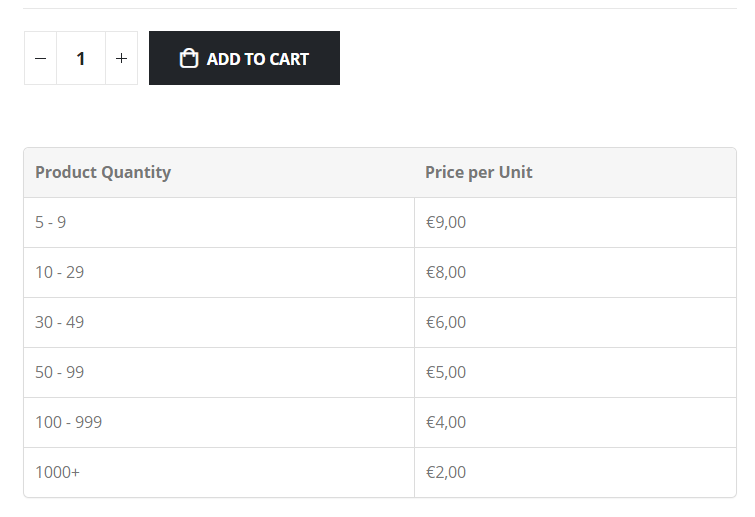
I checked your link – I think I understand – I believe you would need a shortcode where you can specify a product ID, such as [b2bking_tiered_table product=123], so you can add it multiple times and for multiple products.
This shortcode doesn’t currently exist, but we can add that and send it to you. Please note that this would only work for simple products (but not for variable products).
It would be best if you could please open a ticket with us at https://webwizards.ticksy.com , so we can privately send you the updated premium version with this shortcode.
Hi there,
By ‘Bulk table for quantity discount’, do you mean our tiered price table? this one? https://woocommerce-b2b-plugin.com/wp-content/uploads/2020/09/tiered_table_product3.png
And you would like to add it to a specific page? for example through a shortcode?
It helps if you can provide more details, thanks.
1) Thanks for clarifying. I looked into this and did see an issue there when saving the value on the account details page. I think I got that resolved now. I’d like to privately send you the updated version.
2) Please open a ticket there in the ‘B2BKing Pre-Sales’ category and provide us with your purchase code for the plugin ( https://help.market.envato.com/hc/en-us/articles/202822600-Where-Is-My-Purchase-Code ). It’s not our intention to be unreasonable about support – and of course, especially if there’s a bug. It’s just an automatic system that’s in place to protect us.
- This reply was modified 4 years, 1 month ago by WebWizards.
Hi there,
Regarding the issues you reported:
1) You would need to choose the option ‘Custom User Meta Key Mapping’ and enter ‘billing_id’ there ( like this https://prnt.sc/ArDjjbsrDfU5 ). Then the plugin should save the value in both ‘billing_id’ and ‘b2bking_custom_field_FIELDID’.I tested now with the latest version and this is working correctly for me. I find that the value is indeed saved with that key in the wp_usermeta table: https://prnt.sc/g41OR-kVn1Tr
2) It’s hard to say why this would not work correctly in your site.
If you’d like to open a ticket with us at https://webwizards.ticksy.com , and share a backend login to your site or staging site, we’d be happy to look into both of the issues , troubleshoot, and try to get these resolved for you.
Thank you,
StefanHi there,
We’re the B2BKing plugin developers.Our plugin has a feature that enables or disables payment methods for specific users or groups. Kindly please see our article here for more information:
Hi Max,
Thanks for getting in touch,Yes, you can use B2BKing for this purpose. You can create a tax exemption rule, which will make your wholesale customers see prices ex. VAT after signing in. You can also offer various discounts to these customers.
You can either create a discount rule that affects all products (e.g. 10% discount), or you can enter prices directly for each product in the backend.
We sell B2BKing under a lifetime license ( you can get the regular license from this link https://1.envato.market/NMWbV ).
Let me know if you have any questions or anything I can help with,
Kind regards,
StefanThank you for these details,
I looked into this and into our code, but from everything I can see, B2BKing would not normally have any effect on this Order email. Therefore I doubt the issue is directly connected to our plugin. Possibly the issue started before installing our plugin, but you did not notice it immediately.
Please follow these steps:
1. Deactivate the B2BKing plugin, and test again to see if the emails are being sent or not. B2BKing has no permanent effects during installation, so by deactivating the plugin and testing, you can check if the issue is directly connected to B2BKing or not.2. If you can indeed see a direct connection, meaning that emails are sent when B2BKing is active, and not sent when deactivated, then we’re happy to look further into it. In that case, we’d ask you to open a ticket with us at https://webwizards.ticksy.com and please provide us with a backend login to your site or a staging site, so we can directly investigate the issue.
Hi there,
Thank you for using our plugin,Please provide us with more details about the issue:
-> Which emails are being sent out? It helps if you can share a screenshot of the email / emails.
-> What marketplace integration are you using? is this a free plugin that we can test with?
-> How are you opting to stop sending emails? is there a setting? what is the name of that setting?Kind regards,
StefanHi @prokops ,
I tested locally to see if this works with this plugin here – it seems it does not work in our tests either. You would probably need to use custom order meta values as mentioned in the previous reply by the plugin author.
I want to let you know that there are some other free invoice plugins that can work with, and display B2BKing VAT by default. You can find more info here: https://woocommerce-b2b-plugin.com/docs/how-to-add-custom-fields-e-g-vat-to-invoices/
Hi there,
We’re the B2BKing developers. Generally, to get the VAT field included on invoices, it may help to go to B2BKing -> Registration Fields -> click on the VAT field and try to enable the “Add field to billing” checkbox.
Hi there,
It seems that you are using the Premium plugin version – this support forum here is only for the free version. For the Premium version, kindly please open a ticket with us at https://webwizards.ticksy.com/ – our team will be happy to assist you with this there.
Hi there,
These shortcodes are only available in the premium plugin version ( https://1.envato.market/NMWbV ).
Please see our reply in our support forum at webwizards.ticksy.com