wpDataTables

Forum Replies Created
-
Hello,
Just a small follow up- apologies for taking so long to reply.
I am glad these instructions are useful.
We tested all the CSS directly on your Page in the browser inspector tool, so it should work when you implement it as advised.
If anything else comes up, please don’t hesitate to create new Posts.
We are happy to help. 🙂
And thank you for the kind words.Hello,
To begin, I want to extend my heartfelt apologies for the delayed reply, which is due to an unexpectedly high volume of inquiries.
We truly value your patience during this period.
1. When it comes to filtering a Table connected from a Forminator Form with our Forminator integration Add-on;
which only allows each User to only see the entries they created;
It is not possible achieve it with our wpDataTables Lite version, since our Advanced Column Filters are only available in the Premium Plugin Version.
If you need more details about that, please open a ticket on our main Support platform here, and one of our Agents will respond as quickly as possible. Premium products are not supported in these forums, as per this comment by ww.wp.xz.cn moderators.2. In regards to the second part of your Use-Case, I am sorry, but we did not fully understand what you described in terms of ‘clicking on registration’;
Our Plugin does not have any capabilities/feature for registering Users;
And Tables made from our Forminator integration can not be Editable.
There is no editing available in the Lite version – so if you need more details on that subject, please also ask this on our Main Support via a Pre-Purchase ticket and our premium Support can advise you there.
Kind regards.Hello again,
You’re welcome; we are happy to advise as much as our Lite Support can cover.
Yes. This CSS fix we sent you was just a basic Custom CSS without ‘targeting’ a specific Table ID, or specific Table row/cell, etc.
If you need to insert a CSS just for a specific Table ID ( in this example ID 6), you can do this :
#wpdtSimpleTable-6 > tbody > tr:nth-child(7) > td {
… your styles here…
}That way you can make different style for each Table.
From your initial description of the issue, we got the impression that you just needed all the rows/cells in your Table to have the same font color, and we provided that CSS fix.
But now, after the follow up/update from your end, it seems that you have set specific colors on each of the “month” merged cells, such as “MARCH”, “APRIL” and so on.
That complicates the situation/issue.
Basically, these are not “headers” as our Plugin renders it. They are just being rendered as ‘standard rows and cells’ via HTML.
For example, if you inspect the HTML on your Page, you will see that only the row at the top is a Header element, the “FEBRUARY” as on this screenshot :
So, this would be the CSS selector for the Header Row :
“.wpdt-c.wpDataTableContainerSimpleTable .wpdtSimpleTable.wpDataTable th” (table header element);
On the other hand, for your other month values beneath that, our Simple Table is only placing them as regular cell data. ( even though you are merging the cells)
For example, for the “MARCH” cell, a selector for that specific cell with the Table ID would be ( if we use the table ID, then row with “n-th child” and table data) :#wpdtSimpleTable-6 > tbody > tr:nth-child(7) > td { color: red !important; }
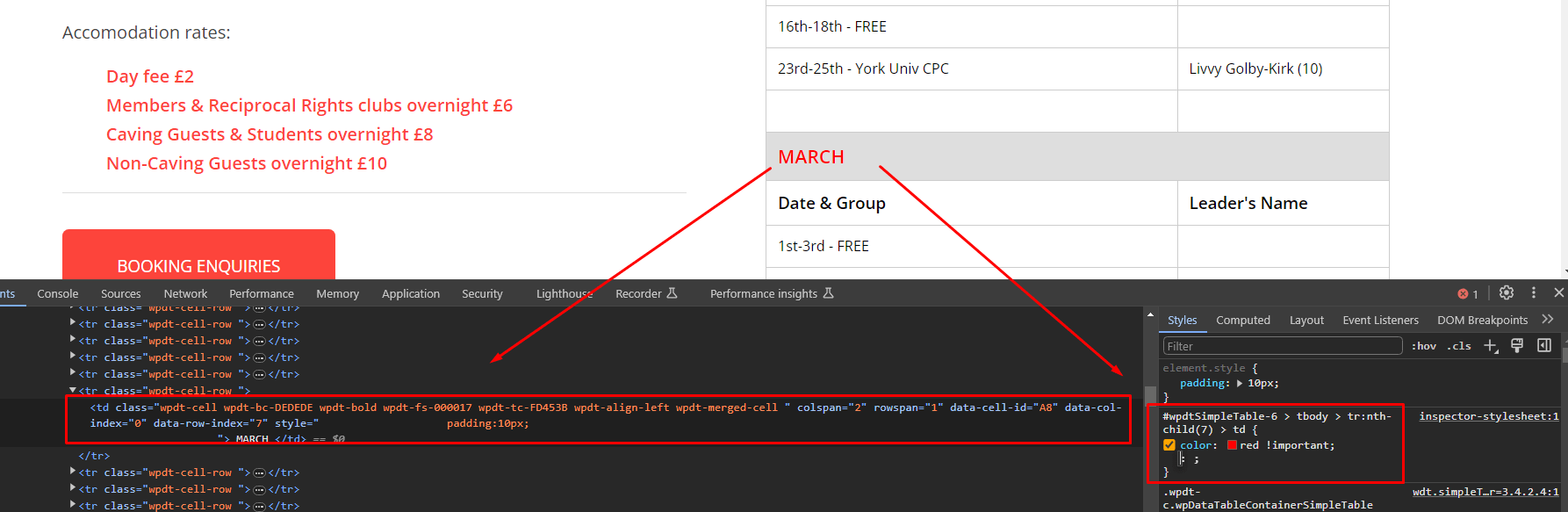
So, if you need to override the Theme conflict with Custom CSS, and you need to ‘target’ a specific Table ID, you can add the Table ID like that to your Selector;
And to target a specific row, you can use that “n-th child” selector.
Just add another line for each specific row with the right ‘child number’ for the element.
Please note a certain level of CSS knowledge is needed, so you can search for some additional tutorials online on places such as this Page from W3Schools.
Other than that, there is another way how you can add a “DIV” html container in a cell and add a custom CSS class which can be called later as a ‘global CSS class” in the Plugin settings.Let’s say if we wanted a Custom Width property for some Column.
You can add a CSS class directly in a cell of a table, and then you can edit, for example, for cell number 1 :
<div class=”abc”>Some text 123</div>Then on the front end we would add this custom CSS:
td .abc {
width: 350px;
}and this will change the column width on the front-end.
It is a similar method to do any CSS rules that you wish to apply to a specific cell.
–
If you wish to add the same CSS to all tables, you can add this to main plugin settings/Custom JS and CSS/Custom CSS.
Or, to target specific Table ID, you can use the selector as we mentioned above, to add it like this :#wpdtSimpleTable-6 td .customClassName{ color: green !important; }Or, you can add CSS only to front-end Page where you have some Table, without adding it to our Plugin’s settings.
Custom code needs to be applied to the page where the booking form is. Depending on what you’re using (Gutenberg blocks, or some page builder), adding the CSS or JS can be done in a few different ways.
If you need help with adding custom CSS to the page, please take a look at this article.
We hope that helps.
If not, then you would need to try to find which CSS of your Theme is overriding our Table’s Styles, as we mentioned at the beginning, and to ‘comment out’ the CSS code which is causing the issue for the Table not being the same between Back-End and Front-End.
Thank you.Hello again,
No problem, we are happy to help.
You most probably won’t need to go through the trouble of isolating the main root of this conflict, since we seem to have found the CSS solution as a fix for you. We tested it directly on your Page’s HTML and CSS and it works in a preview, so it should work when you apply it to your Page.Please try this CSS as a fix :
.wpdt-c.wpDataTableContainerSimpleTable .wpdtSimpleTable.wpDataTable tr td {
color: #000000 !important;
}( Of course, you can change that color value to any other color you need)
Add it to the Main wpDataTables Plugin settings/Custom JS and CSS/Custom CSS; and check how it looks, it should fix the issue.
Or you can add it to the WP Page directly as additional CSS, if that is better/easier from your end, as you wish.
Also, any CSS you add will not be affected by our Plugin’s Updates, it will remain the same.
We hope that helps.
Thank you.Hello,
First, we apologize that our Main support took so long to get to your Pre-Purchase Ticket.
They have responded now, did their best to cover all the main details of your Use-Case.
Please check their response there, and you can ask them any additional questions.
On this specific Forum, it is just made for subjects about our Lite version of the Plugin, so we are not allowed to discuss anything about any Premium Features ( such as SQL Tables etc), as per this comment by ww.wp.xz.cn moderators.Thank you for understanding.
Kind regards.
Hello,
Can you please check do all the cells have the same text color when you load the Preview of this Table in our Plugin’s back-end, and this issue only happens on front-end?
If that is the case, wpDataTables is a WYSIWYG (What You See Is What You Get) concept-based plugin.
This means that the table should look the same both in the back-end and in the front-end.
If your front-end table looks and behaves differently than in the back-end, this usually implies that there is another plugin (or the current theme) that’s changing the behavior of our plugin.Can you please change the theme and see if the issue is resolved?
If not, then please deactivate all other plugins except for our plugin, refresh the page where the issue is, and see if it is resolved (it should be).
If it is, then start activating other plugins one by one, and after each activation refresh the page to see if the issue reoccurred.
Once it does reoccur, you will have found the plugin causing the issue.
When we inspect the HTML and CSS on your Page, it seems this particular CSS is overriding our Table’s ‘odd row’ cell color :.main_color table caption, .main_color tr:nth-child(even), .main_color .pricing-table>li:nth-child(even), #top .main_color .avia-data-table.avia_pricing_minimal td {
color: #777777;
}That code is coming from this CSS file :
“https://rrcpc.org.uk/wp-content/uploads/dynamic_avia/avia-merged-styles-34103314bb6eb9183ba3abdf06550d76—659840e2e5fda.css”.
We are not sure if this might be a file from your Theme, or a Plugin, or if you added a Custom CSS file from your end on your Site.
You can override this CSS conflict with this :
.wpdt-c.wpDataTableContainerSimpleTable .wpdtSimpleTable.wpDataTable tr td {
color: #000000 !important;
}Add it to the Main wpDataTables Plugin settings/Custom JS and CSS/Custom CSS;
Or you can add it to the WP Page directly as additional CSS, as you wish.We hope that helps.
Hello,
To begin, I want to extend my heartfelt apologies for the delayed reply, which is due to an unexpectedly high volume of inquiries.
We truly value your patience during this period.
This can be achieved with our Conditional Formatting Feature, but that is only available in the Premium Version.
If you wish to learn more details about the Premium version of the plugin, please open a ticket on our main Support platform here, choose the Pre-Purchase Ticket category,and one of our Agents will respond as quickly as possible.
Premium products are not supported in these forums, as per this comment by ww.wp.xz.cn moderators.
Thank you for understanding.
Kind regards.
Hello,
To begin, I want to extend my heartfelt apologies for the delayed reply, which is due to an unexpectedly high volume of inquiries.
We truly value your patience during this period.Since you’re asking about the Premium Features of the plugin ( which are not available in the Lite Version), please open a ticket on our main Support platform here,
and one of our Agents will respond as quickly as possible. They might ask you additional details to clarify the use-case and will advise if that is possible.
Premium products are not supported in these forums, as per this comment by ww.wp.xz.cn moderators.
Thank you for understanding.
Kind regards.
Hello again,
Apologies for replying so late to this issue.
Thank you for that confirmation.
We determined there is a conflict with the Porto Theme.
Here is a workaround you can do to fix it.They are using this in the theme:
add_action( 'admin_enqueue_scripts', 'porto_admin_css', 1000 );
add_action( 'admin_enqueue_scripts', 'porto_admin_scripts', 1000 );
This means that whatever we do, their scripts will be executed last, and they are including those scripts on all admin pages, not only of theirs, which is not recommended by WordPress codex.
So, we need to do the same thing, but with a lower priority, for example 1001, but just in case we set it to be 1100.
So, to fix the admin part, you need to add the following to the functions.php of the Theme or even better in a child theme, so then, this modification would stay unaffected by Theme updates :
function wdtRemoveEmbedScript (){
    if (isset($_GET['page']) && (strpos($_GET['page'], 'wpdatatables') !== false)) {
        wp_dequeue_style('porto_admin');
        wp_dequeue_style('porto_admin_bar');
        wp_dequeue_script('porto-admin');
    }
}
add_action( 'admin_enqueue_scripts', 'wdtRemoveEmbedScript', 1100 );
That fixes the admin ( back-end) part.
As for the front-end – the theme is using Bootstrap 4, so you can fix the display length with this:
.wpdt-c .wpDataTablesWrapper .dataTables_length .bootstrap-select .dropdown-toggle:after {
        display:none !important;
}
.wpDataTables .dataTables_length .btn-group.bootstrap-select.length_menu.show {
    display: inline-block !important;
}
.wpDataTables .dataTables_length .dropdown-menu.open.show {
    transform: none !important;
}
You will add that code in the Main Plugin settings/Custom JS and CSS/Custom CSS.
Let us know how it goes, that should fix the conflict.
Thank you.- This reply was modified 2 years, 4 months ago by wpDataTables.
Hello @sherissa_r, and @bwolary.
Firstly we apologize for all the waiting time.
We are still unable to reproduce any error/issue with any of our test CSV or Excel files nor in the Lite Version or in the Premium Version.
All our previously linked Tables are working and we can also make new Tables.
So, in order for us to help debug what might be happening on your specific file(s) or Tables, can you please show us more details, what happens exactly and if you can send us the source File, it seems it mostly happens to some users for specific Excel files.
1. When it comes to reverting your installation to any previous versions, you can download previous versions on this Advanced Page, scroll down and you will find this section :
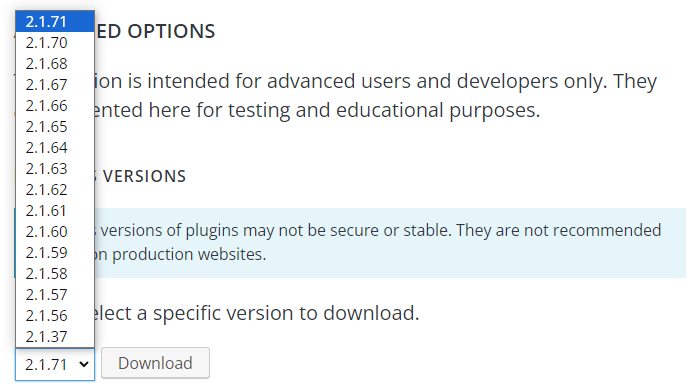
Just please Note what it says about using previous Versions. They may not be secure or stable, so they are used only for testing purposes, not recommended for a live/production Site.
So you can download the previous version and check if the same file works there, versus how it behaves on the new Version.
–
If that is the case, as it happens for @bwolary, we can inspect your file in order to reproduce and ‘catch’ the error on our end.
Could you please send us your source Excel File/the one with the issue, which can be used to reproduce this behaviour?
If it does not contain any sensitive Data, you can just upload it to weTransfer and send us a download link here;
Or if it has any sensitive Data, please open a Private Pre-Purchase Ticket on our main Support platform here, then our Agents can take your file and we can perform testing when we reroll to the previous Lite Version, and if we can notice any difference with the latest Version.
–
If you can also please provide the detailed steps, best will be if you can record a Video, and the same applies depending if it has Sensitive Data – if not, you can send it here;
Or if it has any sensitive Data showing in the Video, you can just send that in a Private ticket to our Main Support.
Our Developers are not going to change this new logic we added which checks your source File for issues with new error handling, so if you need us to determine where the issue is coming from for new ( and future versions), you can send us your source file(s) so we can tell you more details if it might be some formatting issue, or one or more Headers being blank or anything else on the source file.
Thank you.Hello,
1. When it comes to such a large DataSet, if you have more than around 6 thousand rows, the only way to have better performance is to switch to SQL based tables and our server-side processing;
but that is not available in the Lite version.If you wish to learn more details about this, please open a ticket on our main Support platform here, and one of our Agents will respond as quickly as possible.
Premium products are not supported in these forums, as per this comment by ww.wp.xz.cn moderators.
Thank you for understanding.
2. When it comes to rendering links in our Plugin, we are not able to open your Page, but we can advise.
it depends if you have one link per cell, or if you have multiple links in the same cell.
If you have one link per cell, perhaps the easiest way is to use our URL Columns.
They have specific rendering rules :
Rendering rules: If the content of the cells contains a combination of “two sticks” – || – everything to the left of this combination is used as an URL address for the link, and everything to the right as displayed text. For example:
https://wpdatatables.com||Check out wpDataTableswill be rendered as:
Check out wpDataTablesIf the “||” combination is not found in the content, the entire content will be used both for the link and as the display value. For example:
https://wpdatatables.com
will be rendered as:
https://wpdatatables.com–
2.
Alternatively, you can use String Columns.
They can render custom HTML, in that case, you would have to wrap the links in the source data as HTML anchor tags, for example :
<a href="https://www.w3schools.com">Visit W3Schools.com!</a>will be rendered as hyperlink of displayed text : ” Visit W3Schools.com! “
if you use String Columns, you will also be able to have multiple links in the same cell, and combinations or images with links, etc ( if needed).
–
Let me know if that makes sense, and if you have any questions. Thanks
Hello,
We are unable to reproduce this issue and at the moment, you are the only User who reported it, so it might be tricky to isolate what happens specifically on your Site.
Can you please check your “System info” Tab in our Plugin’s back-end Dashboard, and send us a couple of screenshots, such as , what is your current WordPress Version installed, what is the PHP Version on your Server;
Do you have our latest Lite Plugin version 3.4.2.3 installed, etc?
( If you don’t have the latest version, please update and purge cache on Site);
Can you also confirm are you using our Lite or Premium wpDataTables version?
And, do you know did you perhaps recently upgrade your version of WordPress/ or changed the PHP Version on the Hosting Server, any major changes like that;
Or perhaps if you updated any other Plugin when this started happening?
–
It might be caused by some kind of a strange conflict between wpDataTables and another Plugin on your Site.
You could also try this.
The safest way is to make a separate, Staging version of the Site, and then try this :
Change your current Theme, and disable all other Plugins, just leave wpDataTables active, then wait for two/three days and check if it disables.
If it does not, that indicates it might be another Plugin which is doing this/causing a conflict on Site that somehow disables our Plugin.
If that is the case, here is how we usually look for conflicts :
Start activating other plugins one by one, and after each activation refresh the page and wait for the same period of Time, to see if the issue occurred.
Once it does reoccur, you will have found the plugin causing the issue.
( I realise that might be tricky, since you would need to wait a certain time after each attempt/ but that is the only way to test for conflicts and be certain)
Let us know how it goes, if you can confirm those System Info details, and if you recall if some major change/or Plugin update happened on your Site when this issue started;
and if you can please do some tests, to try and isolate it on Staging.
Thank you.Hello,
This is most probably a Theme conflict, or perhaps a conflict coming from another Plugin on Site.
Can you please change the theme and see if the issue is resolved?
If not, then please deactivate all other plugins except for our plugin, refresh the page where the issue is, and see if it is resolved (it should be).
If it is, then start activating other plugins one by one, and after each activation refresh the page to see if the issue reoccurred.
Once it does reoccur, you will have found the plugin(or Theme) causing the issue.
We hope that helps.- This reply was modified 2 years, 4 months ago by wpDataTables.
Hello,
First, we apologize for responding so late to this Post.
wpDataTables is a WYSIWYG (What You See Is What You Get) concept-based plugin.
This means that the table should look the same both in the back-end and in the front-end.
If your front-end table looks and behaves differently than in the back-end, this usually implies that there is another plugin (or the current theme) that’s changing the behavior of our plugin.Can you please change the current Theme and see if the issue is resolved?
( If you already disabled other Plugins/then it is most probably something from the Theme that causes a conflict);
If not, then please deactivate all other plugins except for our plugin, refresh the page where the issue is, and see if it is resolved (it should be).
If it is, then start activating other plugins one by one, and after each activation refresh the page to see if the issue occurred.
Once it does reoccur, you will have found the plugin causing the issue.
Let us know if it is a Theme conflict.
Thank you.Hello @maxkrok;
Can you please confirm which dropdowns you mean when you say there are ‘blank options’ even though it is disabled?
Do you mean in our Advanced Column filtering, such as a Selectbox/MultiSelectbox filtering values?
If that is the case, that means you are using the Premium version of our Plugin, and we can not help you further with this use-case here.If you’re using the Premium version of the plugin, please open a ticket on our main Support platform here,
and one of our Agents will respond as quickly as possible.
Premium products are not supported in these forums, as per this comment by ww.wp.xz.cn moderators.
Just send them some screenshots to ensure that they can see exactly what kind of issue you are having and they will help you out.Thank you for understanding.
@tesrosado , we are happy to see that disabling those options fixed the dropdowns issue for you, that is awesome. 🙂Kind regards.