wpdevart

Forum Replies Created
-
Forum: Plugins
In reply to: [Organization chart] Zoom out on load to show full chartForum: Plugins
In reply to: [Booking calendar, Appointment Booking System] Booking not working anymoreHi.
Since we fixed the bug in the latest version, we will close the topic.
If you have other questions, please let us know.
Thanks.
Forum: Plugins
In reply to: [Countdown Timer - Widget Countdown] Conflict with Gravity FormsHi.
When did you notice this issue?
By the way, we have a new version of Countdown that has more features, so you can test it and see if it works for you. You can find it here – https://ww.wp.xz.cn/plugins/countdown-wpdevart-extended/
Thanks.
You’re welcome. Good to hear that everything is working correctly now.
Thanks.
Hi @vancv786.
We have fixed the issue and updated the plugin. Now you can update the plugin to version 3.2.5, it should work correctly.
Thanks.
Forum: Plugins
In reply to: [Booking calendar, Appointment Booking System] Booking not working anymoreHi @ithelpzi.
We have fixed the issue and updated the plugin. Now you can update the plugin, version 3.2.5 should work correctly.
Thanks.
We have fixed the bug and updated the plugin to the version 3.2.5. Now you can update the plugin, version 3.2.5 should work correctly.
Thanks.
The problem is related to the latest version of our plugin, so here’s the solution. Download the 3.2.3 version from here – https://downloads.wp.xz.cn/plugin/booking-calendar.3.2.3.zip, then deactivate and delete the current version from the Plugins page (in this way, you will not lose the old data) and then install 3.2.3 version.
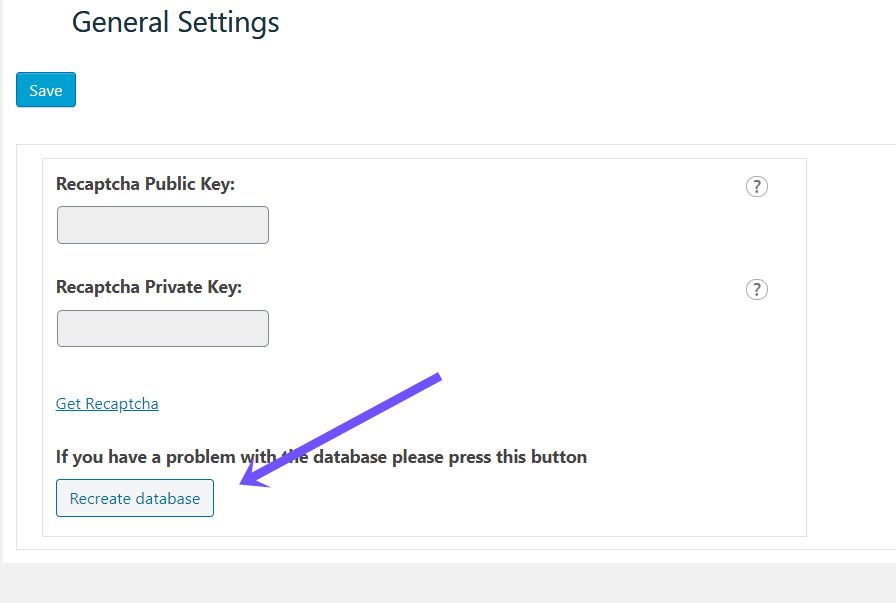
Then from the left admin menu, open our plugin main menu. Then go to the “Global Settings” page and click on the “Recreate database” button. You can check this screenshot – https://wpdevart.com/wp-content/uploads/2022/04/database-issue.png
This should fix the problem.
We will fix the issue as soon as we release version 3.2.5, so wait until version 3.2.5 is released and then update the plugin again.
Thanks.
Thanks @jackidev for the kind words.
Hi @agortech.
We didn’t know that you are using the premium version, otherwise, we would provide support via email. As per ww.wp.xz.cn forum rules, we are required to provide premium support via email, so we will close this topic.
If you have any other questions, please contact us at [email protected] and we will provide future support.
Thanks.
Hi @agortech.
Unfortunately, the problem is that our plugin is coded in such a way that if you use multiple extras, then the second and subsequent extras count towards the total price. This is how our plugin works, and it would take a lot of code on our end to customize our plugin the way you want, and unfortunately, we can’t do that at the moment. We have to change the whole structure of the plugin.
By the way, could you tell us which version of our plugin you are using?
Thanks.
Forum: Plugins
In reply to: [Booking calendar, Appointment Booking System] Booking not working anymoreHi @ithelpzi.
Oops, sorry, we forgot to mention that you need to re-create our plugin database (don’t worry, this won’t delete the old data of the calendar). From the left admin menu, open our plugin main menu. Then go to the “Global Settings” page and click on the “Recreate database” button. You can check this screenshot – https://wpdevart.com/wp-content/uploads/2022/04/database-issue.png
This should fix the problem.
Thanks.
Hi @jackidev.
Yes, you are absolutely right, the problem is with version 3.2.4.
You can download version 3.2.3 from here – https://downloads.wp.xz.cn/plugin/booking-calendar.3.2.3.zip and use it for a while. We will fix the bug in version 3.2.5 and update our plugin soon.
Thanks.
It seems like the problem is related to the 3.2.4 version of our plugin, so here’s a solution. Download the previous version from here – https://downloads.wp.xz.cn/plugin/booking-calendar.3.2.3.zip.
Deactivate and delete the current version from the Plugins page (in this way, you will not lose the old data) and then install the 3.2.3 version.
After that, the calendar should work again.
We will fix the issue with version 3.2.5 and once we update to version 3.2.5 you will be able to update the plugin as well.
Thanks.
Forum: Plugins
In reply to: [Booking calendar, Appointment Booking System] Booking not working anymoreHi @ithelpzi.
It looks like the problem is related to the latest version of our plugin, so here’s a workaround. Download the previous version from here – https://downloads.wp.xz.cn/plugin/booking-calendar.3.2.3.zip, then deactivate and delete the current version from the Plugins page (in this way, you will not lose the old data) and then install 3.2.3 version.
Check if it is working correctly and let us know.
If this version works fine, then don’t update to version 3.2.4 until we update our plugin again. Once version 3.2.5 is released and we update it in the WordPress directory, you will be able to update it as well. We will try to fix this error as soon as possible and update the plugin.
Thanks.