wpdevart

Forum Replies Created
-
Hi @agortech.
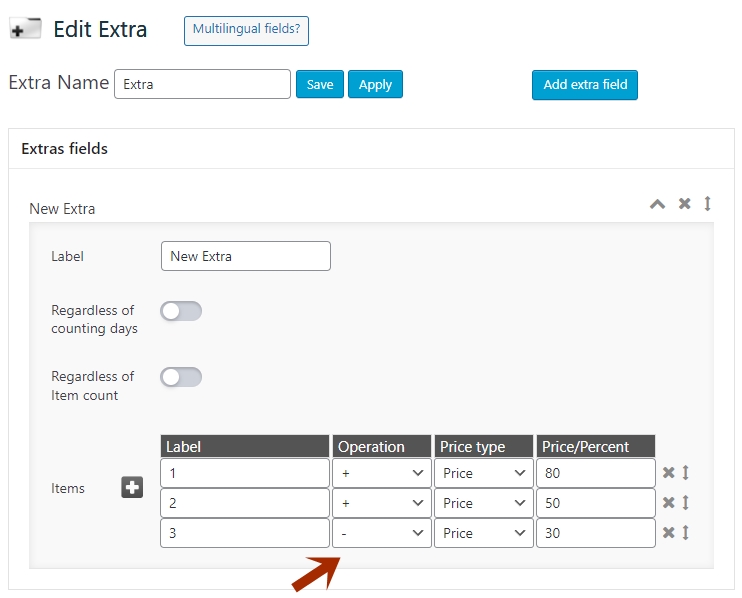
Have you chosen the “-” operation?
By the way, you only need to create one Extra, not 3 separate Extras.
You can check this screenshot and see how to set up an Extra to get the result you want – https://wpdevart.com/wp-content/uploads/2023/02/screenshot-extra.jpg
Thanks.
Forum: Plugins
In reply to: [Booking calendar, Appointment Booking System] Booking not working anymoreHi.
Can you send us the URL of the calendar page again?
Thanks.
Hi.
Can you tell us which version of our plugin you are using?
Thanks.
Hi @darinandrew.
Since you are using the premium version, we must provide future support via email. Contact us at [email protected] and we will check the issue.
Thanks.
Forum: Plugins
In reply to: [Social comments by WpDevArt] Comments no showHi.
We think the post type is not standard so the comment field is not shown. Have you tested it on a standard WordPress theme?
Thanks.
Forum: Plugins
In reply to: [Organization chart] How to Customize Element Information fieldsHi @justlaugh22.
You cannot add a new file, but you can edit existing fields(change or add information to fields).
Thanks.
Hi.
As we understand you are no longer interested in further support, so we will close this topic. If you have other questions, please let us know.
Thanks.
Forum: Plugins
In reply to: [Social comments by WpDevArt] Comments no showHi.
We checked the “Source Code” of the page you sent us but didn’t find the plugin there.
Thanks.
Hi @thompsonaire.
We think you need to set it up in your PayPal settings. This is something that cannot be controlled from our plugin.
Since we need to provide support for the premium version via email, we will close this topic, but if you have other questions then you can contact us at [email protected].
Thanks.
Forum: Plugins
In reply to: [Booking calendar, Appointment Booking System] Cannot create themesHi @wimh.
Since you have already contacted us via email and we have provided a solution, we will close this topic.
Just in case, here’s how to fix this error – From the left admin menu, open our plugin main menu. Then go to the “Global Settings” page and click on the “Recreate database” button.
Thanks.
Hi.
We have tested our plugin again and there is no global error. Since this is not a global problem, we need more details to find out the cause of this problem. What version of WordPress and PHP are you using? Do you have another site on the same server where you can test our plugin and see if it works there or not?
Thanks.
Hi @pixola.
You can download the previous version from here – https://downloads.wp.xz.cn/plugin/booking-calendar.3.2.3.zip
Okay, we will test the latest version again, but we don’t think that it is a global issue.
Also, what version of WordPress and PHP are you using?
Thanks.
- This reply was modified 3 years, 4 months ago by wpdevart.
Hi @pixola.
We just made a test booking and on our part, everything works correctly. Can you check this again, there may have been a server error when you made the booking request.
Thanks.
Forum: Plugins
In reply to: [Booking calendar, Appointment Booking System] Export/Import calendar dataHi @deuce25.
Since this is premium version support, we must provide future support via email, you can contact us at [email protected].
By the way, there is no such function, but you can export and import the plugin database from the old site to the new one manually.
We will close this topic.
Thanks.
Forum: Plugins
In reply to: [Social comments by WpDevArt] Its not showing on