Kathryn Presner

Forum Replies Created
-
Forum: Plugins
In reply to: [Ultimate Addons for Elementor] Workaround for bug in v. 1.6.18@wmasztakowska – I’m not involved with the plugin’s development at all, just sharing a workaround that worked for some other folks. You’ll need to wait for a reply from the plugin developers regarding a fix.
As for rolling back to an older version, I’d suggest you start a separate thread/topic for that where folks can walk you through it.
Forum: Plugins
In reply to: [Ultimate Addons for Elementor] Workaround for bug in v. 1.6.18@manuelecheandia So glad it worked for you!
Forum: Themes and Templates
In reply to: [Twenty Twenty-Three] Issue with the menu in version 6.3Great, glad that did the trick!
Hopefully a fix for this issue will be in the upcoming WP 6.3.2 release; at that point you’ll be able to deactivate Gutenberg, if you want.
Forum: Themes and Templates
In reply to: [Twenty Twenty-Three] Issue with the menu in version 6.3If you’d rather not touch your database, you might try one of these two other solutions until this is fixed in Core:
If you have access to CLI on your site, try running:
wp transient delete wp_core_block_css_filesActivating the standalone Gutenberg plugin also seems to fix the issue. (Be sure to read the notices there before doing so, as the plugin will also give you early access to other block-editor features.)
Forum: Themes and Templates
In reply to: [Twenty Twenty-Three] Images in comments not scaling downGlad that did the trick. I’ll mark this thread as resolved – feel free to do that yourself in the future by changing the “Status” in the right-hand column. 🙂
Forum: Themes and Templates
In reply to: [Twenty Twenty-Three] Post comment count missing?Glad that solved it! I’ll mark this thread as resolved but feel free to create a new topic for more questions.
@countstefan – could you please create your own topic in Fixing WordPress, to allow people to help you more easily? It’s much less confusing for volunteers to do troubleshooting with folks individually, and also we won’t bother the OP (original poster) with notifications of replies unrelated to their site. Thanks.
@souldesigns – let me know if you had a chance to do the troubleshooting steps I mentioned above.
Thanks a lot for setting that up, @markc! Could you try the following steps to remove the default space at the top of the site.
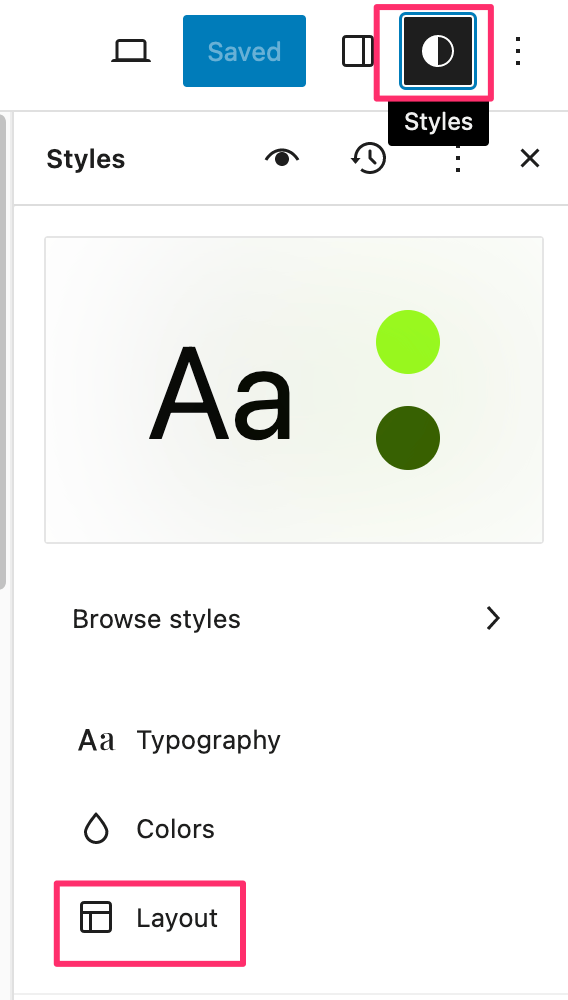
Go into Styles (aka Global Styles) by going into any template in the Site Editor and clicking the half-moon icon at the top right. Then click “Layout.”
In the “Dimensions” section, click the “Padding options” icon, then select “Top”

Click the “Use size preset” icon and enter 0 in the
pxfield.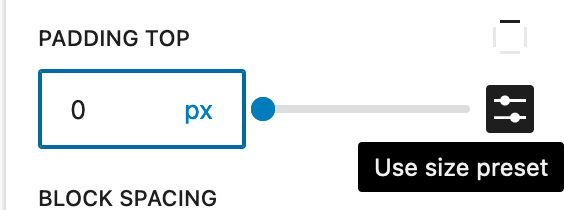
Save the changes.
Let me know how it goes.
Hey there @markc – I haven’t been able to replicate this so far on my 6.3 install running TT3 1.2.
Normally you should be able to zero out all padding/margin on most elements, without needing any custom CSS. As it’ll be much easier to troubleshoot directly, would you be willing to show me the issue on a live site, even if it’s a temporary one via https://instawp.com or another service? Thanks!
Forum: Themes and Templates
In reply to: [Twenty Seventeen] Blown Main MenuHey there @sainkho – looks like there are a number of CSS issues, not just the ones you mentioned.
Did you make CSS changes anywhere besides your child-theme overrides? Since disabling your child theme’s stylesheet in my browser inspector didn’t sort out all the issues I’m seeing, I’m wondering where else you may have made modifications. CSS modifications should normally only be done either in your child theme or in the Customizer’s CSS Editor.
As tests, the first two things I’d recommend doing are:
- Activate the parent Twenty Seventeen child theme. Does the issue persist?
- Is the issue present with all your plugins temporarily deactivated? If the problem goes away, reactivate your plugins one by one (while still in troubleshooting mode) to find the culprit.
Let me know how it goes.
Forum: Reviews
In reply to: [Test Plugin 3 - Testing plugin] A+++ Would Review AgainLet’s see what happens now – email or no?
Forum: Plugins
In reply to: [Gutenberg] Link options boxHi @samwp1 – if this issue is what you’re referring to, as Mika says there:
The issue was fixed and should ship with Gutenberg 16.4, but it missed the cutoff for WP 6.3
https://github.com/WordPress/gutenberg/pull/52799Forum: Themes and Templates
In reply to: [Twenty Twenty-Three] Improve accessibility on button statusExcellent, glad Felipe’s CSS did the trick!
I’ll go ahead and mark this thread as resolved for you, but feel free to start a new topic if you have other questions.
Heya @tytuspenn – I’d love to take a look at this directly, since as Jordan mentioned above, featured images should already be responsive without needing to do anything extra. If you could provide a link to a post or page on your site with a featured image, I’ll be glad to take a peek.
Hey there @souldesigns – here are some troubleshooting steps:
- Do you get the same error when previewing another block theme like Twenty Twenty-Two, Blocksy, or any other block theme?
- Do you still get the error after temporarily deactivating all your plugins? You can use the Health Check plugin‘s troubleshooting mode for this, which will not change your live site. If the problem goes away, reactivate your plugins one by one (while still in troubleshooting mode) to find the culprit.
Let me know how it goes.