• Resolved ebzeta

    (@ebzeta)


    Hi, love how the plugin works (better choice than any other available one), but I’m having problems with how it handles more than one language. Below some data and a description of the problem.
    I have a two language site, handled via WPML.

    Original language is English, additional language Italian. All versions of plugins, themes and wordpress are up to date

    I have created a multi-stage process prompt in italian. My knowledge base is half in italian half in english. The chatbot in the beginning answers back in the user’s language.

    The issue comes at a specific stage in the process where I ask the prompt to look into the knowledge base, compare the question asked by the user with similar questions in the knowledge base and then ask the user three clarification questions. Whenever the prompt reaches that point, it switches back to italian, even if I explicitly prohibit this in the prompt. I have the same problem even if I translate the prompt into English.

    Because of this I can only use it on the pages in Italian on my website. I would love to extend its use to the pages in English

    The only solution I can think of is to upload two copies of each knowledge base document, one in English and one in Italian, however that does seem redundant. Do you think there is a workaround?

    Thanks in advance, and thanks for the amazing job on this plugin!

    • This topic was modified 11 months ago by ebzeta.

    The page I need help with: [log in to see the link]

Viewing 9 replies - 1 through 9 (of 9 total)
  • Plugin Support m4xw3ll

    (@m4xw3ll)

    Hi @ebzeta,

    Thanks for reaching out and giving MxChat a chance! What chat model are you using?

    Thread Starter ebzeta

    (@ebzeta)

    Hi @m4xw3ll thanks for yor answer! I’m using GPT 4.1 and TE3 Large. Similarity Threshold is at 30 if that matters.

    Plugin Support m4xw3ll

    (@m4xw3ll)

    Hi @ebzeta,

    Typically I’ve had no issues with using an AI instructions like “- IMPORTANT: you must strictly respond in the language the user has asked the question”.


    This has worked for me and other users as well. It shouldn’t really matter what language your knowledge base information is in. For example, mine is in English, but it will chat with users in any language they are using.

    One thing I didn’t quite understand about your post is that you said you have your chatbot “The issue comes at a specific stage in the process where I ask the prompt to look into the knowledge base, compare the question asked by the user with similar questions in the knowledge base and then ask the user three clarification questions.” What exactly do you mean by this? You can’t really add in the prompt for the chatbot to look into the knowledge base. It will always look into it no matter the user query. This may be confusing the bot. You can have it ask some follow up questions by adding this in your instructions “When chatting with users about [insert topic] you must first ask these 3 questions [insert questions]” you could try something like that.

    Thread Starter ebzeta

    (@ebzeta)

    Thank you! I’ve managed to clarify and simplify the whole prompt, including the part related to the 3 questions and I’ve made sure that the language instructions are mentioned only once but clearly (below a snippet of my prompt, now in English)

    Response Style – CRITICALLY IMPORTANT

    • MAXIMUM LENGTH: 300 words per response
    • Ultra-concise: Get straight to the answer with no filler
    • No introductions like “Sure!” or “I’d be happy to help” or “According to XXX”
    • No phrases like “based on my knowledge” or “according to information”
    • No explanatory text before giving the answer
    • No summaries or repetition
    • ALWAYS respond in user’s language
    • Minor chit chat or conversation is not acceptable

    Despite this, it still does happen every now and then that the language will switch from English to Italian, even unrelated to the three questions. I’m not sure what to do to solve this, have you encountered a similar problem before? Happy to help with any additional information I could provide

    Thank you!

    Plugin Support m4xw3ll

    (@m4xw3ll)

    hi @ebzeta,

    Are you testing this in one very long chat thread/session? Are you triggering any actions?

    Keep in mind the session persists over a 24h period even if you don’t see it in chat history. I’d encourage you to use the admin debugging panel and chat with it some all in one language and then clear session each time.

    Have you been using the clear session in the debugging?

    edit: no I have not personally experienced this or heard from other users. I’m using Claude sonnet 4 though and all models behave differently. I’ve had users carry on extended conversations in various languages and never randomly switch, so I think there might be something here triggering it.

    • This reply was modified 10 months, 3 weeks ago by m4xw3ll.
    Thread Starter ebzeta

    (@ebzeta)

    Hi, no I’m not triggering any actions and I’m always using different sessions. I’ll keep in mind the 24 hr period for chats, though I’m not sure what you mean with the admin debugging panel, I’ve looked for it and couldn’t find it, is this part of the pro version?

    Plugin Support m4xw3ll

    (@m4xw3ll)

    It’s very hard to start a new session and often users think they did because they don’t see chat history in the UI, but that doesn’t start a new session. Even if you close the browser out and reload the page it doesn’t start a new session.

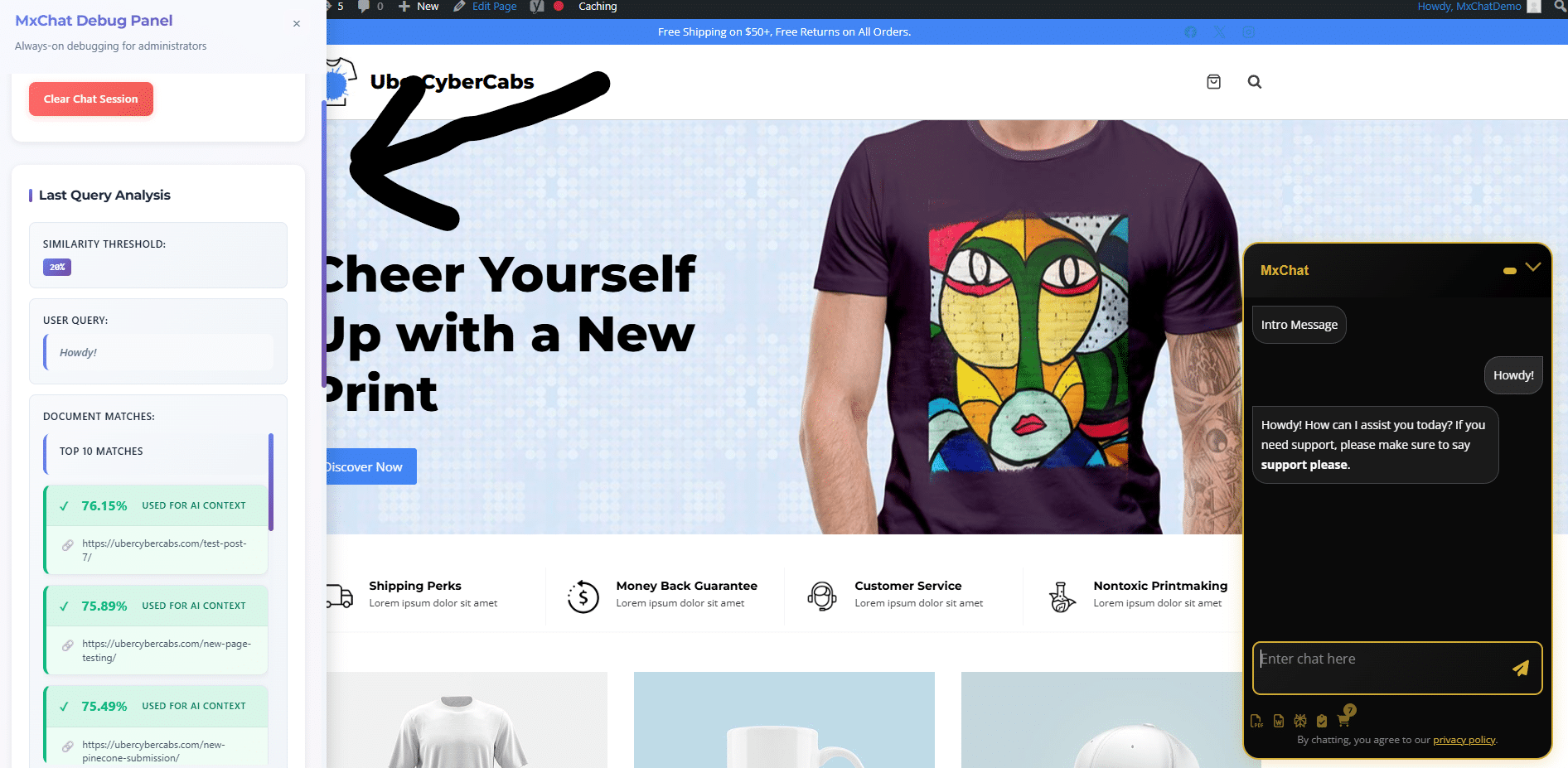
    This is why I built the debugging admin panel, which is fairly new (within the last 2 weeks or so), available for all users for free, and helps you understand what content your chatbot is being fed for context and also allows you to manually reset the chat session completely.

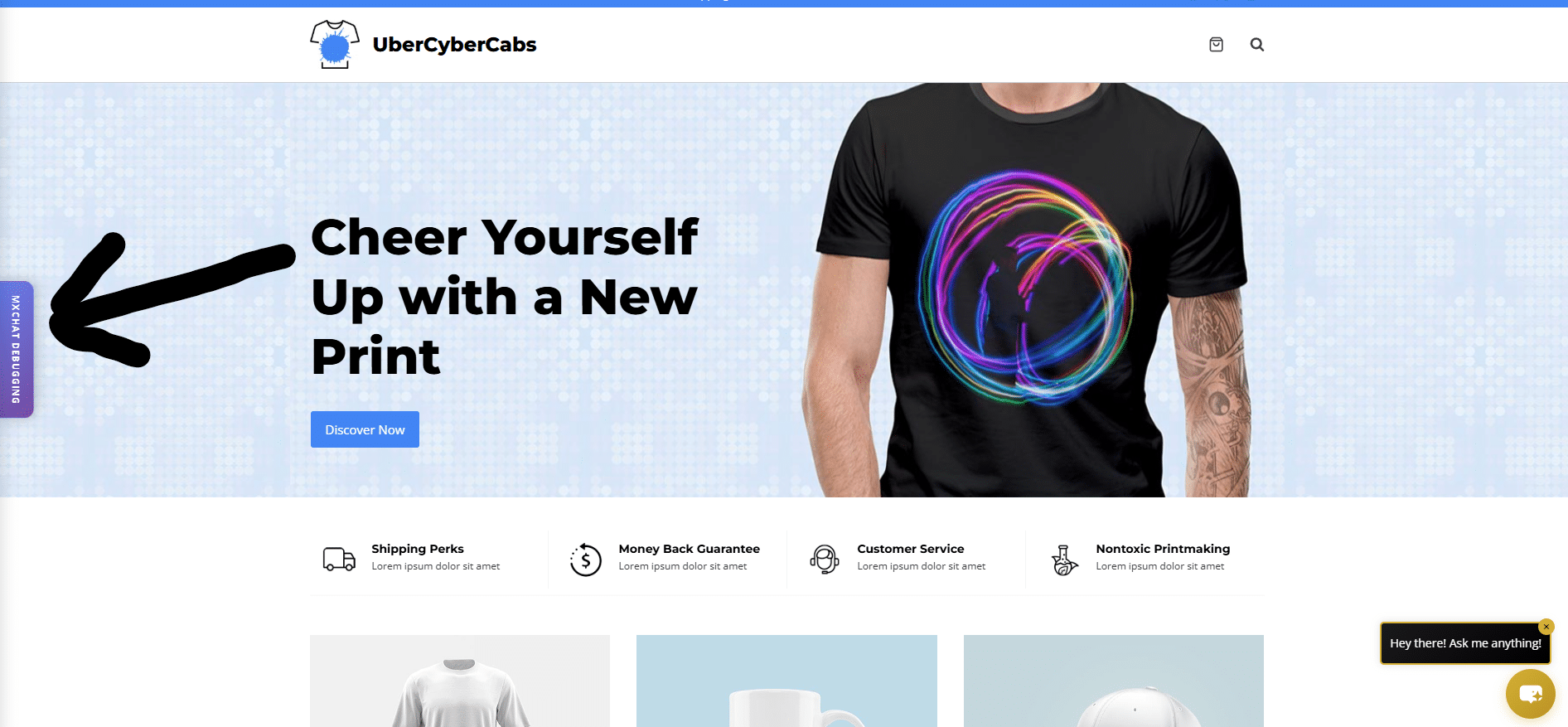
    This panel will only show up when you are logged in as an admin and viewing your website. It will be on the left side and look like a little purple tab that says “MxChat Debugging”. I’d highly encourage you to use this and test. Below are some images.

    I would see if you can replicate it switching and see if maybe it always happens when a certain record gets pulled or something. If you can easily reproduce it through a series of messages, for example like every time you send message 1, message 2, and then on message 3 it switches, that would be helpful as well.

    Thread Starter ebzeta

    (@ebzeta)

    Thank you so much for your help! I was able to replicate one of the mistakes via the debug panel. It appears that when asked a specific question in english, the most relevant source it uses is in Italian – and when it happens, then the answer is in Italian as well, overriding the instructions. The source is a pdf file, should that matter. What could you advise? Thanks again, really appreciated

    Thread Starter ebzeta

    (@ebzeta)

    Hey just a heads up, I have solved this problem by putting these as the first lines in the prompt:

    • ALWAYS detect the user’s language from their first message and use it consistently throughout the conversation.
    • If the user starts in English, respond only in English — even if source material is in another language. Translate or paraphrase retrieved content as needed, but never change the language of your reply.
    • If the user starts in Italian, respond only in Italian — even if source material is in another language. Translate or paraphrase retrieved content as needed, but never change the language of your reply.
    • Do not switch languages unless the user explicitly asks you to.
Viewing 9 replies - 1 through 9 (of 9 total)

The topic ‘Language used’ is closed to new replies.