andrasch

Forum Replies Created
-
Forum: Themes and Templates
In reply to: [OceanWP] Disappeared menuthanks very much for all your help @skalanter
Hi @rochdesigns
Sorry for getting back to you. I am still figuring out how to add a custom CSS in the front end.
However I have just noticed that if I rotate my phone to landscape mode, the photo appears but if my phone is in portrait mode, the photo doesnt appear. do you still recommend to paste the above CSS ?
Thank you
Forum: Themes and Templates
In reply to: [OceanWP] Disappeared menuThank you @skalanter
I have updated the theme. one more question: could you please tell me how to add a CSS on the front-end?
thank you
Forum: Themes and Templates
In reply to: [OceanWP] Disappeared menuThanks @skalanter
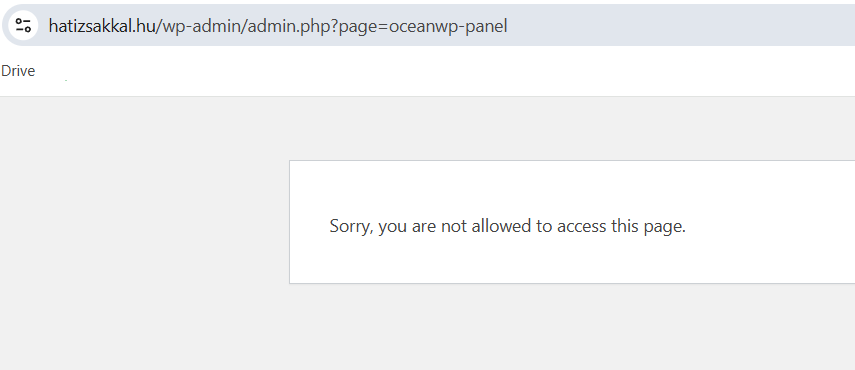
This is the message I try to get to the customise section
https://i.postimg.cc/527ZW94q/Screenshot-2025-05-28-182443.png
I deactivated and reactivated all the plugins but this didnt help me find out which plugin can cause the issue
Are you sure that one of the plugins is the reason why I cannot get access to the customise section?
thank you
Forum: Themes and Templates
In reply to: [OceanWP] Disappeared menuHi Shahin
Many thanks for checking.
When I changed over to Storefront , the menu appeared. However when I changed back to OCeanwp, I got the following message
But then I closed this window and when I returned to the dashboard, the OceanWP theme changed to active mode. And of course now the menu is not visible again.
Please advise
Many thanks
Thank you for your help, much appreciated
Hi @rochdesigns , it looks like the problem is bigger than I thought. I am using the OceanWP and when I went to Appearance > Customise I have only found an empty page. It just shows a sentence saying that I am customising my website. The menu is missing, I cant click on anything. This is new to me as well. And a bit shocking. I used to have a menu in this section. Although I built almost everything with Elementor.
What can be the problem?
Thank you for your patience
- This reply was modified 1 year ago by andrasch.
Thanks very much @rochdesigns but I am not sure if I understand it correctly
I added the above code to Appearance > Theme file editor > OceanWP: style.css. I pasted the code to the bottom. Is this correct?
I also cleared the cache by selecting the browsing data within Privacy and Security. IS this correct?
Unfortunately nothing has changed. What else shall I try?
Thank you
Hi @rochdesigns
This is what I have done so far but nothing has changed unfortunately.
https://snipboard.io/qExfXe.jpg – so I want the image ID 34232 to appear on mobile and tablet view
and this is where I pasted the custom CSS
https://snipboard.io/4SXejy.jpg
Thanks very much
Hello @rochdesigns
I cant find any settings that hides that element despite your screenshot. As I am a beginner, I tried to build my website without using any custom CSS. By looking at your screenshot, is it correct to say that the error is somewhere in elementor? So not in the plugin settings?
Thanks very much
Thank you @rochdesigns
I have just had a look at it and everything is switched off in that section, which means that it should show the image . Is it ok if I have added a portrait mode photo to the existing sliders, where the other photos are in landscape view? I can see that in the main options that the width and the height are set as landscape view. Although previously I created a separate slide with a portrait mode photo in it and still this photo didnt appear when I checked with my mobile. Did you have any more ideas as what I should check?
Thanks very much
Thanks very much for replying, Steve. The link would be the same as above. Please go to that link by using your mobile and you will see that no photo appears. It is just a blank navy blue page. In the settings I have added a 4th photo to the slideshow (all the 4 photos are now under 1 share code). So at the moment I would like to see 3 photos in desktop/laptop view, (which is working) and 1 photo in mobile view. And I have the problem with the latter one.
Hi Steve,
I have found your video about the mobile features in metaslider and added a slide to the existing one. In this slide I hid the big screens because I want it to appear only in mobile and tablet view. However it doesnt work for some reason. The slider in desktop view works perfect but in mobile view for some reason I cant see the image.
I would like to mention that this image’s orientation is portrait. Do you think this can be an issue?
MAny thanks
Hi @stevejburge
I am using elementor and up until recently I never had a problem with the slideshow. I built everything 5 years ago and since I am a complete beginner I forgot where I pasted the code
I would appreciate your help in this regard
Thanks @stevejburge
I am not sure if I have done the right thing. So I have duplicated the desktop slider that has been working. Now I have got a new shortcode. Since I built this homepage 5 years ago I cant remember where to put this shortcode and how to change it to mobile view. Could you please help me with this one as well?
Also I have tried to preview this page but the photo still doesnt appear
MAny thanks