Code Amp

Forum Replies Created
-
Forum: Plugins
In reply to: [Search & Filter] Empty multiselect fields when using Shortcode in PostsHey @matzeatweb , thanks for flagging this, it will be included in an update towards the end of the week.
Best
Hey John
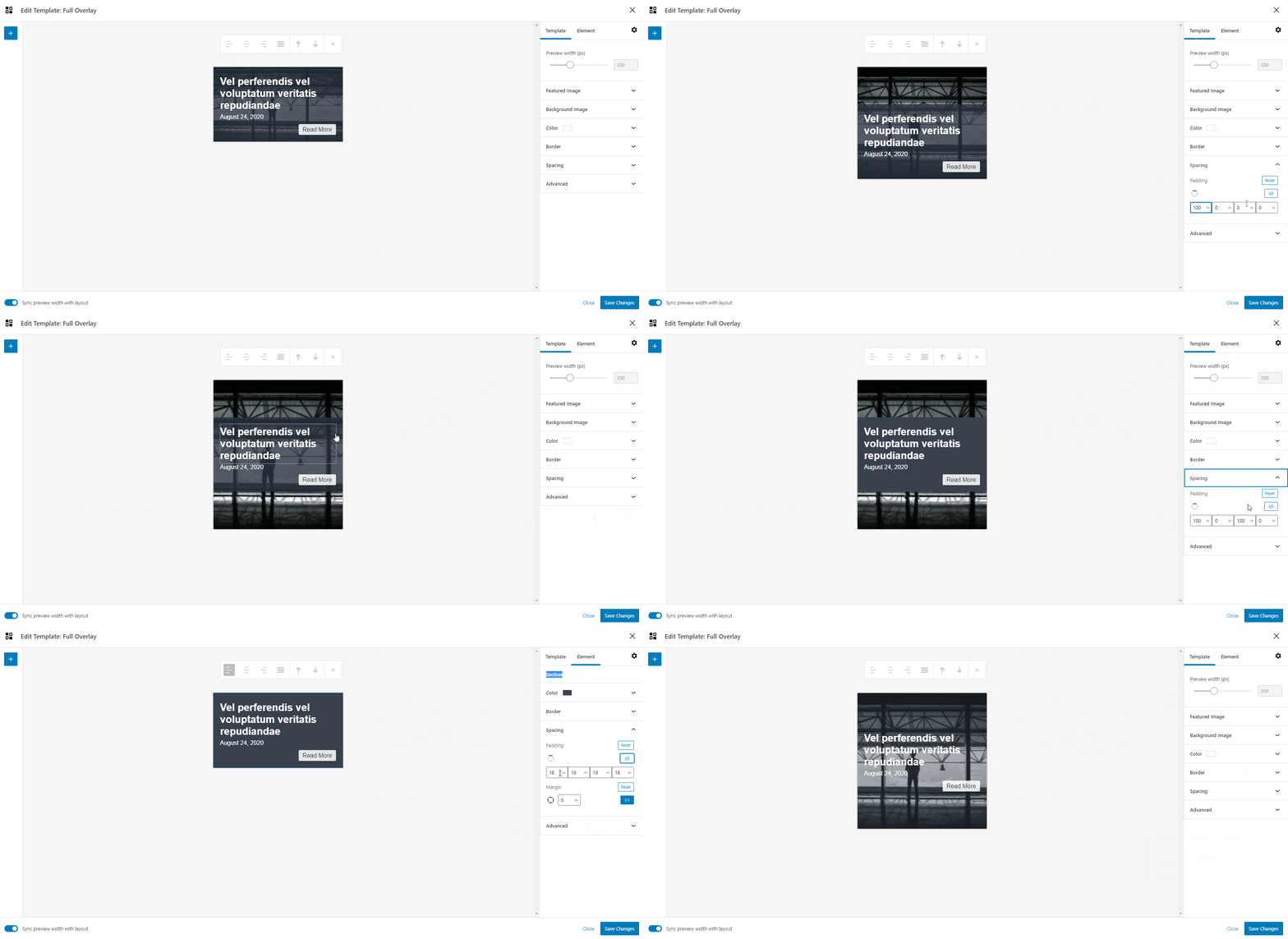
Right now there is no way to choose a height, but you can always increase the height by using padding.
So you can add padding to either the template, or, the section, which is the container where you add all your elements.
I’ve highlighted both methods here:
https://customlayouts.com/wp-content/uploads/2021/04/cl-increase-height.gifAlternatively, you can add some CSS to your site to set the height to specific value:
.cl-template {
    min-height: 600px;
}
This CSS would apply to every template though, but if you add custom classes to your layouts / templates (in the Advanced Panel) then you can target the templates individually.
Let me know if all that makes sense!
Best
Hey John
You can actually import / export these using the WordPress importer – take a look here:
https://snipboard.io/esghKq.jpgAll you have to do is choose the Template post type.
Does that work for you?
I will keep this logged as a feature request though, as I think we should provide an easier way to import/export (maybe to json file).
I was also thinking a cool idea would be to have a showcase of templates on our site, and for you to be able to copy and paste the settings into your own site (which would also mean naturally you can copy + paste between your own sites) – but this is something for a bit further down the line.
Thanks
Forum: Plugins
In reply to: [Custom Layouts - Post + Product grids made easy] Link with dynamic sourceThanks!
I saw you mentioned you grabbed a copy of S&F Pro – best thing to do, is contact support, and just write a message saying you are reaching out to me, Ross, as requested.
It will get then get assigned to me, and we can have a proper chat by email 🙂
Best
Forum: Plugins
In reply to: [Custom Layouts - Post + Product grids made easy] Dash Icon Before TaxonomyHey @magniture
I think you could this with some CSS, I’ll try to have a look later on today / monday for some code I can share with you.
Best
– RossForum: Plugins
In reply to: [Custom Layouts - Post + Product grids made easy] Link with dynamic sourceHey @claytonchase
Thanks for the suggestion, I think the Custom Field could do it (HTML) but I’m guessing maybe it doesn’t run a shortcode inside? (need to test that) – you could actually use a manually crafted excerpt as an immediate workaround (as shortcodes are supported there) – but then again, your post type may not support them.
Also, sounds great you’re happy to help out – would really appreciate that! Let me know in what capacity you’d be able to help and I’m all ears (whether its brainstorming some ideas, or testing a beta, or something else entirely) 🙂
FYI just trying to finish a fairly substantial release, I hope it will be ready tomorrow now.
Thanks
– Ross- This reply was modified 5 years, 1 month ago by Code Amp.
Forum: Plugins
In reply to: [Custom Layouts - Post + Product grids made easy] Link with dynamic sourceHey Clayton
Would it work for you if this behaved the same as the current link field – except you set the source to the custom field, and you manually enter some text (which is used across all buttons)?
I was thinking to add another “Type” to the custom field element, and call it “Link” which would then behave the same as the “link” field allowing for a custom label – was going to pop that in an update today / tomorrow.
I can see already though that this approach needs to be reworked in the near future – because what if you wanted a custom field for the url, but also for the label text…
I see some other plugins using a kind of tag sytsem (PODs) where you can put things like
%post_title%or%post_meta:meta_key%into any input field, and it will convert the values on the frontend… I’m still having a think on this, I think we’ll do something like this at some point, but possibly provide a nice UI for it instead (more like Elementor) and show the actual data in the preview/editor area.Best
Thanks for the review Clayton 🙂
Forum: Plugins
In reply to: [Custom Layouts - Post + Product grids made easy] Feature SuggestionHey @claytonchase
Thanks for the kind words – yeah we plan to add other blocks, but right now we just testing all this out in a controlled environment.
I’m concerned that once we add the full block library performance will get sluggish, and there might be some other errors (not to mention nesting/child blocks could be a bit awkard / difficult to deal with).
I think what we’ll do first is get columns (and rows) added, then perhaps rollout to the default WP blocks, and if that works well, let users decide if they want to enable 3rd party block support.
Anyway, that’s a rough outline of the plan so far.
Thanks for the feedback!
Forum: Plugins
In reply to: [Custom Layouts - Post + Product grids made easy] PaginationRe the labels, yeah makes sense, we’ll add support for this.
Re the image element – that’s on the todo list too, but I think right now its more important we nail the concepts of columns and rows, because I see immediatley the need to position an image “to the left” and add some text or info “to the right”.
Thanks for the suggestions + feedback, keep em coming 😉
- This reply was modified 5 years, 1 month ago by Code Amp.
Forum: Plugins
In reply to: [Custom Layouts - Post + Product grids made easy] Padding or marginHey @loekarin
No problem its easily mixed up.
Padding and margin are CSS concepts – margin, is the space around the element, and padding is the space inside the element.
Try setting a background color, and then playing with both options 🙂
Let me know if that makes sense? (I should probably add this to the docs)
Best
Forum: Plugins
In reply to: [Custom Layouts - Post + Product grids made easy] PaginationHey @loekarin
I’m afraid its an all or nothing approach right now.
We’re working on some updates (about a month or two away I think) which will allow you to design your pagination just as with other parts, so you can change colors, borders, spacing, font etc, of the individual parts – plus the options you mentioned too.
We’ll also be adding “load more” style pagination option.
Sorry the news is not better right now, but we will be improving this.
Best
- This reply was modified 5 years, 1 month ago by Code Amp.
Hey @ciaoq
And thanks @thales007 – this is correct.
Please see the integration guide here for more info:
https://searchandfilter.com/documentation/search-results/custom-layouts/Let me know if you have any futher issues.
Best
Forum: Plugins
In reply to: [Custom Layouts - Post + Product grids made easy] Sample templatesHey @loekarin
You can find examples of our sample templates here:
https://customlayouts.com/templates/For importing the sample templates, check the instructions here (scroll down):
https://customlayouts.com/documentation/getting-started/Before following that, you need to download our plugin to your computer (the zip file, from this site), extract that zip, and in there, you will find the sample templates XML file under these folders:
custom-layouts/sample-data/sample-templates.xmlI hope that helps!
Best
Thanks for such an awesome review! 🙂