codepeople

Forum Replies Created
-
Forum: Plugins
In reply to: [Calculated Fields Form] Calculation replaced – history not recoveringHello @beananimal
Thank you very much for using our plugin. Could you please provide the version number of your plugin copy?
The only once time we received a similar error report was related with a browser extension.
Could you please try to edit the equation with the browser in safe mode (While you navigate in safe mode the browser disables the extensions)?
Best regards.
Forum: Plugins
In reply to: [Calculated Fields Form] OR statementHello @sajtfokus
Thank you very much for using our plugin.
If you embed block/endblock tags you would be implementing an “and” operator:
<%fieldname1_block if_value_like={{apple}}%>
<%fieldname2_block if_value_like={{orange}}%>
some text
<%fieldname2_endblock%>
<%fieldname1_endblock%>
There are two possible solutions to implement an “or”:
- You can insert a calculated field in the form to be used as an auxiliary (you can hide it by ticking a checkbox in its settings), and enter the equation:
IF(OR(fieldname1 == 'apple', fieldname2 == 'orange'), 1, 0)And use the block tags:
<%fieldname3_block if_value_is={{1}}%>
some text
<%fieldname3_endblock%>- The second alternative requires to duplicate blocks:
<%fieldname1_block if_value_like={{apple}}%>
some text
<%fieldname1_endblock%>
<%fieldname1_block if_value_unlike={{apple}}%>
<%fieldname2_block if_value_like={{orange}}%>
some text
<%fieldname2_endblock%>
<%fieldname1_endblock%>
The previous structure prevents repeating the “some text” text.
Best regards.
Hi,
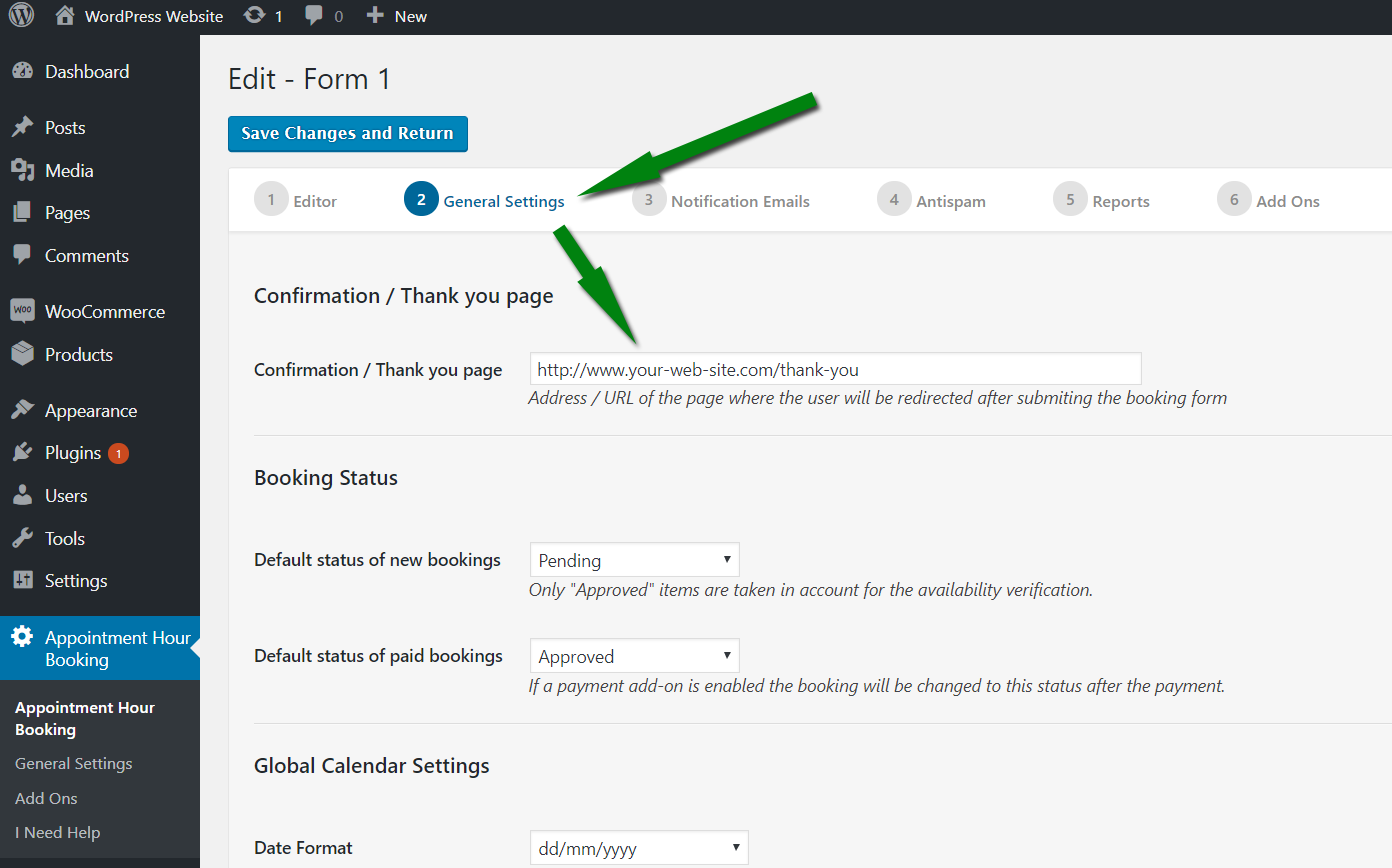
Put the address of the page where you want to redirect after the submission in the following settings field:

https://apphourbooking.dwbooster.com/images/articles/thank-you-page.png
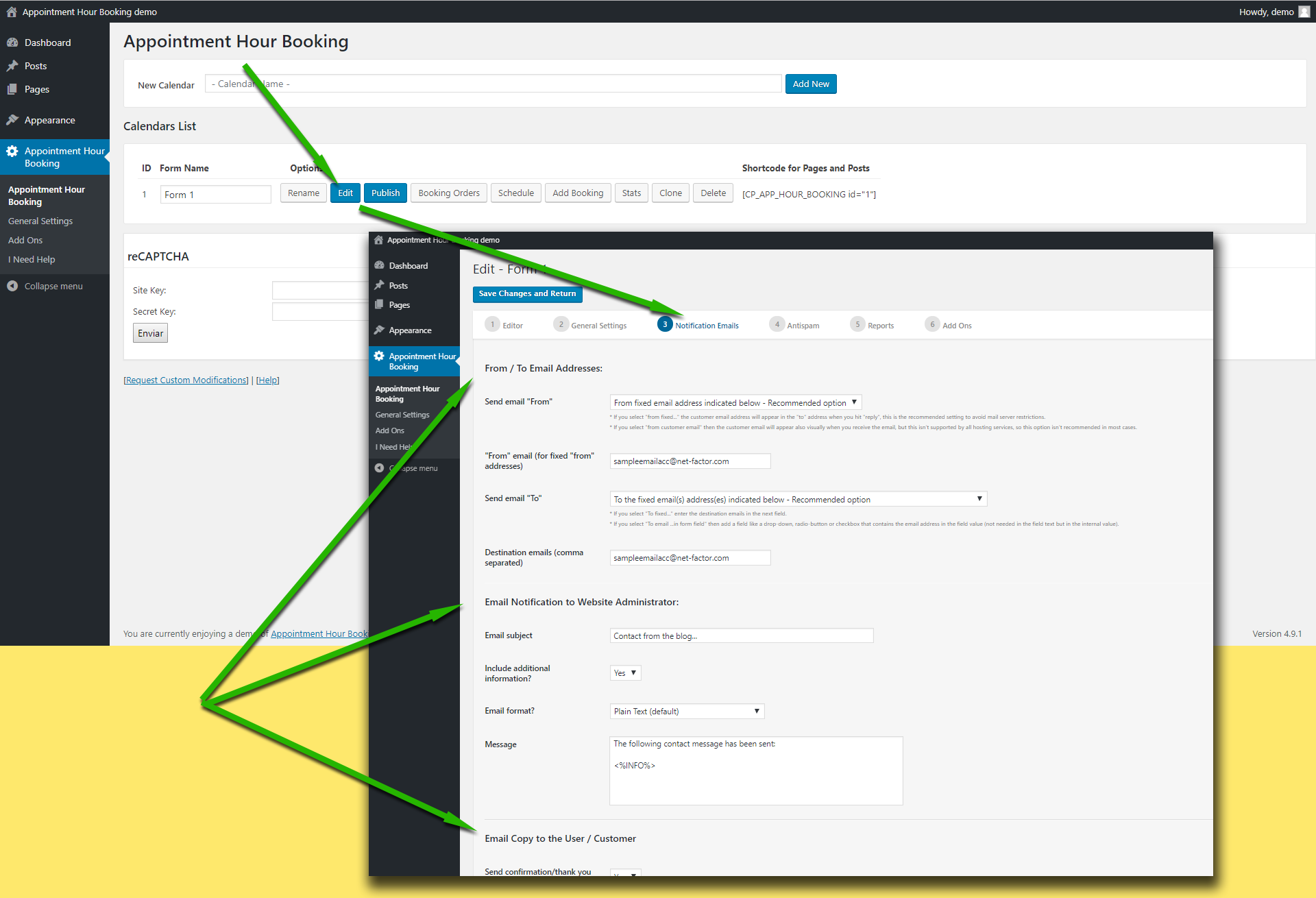
Regarding to the email notifications, check the following settings area:

https://apphourbooking.dwbooster.com/customdownloads/email-settings.png
Try first using a “from” email address that belongs to your website domain, this is the most common restriction applied in most hosting services.
If that doesn’t work please check if your hosting service requires some specific configuration to send emails from PHP/WordPress websites. The plugin uses the settings specified into the WordPress website to deliver the emails, if your hosting has some specific requirements like a fixed “from” address or a custom “SMTP” server those settings must be configured into the WordPress website.
Thank you for using the plugin!
Hi,
The capacity is set at the service level. You will need two services in that case to be able to use different capacity.
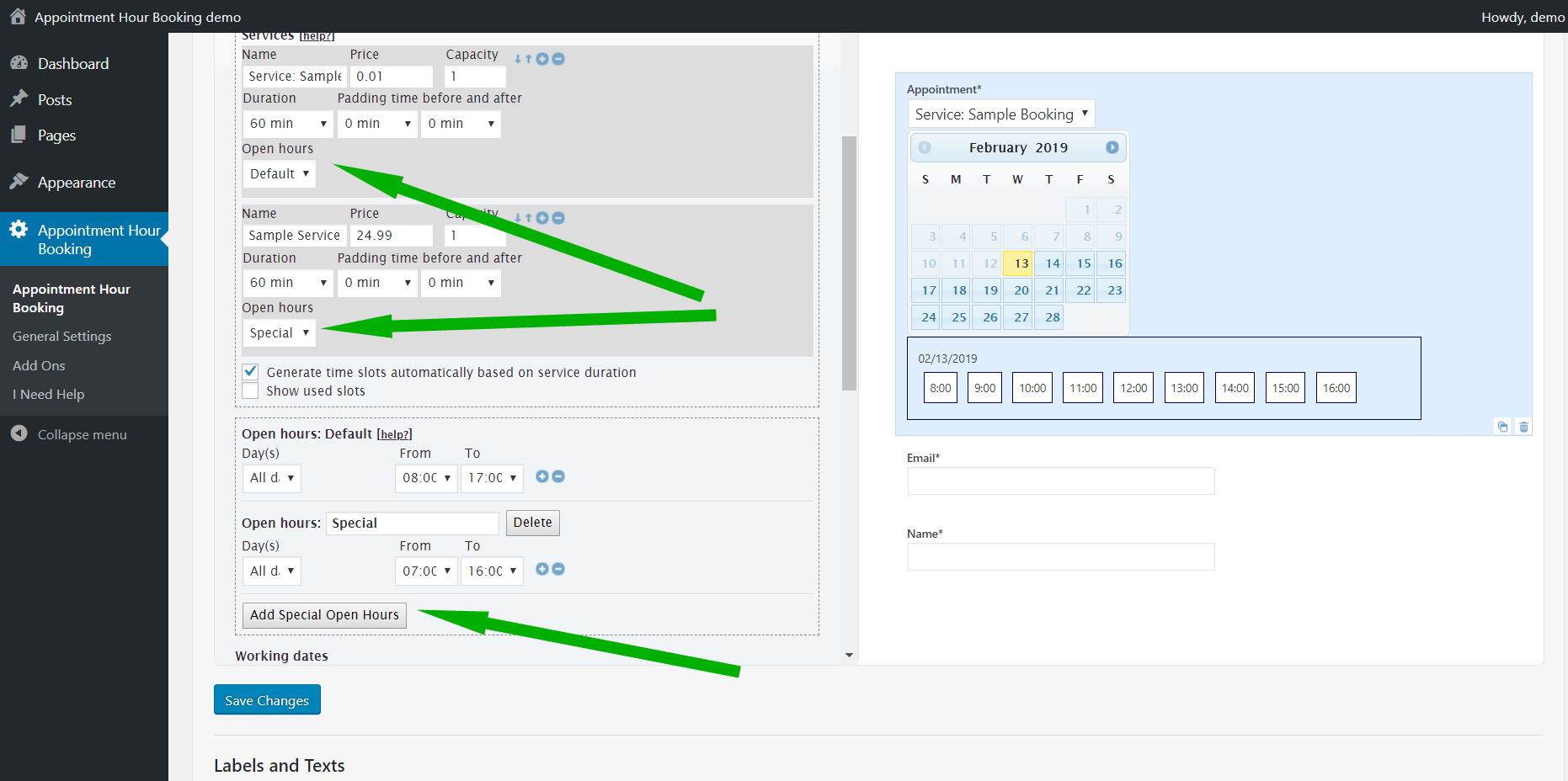
The following feature may be also needed to setup different weekdays/open hours for different services:
https://apphourbooking.dwbooster.com/images/articles/special-open-hours.png
Note that this latest one is a commercial feature. We’d like to help but we can’t reply about commercial features in this forum. We are not allowed to support any customers in these forums.
For pro or commercial product support please contact us directly on our site. This includes any pre-sales topics as well.
Commercial products are not supported in these forums. We will happily answer this and any other questions you can have on our own site.
Thank you.
Hi,
If it is a range of dates, then the dates may be blocked in the following area:

https://apphourbooking.dwbooster.com/customdownloads/invalid-dates.png
Thank you for the feedback!
Forum: Plugins
In reply to: [Calculated Fields Form] Request to Hide Submit ButtonHello @massimo1971
Thank you very much for using our plugin. To hide the “Submit” button you only should select the “No” option for the “Display submit button?” attribute in the form settings:
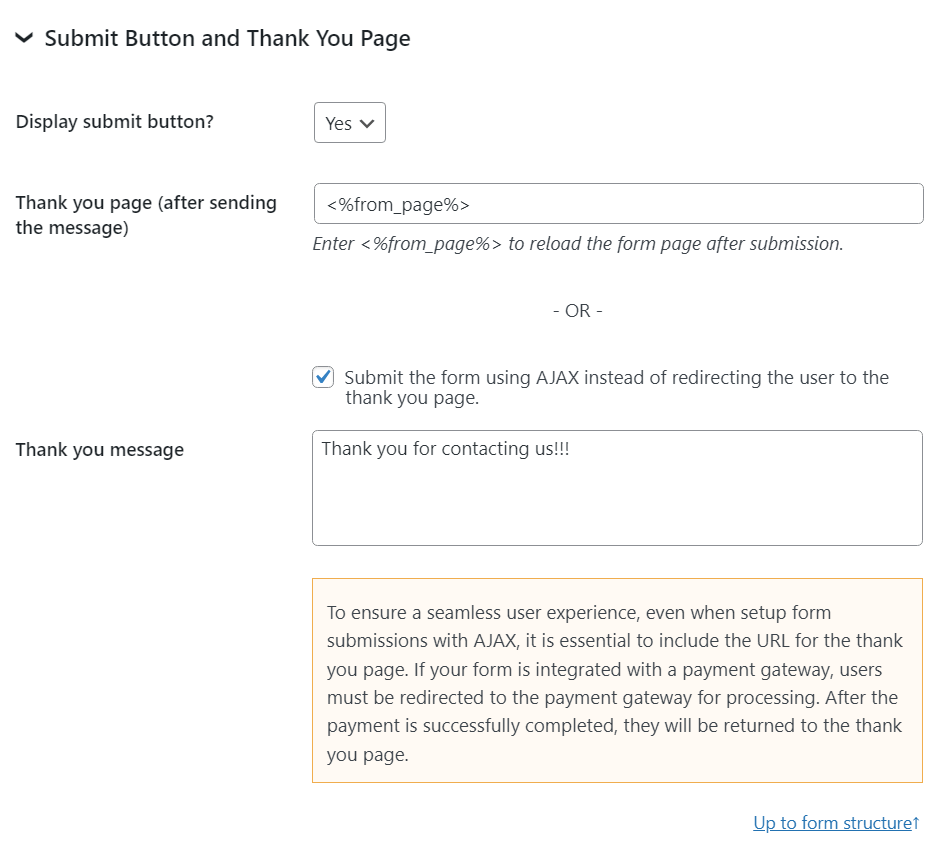
Best regards.
Forum: Reviews
In reply to: [Corner Ad] Ein absoluter Game-Changer: Corner AdForum: Plugins
In reply to: [Calculated Fields Form] Check/uncheck radiobutton based on valueHello @ra2or
Thank you very much for using our plugin. I’ll try to describe the process with a hypothetical example.
Assuming the radio buttons field is the fieldname123, and it has a choice with value 888, and you want to tick/untick it based on another field, for example, the value of the fieldname2, as follows:
If the fieldname2 value is greater than 100 tick the choice, and untick it otherwise.
To implement this behavior you can use a calculated field as an auxiliary (you can hide it by ticking a checkbox in its settings) and enter the equation:
(function(){
if(100 < fieldname2) getField(fieldname123|n).setVal(888);
else getField(fieldname123|n).setVal(0);
})()
Note I used the |n modifier with the fieldname123 field to refer directly to its name instead of its value.
Best regards.
Hi,
You can set a different number of open hours for each weekday and also for specific dates. Example about defining separated open hours for different weekdays and also for a specific date:

If you also need to setup less capacity for each time-slot, note that the capacity is set at the service level, so you may need a different service for Fridays. If this is the case then you may need the following commercial feature: https://apphourbooking.dwbooster.com/images/articles/special-open-hours.png
For pro or commercial product support please contact us directly on our site. This includes any pre-sales topics as well.
Commercial products are not supported in these forums. We will happily answer this and any other questions you can have on our own site.
Thank you.
Hi,
Locate and remove the blocked entries from the booking orders list:

https://apphourbooking.dwbooster.com/customdownloads/booking-orders-list.png
Thank you for using the plugin!
Hi,
You can set a different number of open hours for each weekday and also for specific dates. Example about defining separated open hours for different weekdays and also for a specific date:
If you also need to setup less capacity for each time-slot, note that the capacity is set at the service level, so you may need a different service for Fridays. If this is the case then you may need the following commercial feature: https://apphourbooking.dwbooster.com/images/articles/special-open-hours.png
For pro or commercial product support please contact us directly on our site. This includes any pre-sales topics as well.
Commercial products are not supported in these forums. We will happily answer this and any other questions you can have on our own site.
Thank you.
Forum: Plugins
In reply to: [Calculated Fields Form] Allow negative numbers in number fieldHello @peto21
Thank you very much for using our plugin. Yes, you can enter negative values in currency fields.
Best regards.
Forum: Plugins
In reply to: [Search in Place] Searching Embedded ContentHello @adamslater
Thank you very much for using our plugin. The answer to your question depends on the way you embed the third-party website’s information in your website.
If you utilize iframe tags, you are unable to access the third-party website’s information due to the browser’s security restrictions.
Best regards.
Forum: Plugins
In reply to: [Calculated Fields Form] Calculate Type of Button Field Isn’t Work ProperlyHello @serkanyaman
Assuming you have the equation:
(function(){
    var phone = fieldname1;
    var minussum = fieldname2 + fieldname3 + fieldname4 + fieldname5 + fieldname6;
    var total = telefon – eksitoplam;

    if(AND(fieldname1, fieldname2, fieldname3,fieldname4,fieldname5,fieldname6))
    return total;
})()
And you want to validate the fields displaying the corresponding error messages before evaluating the equation. You can edit the equation as follows:
(function(){
    var phone = fieldname1;
    var minussum = fieldname2 + fieldname3 + fieldname4 + fieldname5 + fieldname6;
    var total = telefon – eksitoplam;

    if(AND(VALIDFIELD(fieldname1|n), VALIDFIELD(fieldname2|n), VALIDFIELD(fieldname3|n),VALIDFIELD(fieldname4|n),VALIDFIELD(fieldname5|n),VALIDFIELD(fieldname6|n)))
    return total;
})()
Learn more about the “Managing Fields Operations” module by reading the following section in the plugin documentation:
https://cff.dwbooster.com/documentation#managing-fields-module
Best regards.
Forum: Plugins
In reply to: [Calculated Fields Form] Calculate Type of Button Field Isn’t Work ProperlyHello @serkanyaman
Thank you very much for using our plugin. You can use conditional statements or conditional operations in the equation.
I’ll try to describe the process with a hypothetical example.
Assuming you have three fields, fieldname1, fieldname2, and fieldname3 and you want to calculate the average. The basic equation would be:
AVERAGE(fieldname1, fieldname2, fieldname3)But if you want to evaluate it only after the user enter the fields’ values, you should edit the equation as follows:
IF(AND(fieldname1, fieldname2, fieldname3), AVERAGE(fieldname1, fieldname2, fieldname3), '')If you prefer to implement the equation with function structure and the “if” conditional statement instead of the “IF” operation, it would be:
(function(){
    if(AND(fieldname1, fieldname2, fieldname3))
        return AVERAGE(fieldname1, fieldname2, fieldname3);
})()
Best regards.