codepeople

Forum Replies Created
-
Forum: Plugins
In reply to: [Calculated Fields Form] Concatenate two resultsHello @acatenan
Thank you very much for using our plugin. Yes, that’s possible. Assuming the fields are fieldname1 and fieldname2, please insert an “HTML Content” field in the form and enter the following text with tags as its content:
The result is <span data-cff-field="fieldname1"></span> hours and <span data-cff-field="fieldname2"></span> minutesBest regards.
Forum: Plugins
In reply to: [Calculated Fields Form] Creating LinksHello @klingbeil
An alternative would be to create the iframe at the runtime, and give your clients the URL to a javascript file.
Something similar to:
// Create a new iframe element
const iframe = document.createElement('iframe');

// Set the attributes of the iframe
iframe.src = 'https://www.xxx.com/?cff-form=15&link='+encodeURIComponent(document.location.href);
iframe.style = 'width: 100%; height: 2581px; overflow: hidden; border: none;'

// Append the iframe to the body
document.body.appendChild(iframe);
The previous code has created the iframe dynamically and passed the target website’s URL as parameter.
Please note these questions are not about our plugin, they are specific to your project. The plugin support does not cover implementing the users’ projects. If you need a developer to implement your project, contact us via the plugin website. Contact us.
Best regards.
Forum: Plugins
In reply to: [Calculated Fields Form] Creating LinksHello @klingbeil
If both pages, target website and page loaded into the iframe belongs to different domains, you cannot get the target URL from the iframe content due to same-origin policy restrictions of browsers.
Best regards.
Forum: Plugins
In reply to: [Calculated Fields Form] Creating LinksHello @klingbeil
I’m sorry, but I don’t understand your explanation:
>>> For example, I uploaded the iframe code to the ABCD site. When the form is loaded onto the ABCD site, it should create an additional nofollow link on the ABCD site outside of the form. However, this rule must be implemented directly within the form using JavaScript code, not through the iframe.
If you want to pass a link to the form via its URL you can do something similar to:
<iframe id="xxx" src="https://www.xxx.com/?cff-form=15&link=https%3A%2F%2Fwww.abcd.com%2Fpage'" style="width: 100%; height: 2581px; overflow: hidden; border: none;" scrolling="no"></iframe>I’m passing the link parameter with an URL to the
https://www.abcd.com/pagepageNow in the form, you can insert an “HTML Content” field with a DIV in its content where display the link
<div class="link-container"></div>
<script>
var link = getURLParameter('link', '');
if(link) document.getElementsByClassName()[0].innetHTML = '<a href="'+link+'" rel="nofollow">Go to the page</a>';
</script>
Best regards.
- This reply was modified 1 year, 9 months ago by codepeople.
Forum: Plugins
In reply to: [Calculated Fields Form] Edit LayoutHello @marketingtrek
The templates are located in the “/wp-content/plugins/calculated-fields-form/templates” directory, in your case, the template files are located in “/wp-content/plugins/calculated-fields-form/templates/13/”. However, I recommend you to create a custom template you can select from the templates list in the “Form Settings” tab instead of editing the plugin files directly.
Learn more about creating custom templates by reading the following blog post:
https://cff.dwbooster.com/blog/2021/09/27/create-new-form-template
Note the plugin includes other alternatives to customize the fields and form designs:
https://cff.dwbooster.com/documentation#customize-form-design
Best regards.
Hi,
Answers:
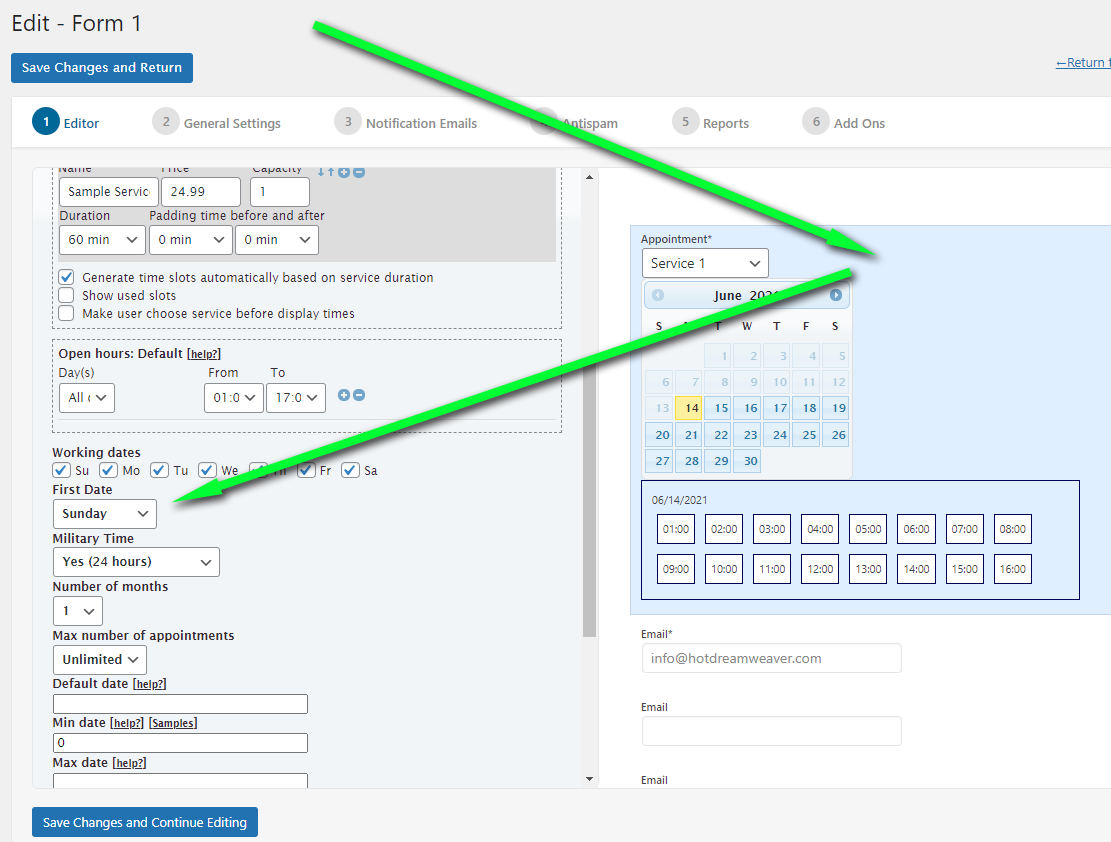
1.) Setup of the start weekday: https://apphourbooking.dwbooster.com/images/articles/start-weekday.png
2.) Disabling the captcha field: https://apphourbooking.dwbooster.com/customdownloads/captcha-settings.png
3.) Hiding the service field: https://apphourbooking.dwbooster.com/faq#q311
Thank you for using the plugin!
Hello @kylerollins
My apologies for the delay in responding to your question. Could you please install the latest update (released just now), purge your website and browser caches, and recheck the search-in-place box?
Best regards.
Forum: Plugins
In reply to: [Calculated Fields Form] Email errorHello @mpbaweb
If the ISP does not generate the message provided (https://www.mpba.org.uk/wp-content/uploads/2024/08/mail_error.jpg), you must identify the plugin responsible for generating it, as it will include the spam rules.
Thank you very much for the feature suggestion. We will study to include it in the plugin distribution.
Best regards.
Forum: Plugins
In reply to: [Calculated Fields Form] Multilanguage Add-OnHello @radovand
The “Multilanguage for Calculated Fields Form” complementary plugin (https://cff-bundles.dwbooster.com/product/multilanguage) translates the fields’ texts and includes functions to translate texts and values generated dynamically. These translated texts and values would be submitted in the form submission. So, the emails and thank you pages would display the information in the submitted language.
Please note we are not allowed to support any customers in these forums and the “Multilanguage for Calculated Fields Form” complementary plugin is a commercial plugin that is not distributed with the Calculated Fields Form.
For pro or commercial product support please get in touch with us directly on our site. This includes any pre-sales topics as well.
Commercial products are not supported in these forums. We will happily answer this and any other questions you can have on our site.
Thank you.
Forum: Plugins
In reply to: [Calculated Fields Form] Email errorHello @mpbaweb
The screenshot image provided describes the issue’s cause. The spam rules in your SMTP server are identifying the emails sent from the website as spam. Our plugin calls the wp_mail WordPress function (https://developer.ww.wp.xz.cn/reference/functions/wp_mail/) and lets WordPress decide how to deliver the emails.
If you have installed and configured an SMTP connection plugin, WordPress will send the emails via the SMTP server, or the PHPMailer module in the web server otherwise.
I recommend installing and configuring an SMTP connection plugin on your website, and if the issue persists, please ask your hosting provider what rule is blocking the emails.
Best regards.
Forum: Reviews
In reply to: [Calculated Fields Form] What a great pluginForum: Plugins
In reply to: [Calculated Fields Form] Conditional text displays prematurelyForum: Plugins
In reply to: [Calculated Fields Form] Conditional text displays prematurelyHello @netgui
Please edit the equation as follows:
'' !== value|r && value<20If the raw value is different from the empty text and it is less than 20.
Best regards.
Forum: Plugins
In reply to: [Calculated Fields Form] Conditional text displays prematurelyHello @netgui
If you are defining the dependencies in the calculated field settings, please click on “Edit rule manually” and enter the following condition:
'' != value && value<20Best regards.