codepeople

Forum Replies Created
-
Forum: Plugins
In reply to: [Calculated Fields Form] Save Changes doesn’t workHello @jayceezay
Please select the “No” option for the “Display submit button?” attribute in the form settings.
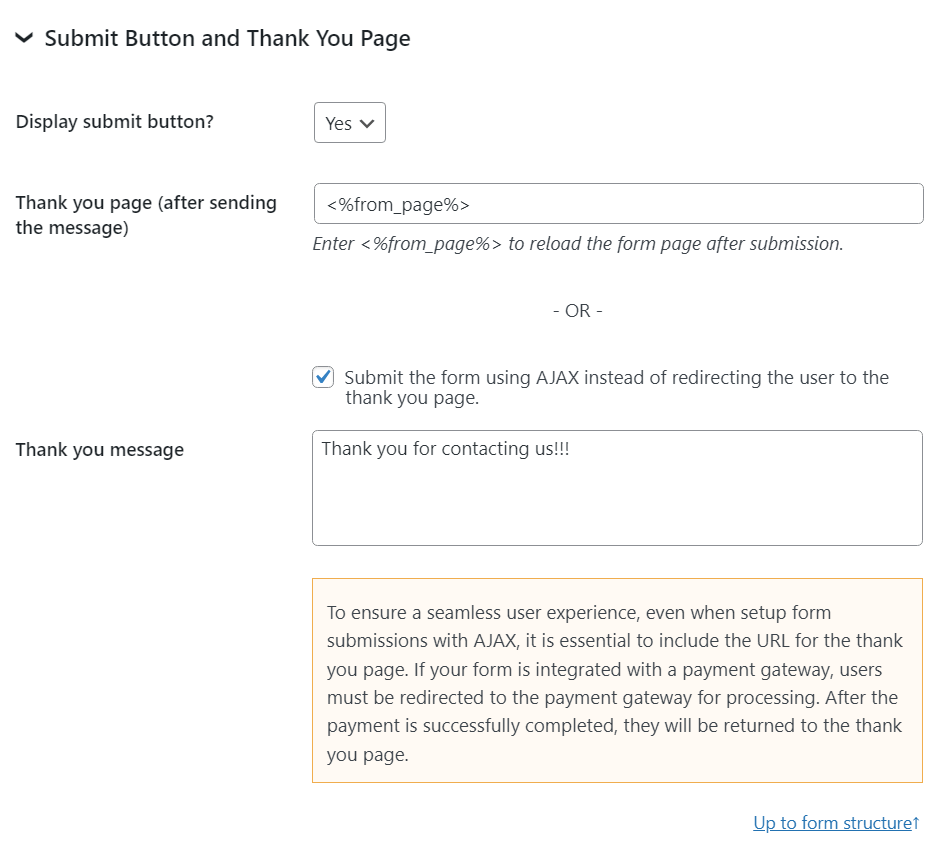
Best regards.
Hello @sg13040 ,
My apologies for the inconvenience. We detected an issue with the new submit button in plugin version v5.2.0 and released an update (v5.2.1) that fixes it.
Could you please install it and let us know if the issue persists on your side?
Best regards.
Forum: Plugins
In reply to: [Calculated Fields Form] Save Changes doesn’t workHello @sg13040 ,
My apologies for the inconvenience. We have released a plugin update (v5.2.1) that fixes the reported issue.
Could you please install it and let us know if the issue persists on your side?
Best regards.
Hello,
Thank you very much for using our plugin.
My apologies for the delay in responding to your question, we have checked the issue cause. We have released a plugin update (v5.2.1), just now, that should fix the issue reported.
Could you please install it and let me know if the issue persists?
Best regards.
Hi! The edition (for both admin and customers) and also the cancellation add-on (to allow customers cancel specific bookings) are commercial features. We’d like to help but we can’t reply about that in this forum. We are not allowed to support any customers in these forums.
For pro or commercial product support please contact us directly on our site. This includes any pre-sales topics as well.
Commercial products are not supported in these forums. We will happily answer this and any other questions you can have on our own site.
Thank you.
Hi,
Use the min-date settings field for that purpose:
https://apphourbooking.dwbooster.com/blog/2021/05/12/minimum-available-time/
Thank you for using the plugin!
Hello @sg13040
Our plugin includes the methods you can call external APIs, you must find a free API that satisfies your needs, and use the plugin methods to call it.
Best regards.
Forum: Reviews
In reply to: [Calculated Fields Form] Perfect!Hello @sg13040
The cffProxy is a method for calling external services directly from client-side equations and reevaluating them after receiving the external service information.
This method is not specific for exchangeratesapi.io, you can use it with other services.
If you prefer to use a different service than exchangeratesapi.io, please check the “CFF Currency Exchange” complementary plugin (https://cff-bundles.dwbooster.com/product/currency-exchange)
Best regards.
Hello @sg13040
The latest versions “exchangeratesapi.io” require that you generate an API Key and pass it via the API request:
url: 'https://api.exchangeratesapi.io/latest?access_key = API_KEY&base='+_from+'&symbols='+_toBest regards.
- This reply was modified 2 years, 1 month ago by codepeople.
Hello @sg13040
Thank you very much for using our plugin. You have multiple alternatives to get the real exchange rates. The solution to use in your form will depend on the service you decide to use.
First option. You can install the “CFF Currency Exchange” complementary plugin (https://cff-bundles.dwbooster.com/product/currency-exchange) to use any of the supported services.
Second option. You can activate the “Server Side Equations” add-on, distributed with the Developer and Platinum plugin versions, and implement a server-side equation to call the external service. Please read the following blog post:
https://cff.dwbooster.com/blog/2018/10/01/server-side-equations
Or, you can use the cffProxy operation and implement the process on the client side:
https://cff.dwbooster.com/blog/2019/05/17/third-party-connection-module
Best regards.
Forum: Plugins
In reply to: [Sell Downloads] Coupon CodeHello @cheristojk
In the current plugin version, the coupon scope is the store as a whole and not separate products. If you need custom behavior, you can contact us directly through the plugin’s website:
https://wordpress.dwbooster.com/contact-us
Best regards.