codepeople

Forum Replies Created
-
Forum: Plugins
In reply to: [Calculated Fields Form] Form DesignHello @klingbeil
I tried again and even opened the page with the browser in incognito mode, and there was no issue.
Best regards.
Forum: Plugins
In reply to: [Calculated Fields Form] Form DesignHello @klingbeil
I tested your website and the issue described is not happening on my side. Please watch the video by visiting the following link:
https://resources.developers4web.com/cff/tmp/2024/25/video_o.mp4
Best regards.
Forum: Plugins
In reply to: [Calculated Fields Form] Space before and after calculated fieldHello @victoriei101
Could you please indicate the version number of your plugin copy and if the screenshot is for the summary control in the form?
Forum: Plugins
In reply to: [Calculated Fields Form] Change button namesHello @martin136
Thank you very much for using our plugin.
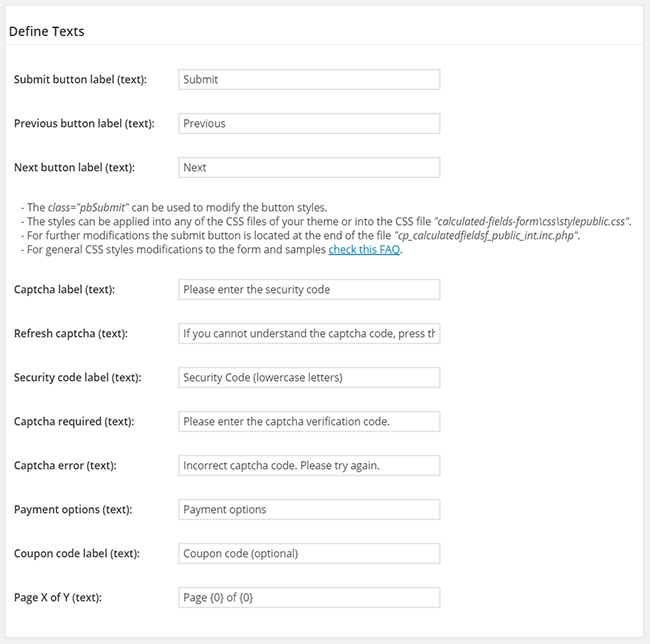
You can do it directly from the form settings. Please enter the new texts through the “Previous button label” and “Next button label” attributes:
Best regards.
Hi,
Seems you are using an outdated commercial version of the plugin. You should update to a more recent version to keep it compatible with the latest PHP versions.
We’d like to help but we can’t reply about that in this forum. We are not allowed to support any customers in these forums.
For pro or commercial product support please contact us directly on our site. This includes any pre-sales topics as well.
Commercial products are not supported in these forums. We will happily answer this and any other questions you can have on our own site.
Thank you.
Forum: Plugins
In reply to: [Calculated Fields Form] Form DesignHello @klingbeil
The issue is not caused by the styles but by the form structure. The element with the cp_cff_custom-card class name is part of the form. Please, follow the steps below:
- Insert a DIV field as the first field in the form, and move inside it every field except fieldname7.
- Assign a custom class name to the DIV field. The class names are assigned to the fields through their “Add CSS Layout Keywords” attributes. Ex.
cff-left-column - Assign a custom class name to the fieldname7. Ex
cff-right-column - Finally, enter the class name definitions through the “Customize Form Design” attribute in the “Form Settings” tab:
@media screen and (min-width:1200px){.cff-left-column{max-width:60% !important; display: inline-block !important; clear: none !important;}.cff-right-column{max-width:40% !important; float: right !important; display: inline-block !important; clear: none !important; } }Best regards.
Forum: Plugins
In reply to: [Calculated Fields Form] Form DesignHello @klingbeil
Please provide the link to the page you are editing. There are other CSS rules that participate in the process like “display” and “clear”, and I cannot be sure what of them are affecting your design.
@media screen and (min-width:1200px){
.cp_cff_custom{max-width:60% !important; display: inline-block !important; clear: none !important;}
.cp_cff_custom-card{max-width:40% !important; float: right !important; display: inline-block !important; clear: none !important; }
}
Best regards.
Forum: Plugins
In reply to: [Calculated Fields Form] Form DesignHello @klingbeil
Your question depends on other styles on your website.
An possible alternative would be to enter the style definition below through the “Appearance > Customize > Additional CSS” menu option:
@media screen and (min-width:1200px){
.cp_cff_custom{max-width:60% !important;}
.cp_cff_custom-card{max-width:40% !important; float:right !important;}
}
Best regards.
Forum: Plugins
In reply to: [Calculated Fields Form] background and foreground text color changeHello @sg13040
The “Customize Form Design” attribute in the “Form Settings” tab is a CSS editor with syntax highlighting and error checks. This attribute allows you to modify the form and fields’ appearance.
For example, if you want to modify the background and text colors of calculated fields, you can enter a CSS block similar to the following one through the “Customize Form Design” attribute:
#fbuilder .cff-calculated-field input{
background:red !important;
color:white !important;
}
Learn more about the form and fields’ structure and how to modify their appearance by reading the following blog post:
https://cff.dwbooster.com/blog/2020/01/12/form-design
Best regards.
Forum: Plugins
In reply to: [Sell Downloads] Add Links to Copyright areaHello @mrgtih2
The area you mention is part of the theme active on your website and not our plugin. Our plugin handles only the area of the page that contains the store and the products. The theme controls the website’s header, footer, navigation menu, sidebar, and search results page.
Best regards.
Forum: Plugins
In reply to: [Sell Downloads] Add Links to Copyright areaHello @mrgtih2
Thank you very much for using our plugin.
What copyright area are you referring exactly?
Best regards.
Forum: Plugins
In reply to: [Calculated Fields Form] Use multiple formsHello @civilvicky
No, I’m sorry, that’s not possible. The HTML standard does not support nested form tags.
Best regards.
Forum: Plugins
In reply to: [Calculated Fields Form] Update Problem.Hello @pexel
Please follow the steps described below. I’ll include the definitive solution in the next plugin update.
Open the “/wp-content/plugins/calculated-fields-form/inc/cpcff_auxiliary.inc.php” file with the text editor of your choice and edit the piece of code:
$v = wp_kses( trim( wp_unslash( $v ) ), $allowed_tags );as follows:
$v = wp_kses( wp_unslash( $v ), $allowed_tags );Best regards.
Forum: Plugins
In reply to: [Calculated Fields Form] Update Problem.Hello @pexel
In the latest plugin update (v5.2.1) the “No” option is the “Display Submit Button?” default option.
You only should select manually the “No” option in those forms where you pressed the “Save” button after installing the plugin version 5.2.0.
Best regards.
Forum: Plugins
In reply to: [Calculated Fields Form] Update Problem.Hello,
Thank you very much for using our plugin.
My apologies for the inconvenience. We detected an issue with the new submit button in plugin version v5.2.0 and released an update (v5.2.1) that fixes it.
Could you please install it and select the “No” option for the “Display submit button?” attribute in the form settings?
Best regards.