codepeople

Forum Replies Created
-
Hi,
Use the “Single Line” field in the form builder for adding any generic text or numeric field:
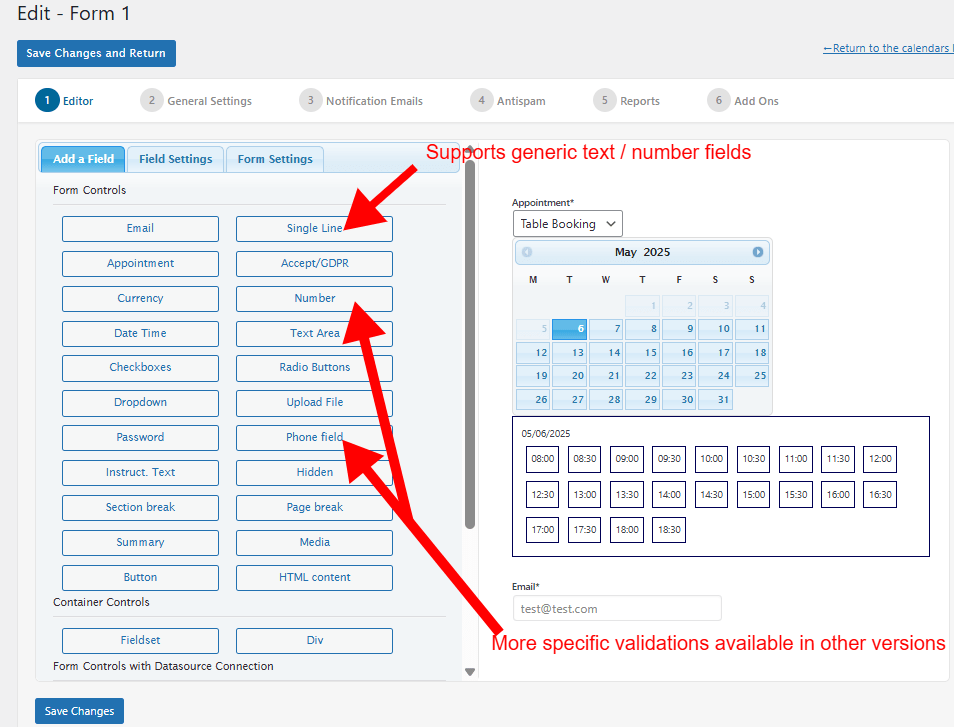
Additional options are available in other versions of the plugin.
Thank you for using the plugin!
Hi,
The free version has never had options removed. If you find that some options are missing, it is likely because you are downgrading from a commercial version to the free version.
Please confirm the version number you were using.
Thank you.
Hi,
If you have the version #9.7.03 then you are using a commercial version. You need to update it to the latest version 9.8.18 or later to correct that problem. You can get the latest update with your personal download link or by contacting our support service.
For pro or commercial product support please contact us directly on our site. This includes any pre-sales topics as well.
Commercial products are not supported in these forums. We will happily answer this and any other questions you can have on our own site.
Thank you.
Hi,
Please confirm the settings at the following settings area:

Please check that and let me know any comments.
Thank you!
Hi,
Please update to the latest version of the plugin (version 1.5.21 or later) to correct that issue.
Thank you for the feedback!
Forum: Plugins
In reply to: [Appointment Hour Booking - Booking Calendar] Data isn’t validHi,
Please update to the latest version of the plugin (version 1.5.21 or later) to correct that issue.
Thank you for the feedback!
Forum: Plugins
In reply to: [Appointment Hour Booking - Booking Calendar] iCal synchronizationHi,
Please update to the latest version of the plugin (version 1.5.21 or later) to correct that issue.
Thank you for the feedback!
Forum: Plugins
In reply to: [Appointment Hour Booking - Booking Calendar] Not working on mobile devicesHi,
Please update to the latest version (#1.5.18 or later) to correct that issue.
Important!: Remember to clear the cache after applying the update.
Thank you for the feedback!
Hi,
Please update to the latest version (#1.5.18 or later) to correct that issue.
Thank you for the feedback!
Forum: Reviews
In reply to: [Appointment Hour Booking - Booking Calendar] Clever PluginThank you very much for the review!
Best regards.
Forum: Plugins
In reply to: [WP Time Slots Booking Form] Interference with Tutot LMS?Hi,
Add the following styles to correct that styles conflict:
#fbuilder .ui-datepicker .ui-datepicker-prev:before,#fbuilder .ui-datepicker .ui-datepicker-next:before {content:"";}
#fbuilder .ui-datepicker .ui-datepicker-calendar .ui-state-default {border-radius: 0% !important;}
#fbuilder .ui-datepicker .ui-datepicker-calendar td{border-radius: 0% !important;}
Remember to clear the cache after adding the styles.
Thank you for using the plugin!
Hi,
From what area are you changing the status of the booking? Please note that the status changed from the Schedule List View applies only to the selected time-slot.
If you want to apply a status change to all the time-slots into a booking then change the status from the booking orders list or from the edit booking page:


You can also go directly from the Schedule List View to the edition area:

Edition area can be also accessed this way:

Thank you for using the plugin!
Forum: Plugins
In reply to: [CP Contact Form with PayPal] Email copy completed formHi,
You can use specific tags for each field to select what info you want to include in the notification email:
https://cfpaypal.dwbooster.com/faq#q81
Depending of the version of the plugin you are using, you can setup the email in HTML format:

Thank you for using the plugin!
Forum: Plugins
In reply to: [CP Multi View Events Calendar] Translation to serbian-latinHi,
Done! The Serbian-Latin calendar translation is now available in the plugin. Please update to the latest version to get it.
Thank you for the feedback!
Forum: Plugins
In reply to: [WP Time Slots Booking Form] Interference with Tutot LMS?Hi,
Sorry for the late. When I try to open the referred page to see the styles involved I get the following message “Jéje, tato stránka tu asi není “. Please confirm the address of the page that contains the public booking form to check what styles are affecting it and provide the solution.
Thank you!