CodePeople2

Forum Replies Created
-
Forum: Plugins
In reply to: [Calculated Fields Form] About rounding numbersHello @life2
Yes, of course, that’s possible. You should use the PREC operation but passing true as the third parameter:
PREC(X, Y, Boolean) It rounds the number X with Y decimals, and if you pass true as the third parameter, if X is an integer, it returns the integer without decimal places:
For example, PREC(1.04, 1) returns 1.0, or PREC(6, 1) returns 6.0
However, PREC(1.04, 1, true) returns 1, and PREC(6,1, true) returns 6
Best regards.
Forum: Plugins
In reply to: [Calculated Fields Form] About applying two radio buttons to the same fieldsHello @life2
Fantastic !!! Would you mind sharing your solution? Your insights could empower and benefit many facing the same challenge. Thank you!
Best regards.
Forum: Plugins
In reply to: [Calculated Fields Form] About applying two radio buttons to the same fieldsHello @life2
I sent you a hypothetical example, you must adjust it to your fields. Please provide the link to the page that contains the form and indicate the names of the radio button fields and your equation code.
Best regards.
Hello @spacemakerman
As I described in your other thread, if you are opening the popup by pressing a button field and not in the page onload or by code, you can hide by entering the following code instead of the recommended in your other thread:
<script>
fbuilderjQuery(document).on('click', function(evt){
    let e = fbuilderjQuery(evt.target);
    if( ! e.hasClass('.cff-popup-container') && ! e.closest('.cff-popup-container,.cff-button-field').length) fbuilderjQuery('.cff-popup-field').hide();
});
</script>
Best regards.
Hello @spacemakerman
If you are opening the popup by pressing a button and not in the page onload or by code, you can edit the previous code as this one:
<script>
fbuilderjQuery(document).on('click', function(evt){
    let e = fbuilderjQuery(evt.target);
    if( ! e.hasClass('.cff-popup-container') && ! e.closest('.cff-popup-container,.cff-button-field').length) fbuilderjQuery('.cff-popup-field').hide();
});
</script>
Best regards.
Forum: Plugins
In reply to: [Calculated Fields Form] About applying two radio buttons to the same fieldsHello @spacemakerman
I’m sorry, you are right. However, the solution is simpler. Please replace the code I sent you previously with this one:
<script>
fbuilderjQuery(document).on('click', function(evt){
    let e = fbuilderjQuery(evt.target);
    if( ! e.hasClass('.cff-popup-container') && ! e.closest('.cff-popup-container').length) fbuilderjQuery('.cff-popup-field').hide();
});
</script>
Best regards.
Forum: Plugins
In reply to: [Calculated Fields Form] About applying two radio buttons to the same fieldsHello @life2
Yes, that’s possible but it requires more sophisticated code. To continue with the previous example, assuming you want to deactivate the “b,d” choice in the fieldname2 when the “a,b” choice is selected in the fieldname1.
In this case, the equation code would be similar to:
(function(){
    let choice = getField(fieldname2|n).jQueryRef().find('[value="b,d"]');
    if(fieldname1 == 'a,b') {
        choice.prop('checked', false).prop('disabled', true);
    } else {
        choice.prop('disabled', false);
    }
})()
<span style=”box-sizing: border-box; margin: 0px; padding: 0px;”>Please note that support does not cover implementing users’ projects. If you need us to implement custom behaviors on your specific form, you should request a custom coding service through the plugin website. Contact Us.</span>
Best regards.
Hello @spacemakerman
If multiple forms are inserted on the page, you must pass a second parameter to the HIDEFIELD operation with the form selector to solve the ambiguity. For example, if you assigned a class name to the form through its shortcode:
[CP_CALCULATED_FIELDS id="1" class="class-name"]You can enter the code:
<script>
fbuilderjQuery(document).on('click', '.cff-popup-modal', function(){HIDEFIELD(12, '.class-name');});
</script>
Another alternative would be to hide all opened popups, no matter the forms they belong:
<script>
fbuilderjQuery(document).on('click', '.cff-popup-modal', function(){ fbuilderjQuery('.cff-popup-field').hide();});
</script>
Best regards.
Hello @spacemakerman
Please provide the link to the page containing the form to check you code in action.
Best regards.
Hello @spacemakerman
Thank you so much for using our plugin. If the Popup field is the fieldname12, you can enter the code:
<script>
fbuilderjQuery(document).on('click', '.cff-popup-modal', function(){HIDEFIELD(12);});
</script>
Best regards.
Forum: Plugins
In reply to: [Calculated Fields Form] [CP_CALCULATED_FIELDS_USER_SUBMISSIONS_LIST]Hello @bens2020
Please note that we can’t reply to that in this forum and are not allowed to support customers in these forums.
For pro or commercial product support please get in touch with us directly on our site. This includes any pre-sales topics as well.
Commercial products are not supported in these forums. However, we will happily answer this and any other questions you may have on our site.
However, I have installed the plugin version 6.3.24:

And the users submissions list shortcode is working fine, with no problems:
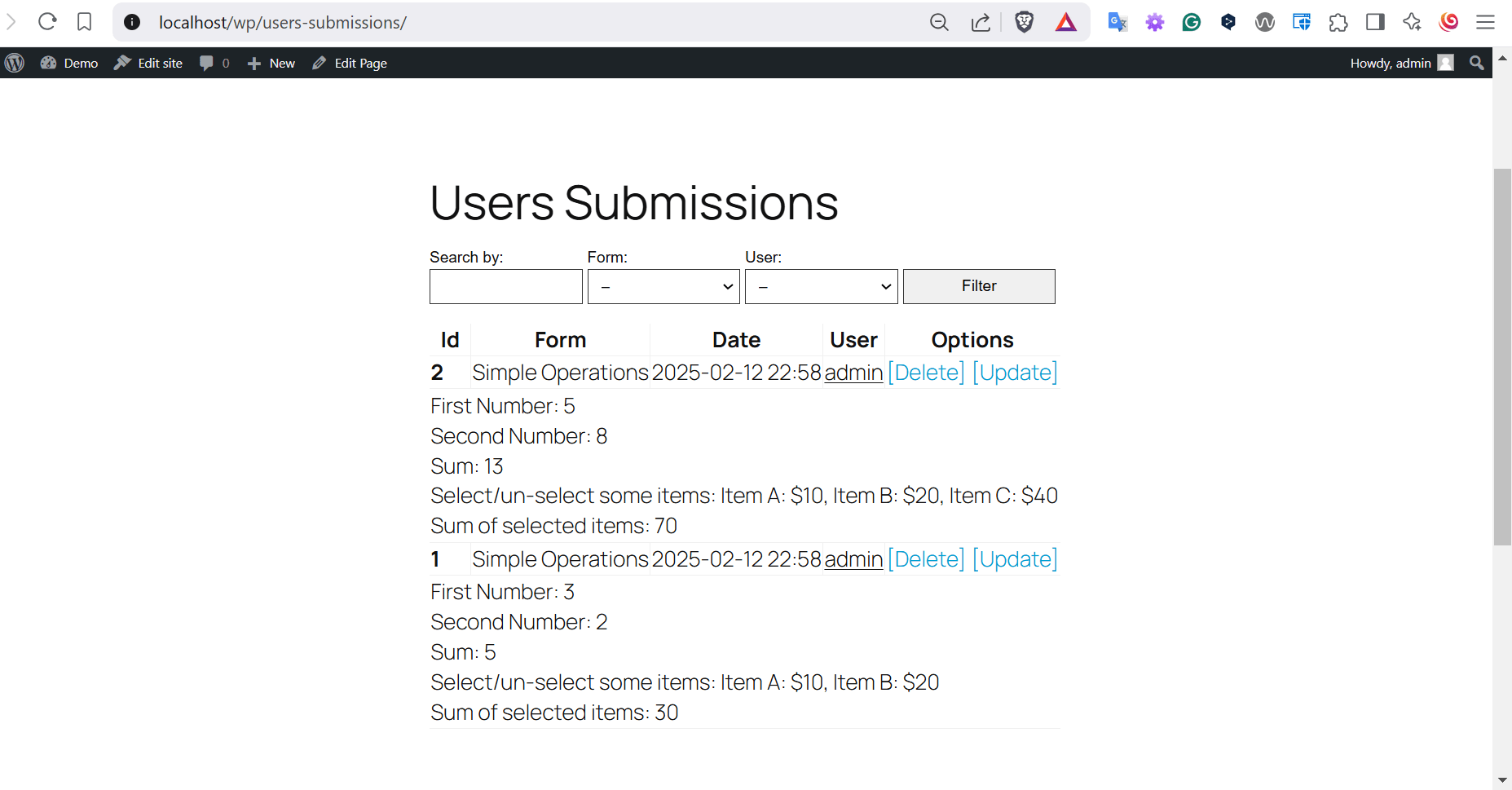
Thank you.
Hello @spacemakerman
The easier alternative is using the CFF Fields Synchronization complementary plugin:
https://cff-bundles.dwbooster.com/product/fields-synchronization
An alternative, that is not as complete as the complementary plugin, is to assign the field’s value directly.
You can insert a calculated field in the form to be used as an auxiliary, and enter an equation similar to the following one:
getField(fieldname1|n).setVal(getField(fieldname1|n, '.class-a').val());You can hide the auxiliary calculated field from the form by ticking a checkbox in its settings.
Best regards.
Hello @spacemakerman
No, I’m sorry, it is not correct. The code I provided you is for an equation, and the equations must be entered in the “Set equation” attribute of a calculated field.
So, you must enter the code in the “Set equation” attribute of the fieldname2 of your screenshot.
Best regards.
Forum: Plugins
In reply to: [Calculated Fields Form] Fatal error with 5.3.22Excellent !!! Thank you so much for the feedback.