CodePeople2

Forum Replies Created
-
Hello @spacemakerman
In that case you cannot use the iframe attribute because in that case the forms are not on the same page. The iframe tags are a separate context of the main page.
Best regards.
Hello @spacemakerman
Thank you so much for using our plugin. The answer is yes, you can use the fields in a form from the equations in other forms on the same page easily.
First, assign a custom class name to the form with the fieldname1. You can assign a custom class name to the form directly through its shortcode.
E.g. If the form is 123, and you want to assign it the
class-aclass name. You can enter the shortcode:[CP_CALCULATED_FIELDS id="123" class="class-a"]Now, you can use the field from the equations in other forms on the same page by using the getField operation as follows:
getField(fieldname1|n, '.class-a').val();For example, if you want to implement an equation that duplicates the value of the fieldname1 field in the form with the class-a class, the equation would be:
getField(fieldname1|n, '.class-a').val() * 2Best regards.
Forum: Plugins
In reply to: [Calculated Fields Form] Fatal error with 5.3.22Hello @oberton
Thank you so much for providing the error log. It says your plugin copy could not localize the
cp-feedback.phpfile in the/xxxx/htdocs/wp-content/plugins/calculated-fields-form/feedback/cp-feedback.phppath. However, the file is there:
You can check it by downloading the plugin’s ZIP file directly:
https://downloads.wp.xz.cn/plugin/calculated-fields-form.5.3.22.zip
So, I guess that what happened on your website is that the plugin was not installed properly.
Please try to install the plugin again, or do it manually as described the plugin documentation:
https://cff.dwbooster.com/documentation#installation
Best regards.
Forum: Plugins
In reply to: [Calculated Fields Form] Using Variables in WhatsApp Message TextHello @spacemakerman
Thank you so much for using our plugin. In Javascript, the texts must be enclosed between quotes.
E.g:
const message = encodeURIComponent(<code>Hello, I am contacting you through your website. My name is ${name}, my phone number is ${phone}. I want to order project, area is ${area} m2.</code>);You must use them in the URL variable too.
Also, you can refer to the fields’ values directly by their names only in the equations’ content. If you want to access the fields’ values from another context, like the onclick event of a button, you must use the plugin operations like getField that returns an object representation of the fields, and calls its val method with two parameters:
E.g.
const name = getField('fieldname1').val(true, true);The first parameter in the val method tells the plugin you want to access the field’s raw value. The second one tells the plugin that you want it without extra double quote symbols.
For additional questions, please provide the link to the page containing the form to check your code in action.
Forum: Plugins
In reply to: [Calculated Fields Form] Fatal error with 5.3.22Hello @oberton
I hope you’re doing well. Have you had the chance to localize the entry related to the Fatal Error in your server error logs? This information is essential for us to determine if the issue is directly linked to our plugin, allowing us to address and resolve it promptly.
Your assistance in this matter would be invaluable, and we appreciate your cooperation in helping us ensure everything functions smoothly.
Thank you, and I look forward to your response.
Best regards.Forum: Plugins
In reply to: [Calculated Fields Form] Fatal error with 5.3.22Hello @oberton
Thank you so much for using our plugin, and I apologize for the error. Could you please provide the corresponding entry in the Error logs file on your server? The modifications in the code are mainly related to Javascript code.
Best regards.
Forum: Plugins
In reply to: [Calculated Fields Form] The string “items” in dropdown not in the POT fileHello @beentee
I understand now what you mean. The “0 Items” is not related to the plugin but to the device. On mobile devices, when you insert a SELECT tag configured as multi-select, when no item is selected the device displays a text for no items selected. The text is different based on the devices’ operative systems and languages (Android, iOS, …).
To prevent this behavior, and make the control appearance equal for desktop and mobile devices, I recommend ticking the “Include a search box” checkbox in the DropDown field settings.
Best regards.
Forum: Plugins
In reply to: [Calculated Fields Form] The string “items” in dropdown not in the POT fileHello @beentee
Could you please provide the link to the page containing the form? Our plugin does not includes a “0 Items” text to the dropdown choices.
Best regards.
Forum: Plugins
In reply to: [Calculated Fields Form] The string “items” in dropdown not in the POT fileHello @beentee
You can contact us directly through the contact us page in the plugin website.
Best regards.
Forum: Plugins
In reply to: [Calculated Fields Form] The string “items” in dropdown not in the POT fileForum: Plugins
In reply to: [Calculated Fields Form] The string “items” in dropdown not in the POT fileHello @beentee
Thank you so much for using our plugin.
What “items” word are you referring to exactly? All texts in dropdown fields, or any other field in the plugin, are entered by yourself through the fields properties (the sidebar when you select the field.)
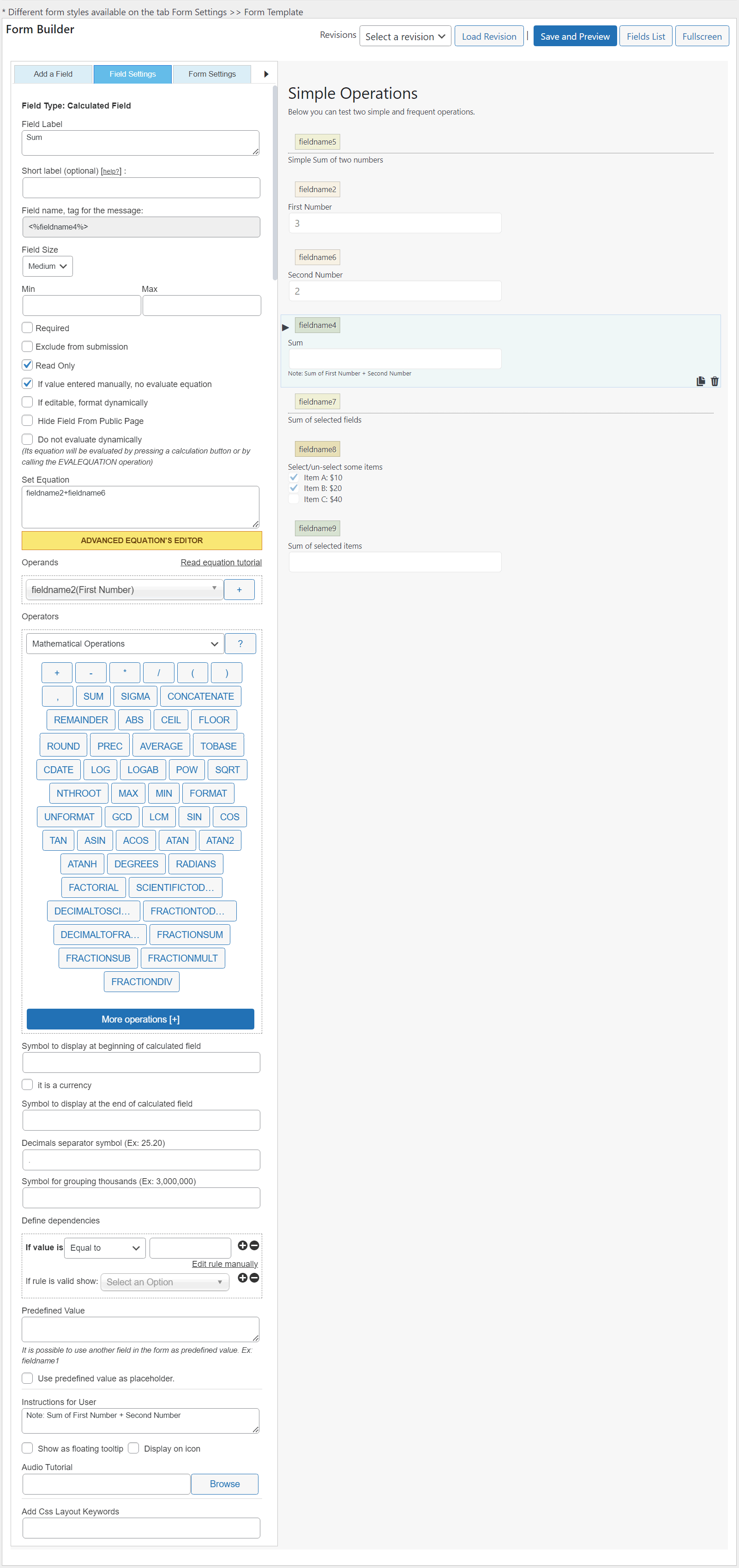
Other texts that affect multiple fields in the form are entered through the “Texts” and “Validation” sections:
https://cff.dwbooster.com/documentation#texts-section
https://cff.dwbooster.com/documentation#validation-settings
Best regards.
Forum: Plugins
In reply to: [Calculated Fields Form] About applying two radio buttons to the same fieldsHello @life2
Yes, that’s possible. However, instead of disabling the dynamic evaluation of the equations in the form settings tab, you should deactivate the equations in each calculated field except those whose equations you want to evaluate dynamically.
- Tick the “Dynamically evaluate the equations associated with the calculated fields” checkbox in the “Form Settings” tab.
- Tick the “Do not evaluate dynamically” checkbox in the calculated field whose equations you want to evaluate manually.
Best regards.
Forum: Plugins
In reply to: [Calculated Fields Form] About applying two radio buttons to the same fieldsHello @life2
The plugin applies an “OR” not an “AND”. If the plugin applies an “AND” and you tick a choice of the first radio buttons but no choice in the second, none of the four fields would be visible.
That means if you select the “a,b” choice in the first radio buttons, and “a,c” in the second field, you would have activated the fields a, b, and c.
However, note you don’t want to apply an “OR” or “AND”. You want to apply a custom dependency rule. If there are ticked choices in both fields, you want to apply an “AND”. If this is not the case, you want to activate the fields associated with the choice ticked in any of the fields.
To define custom dependency rules you must use a calculated field as an auxiliary (you can hide it from the form and exclude it from the submissions by ticking a couple of checkboxes in its settings).
I’ll try to describe the process with a hypothetical example. Assuming the first radio buttons field is the fieldname1 with the choices’ values “a,b” and “c,d” and the second radio buttons fieldname2 with choices values “a,c” and “b,d”. Finally, you have other four fields:
A: fieldname3
B: fieldname4
C: fieldname5
D: fieldname6Insert a calculated field in the form and enter the following equation:
(function(){
if( AND(fieldname1 == 'a,b', OR(NOT(fieldname2), fieldname2 == 'a,c'))) ACTIVATEFIELD(fieldname3|n);
else IGNOREFIELD(fieldname3|n);

if( AND(fieldname1 == 'a,b', OR(NOT(fieldname2), fieldname2 == 'b,d'))) ACTIVATEFIELD(fieldname4|n);
else IGNOREFIELD(fieldname4|n);

if( AND(fieldname1 == 'c,d', OR(NOT(fieldname2), fieldname2 == 'a,c'))) ACTIVATEFIELD(fieldname5|n);
else IGNOREFIELD(fieldname5|n);

if( AND(fieldname1 == 'c,d', OR(NOT(fieldname2), fieldname2 == 'b,d'))) ACTIVATEFIELD(fieldname6|n);
else IGNOREFIELD(fieldname6|n);
})()
I implemented a basic form you can download and import by visiting the following link:
https://resources.developers4web.com/cff/tmp/2025/02/06/demo.zip
Unzip the file and import the “.cpfm” file with the form structure by following the instructions described in the following section of the plugin documentation:
https://cff.dwbooster.com/documentation#import-export-form
Best regards.
Forum: Plugins
In reply to: [Calculated Fields Form] About applying two radio buttons to the same fieldsHello @life2
Thank you so much for using our plugin.
I apologize for any misunderstanding, but I would appreciate some clarification regarding your statement: “The first radio buttons divide them into ‘a, b’ and ‘c, d’ based on the choice selected. The second radio buttons are supposed to further divide them into ‘a’ and ‘b’ then ‘c’ and ‘d’.”
Could you please elaborate on what you mean by “divide”?
Best regards.
Forum: Plugins
In reply to: [Search in Place] Issue with Search Plugin Display After Upgrading to PremiumHello @thaynazacharias,
Thank you so much for supporting our plugin. Since the issue is related to the plugin commercial distribution, please open a ticket directly on the plugin website:
https://searchinplace.dwbooster.com/contact-us
Thanks for uderstanding.
Best regards.