Pia

Forum Replies Created
-
Forum: Plugins
In reply to: [Simple Shopping Cart] Cart Orders Are Not CompletedI’m testing live. On the screen shot Paypal has a link to documentation with a lot of code stuff I don’t understand.
I have not yet posted this question to paypal, I was hoping the author of this thread had found a solution.
I’ll see if I can find the time to ask them this week, if you are certain there is nothing more I need to input on my website besides the plugin settings.
As I stated before, I was wondering if it could be a timeout issue due to poor bandwidth, Paypal sending the ping and not getting an answer fast enough. There doesn’t seem to be any waiting time for the transaction to happen, but then I’m not a server, so I don’t know what kind of response time they require.
Forum: Plugins
In reply to: [Simple Shopping Cart] Cart Orders Are Not Completed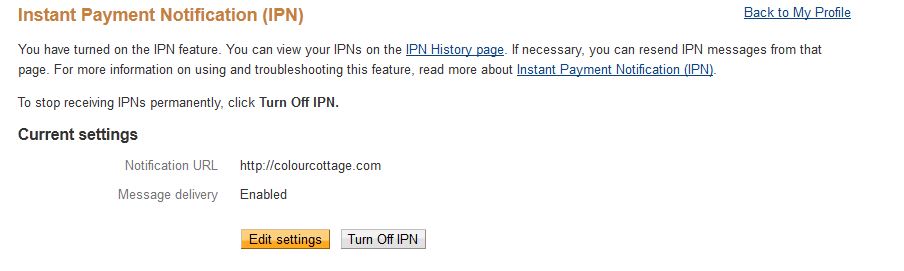
Did this a few weeks ago.
Forum: Plugins
In reply to: [Simple Shopping Cart] Cart Orders Are Not CompletedYes, I have enabled IPN on Paypal and entered my website URL as per your instructions before I set up the shop. But if you go to the Paypal instructions/sandbox thingy they get very specific about nerdy codes and whatnot.
Forum: Plugins
In reply to: [Simple Shopping Cart] Cart Orders Are Not CompletedI can’t get my friend to make a new purchase until later today, but I have enabled to debugger just now and clicked
http://colourcottage.com/?simple_cart_ipn=1
debug file says:
[10/05/2018 11:57 AM] – SUCCESS :Paypal Class Initiated by 2.110.148.67
[10/05/2018 11:57 AM] – SUCCESS :Post string :
[10/05/2018 11:57 AM] – SUCCESS :Checking if PayPal IPN response is valid
[10/05/2018 11:57 AM] – SUCCESS :Connecting to: https://www.paypal.com/cgi-bin/webscr
[10/05/2018 11:57 AM] – FAILURE :IPN validation failed.
[10/05/2018 11:57 AM] – SUCCESS :Paypal class finished.I’ve been reading abot IPN on Paypal and get thrown all sorts of code that apparently needs to be put into the php files of the site before it works and not just entering the URL as per your video – is that what’s missing? (I naively thought the plugin would have added all that stuff)
Forum: Plugins
In reply to: [Simple Shopping Cart] Cart Orders Are Not CompletedThe exact same thing is happening to me. I had another person buy a test product, so I didn’t create errors buying from myself.
His order does not even show on my paypal account, although he got the confirmation from paypal. The order is in my plugin trash folder, empty of data, Field “buyer email sent” says no. He did not do anyting to cancel the purchase. (In fact my own purchase from myself, one paypal account, does show in my paypal list of transactions “Status unclaimed”, but I didn’t get the relevant emails)
As a seller, I also did not get an email from the plugin or from paypal.
Does the URL for IPN have to be https or can it be http?
Bandwidth? As in timeout when paypal “pings” for the IPN thingy (above my technical skills)
I was going to use this for “free” downloads simply to keep track of downloads and for practice.
Forum: Plugins
In reply to: [Simple Shopping Cart] php error with nggalleryWill do. I will continue to use your nice and simple setup in other figurations until then and consider the bigger plugins if I ever actually make some sales. (build first, marketing later)
Forum: Plugins
In reply to: [Simple Shopping Cart] php error with nggalleryAnd if I add the template, wp cart buttons don’t work inside the NG thumbnail boxes.
Forum: Plugins
In reply to: [Simple Shopping Cart] php error with nggalleryYes, I’m referring to the Nextgen gallery settings.
The integration works if I set columns to zero under Thumbnail settings.
The downside to this is, that on SOME pages, I get full width rows of thumbnails (my monitor shows 3-4, while on others they stack really weirdly.
http://colourcottage.com/shop/handwoven/
Obviously this is not your problem.
If I turn on number of columns, either in the NG settings or locally in the [nggallery id=5 template=”wp-cart” ] code, then the error about line 39 comes back.
I’ve reset my NextGen galleries to have no template chosen, instead of the _caption that I had before.
Forum: Plugins
In reply to: [Simple Shopping Cart] php error with nggalleryWell it appears I’ve fixed the issue and I thought I’d leave it here for other users.
I finally found the one difference between my twin sites, and you were right about it being a nextgen issue.
In the Thumnail settings “Number of columns to display ” the value must be 0. On the site of my errors, I had it set to 3.
Forum: Plugins
In reply to: [Simple Shopping Cart] php error with nggalleryYes – it appears the code
[nggallery id=5 template=”wp-cart” ]
created the error on line 39
and using the nextgen button to add the gallery instead makes the button appear as code instead of an actual working button as in the tutorial I followed and which seemed to work just last week! I guess I picked the wrong weekend to build new websites…. 😉
Forum: Plugins
In reply to: [Simple Shopping Cart] php error with nggalleryI’m selling mostly physical objects though and the wp gallery function is clunky for making links to individual product pages with descriptions of the items.
If you are no longer updating your code to support ng, obviously I’ll just have to start from scratch with something else or only have the payment button on individual pages, not the main category page. Thank you for your time.
Forum: Plugins
In reply to: [Simple Shopping Cart] php error with nggalleryI’m trying to figure out what “variable: i”, whether it’s related to some setting in ng gallery.
It seems odd that the button shows in some places and not in others, as well as the error message.
We have the latest php version as the server is newly installed before setting up the twin websites.
I haven’t done anything to customize my template.
Forum: Plugins
In reply to: [Simple Shopping Cart] php error with nggalleryNotice: Undefined variable: i in /home/com/public_html/wp-content/plugins/wordpress-simple-paypal-shopping-cart/lib/gallery-wp-cart.php on line 39
Forum: Plugins
In reply to: [Simple Shopping Cart] php error with nggalleryCan’t you see my images? There is an error code next to the orange scarf and there is button code under the other items instead of a blue button showing (like there is a blue button showing under the orange scarf)
Forum: Plugins
In reply to: [Simple Shopping Cart] php error with nggalleryThe image with the orange scarf has the exact same button code as those below – I’m trying to set up sample pages for everything I need so I can later copy new products in easily.