[email protected]

Forum Replies Created
-
Forum: Plugins
In reply to: [WPS Limit Login] WPS limit login caused crash with lastest wordpress updateThat would be WordPress version 5.9 that I’m talking about.
here is from wordpress…`Since WordPress 5.2 there is a built-in feature that detects when a plugin or theme causes a fatal error on your site, and notifies you with this automated email.
In this case, WordPress caught an error with one of your plugins, TablePress.
First, visit your website (https://www.davidstentdc.org/) and check for any visible issues. Next, visit the page where the error was caught (https://www.davidstentdc.org/wp-admin/admin-post.php) and check for any visible issues.
Please contact your host for assistance with investigating this issue further.
If your site appears broken and you can’t access your dashboard normally, WordPress now has a special “recovery mode”. This lets you safely login to your dashboard and investigate further.
To keep your site safe, this link will expire in 1 day. Don’t worry about that, though: a new link will be emailed to you if the error occurs again after it expires.
When seeking help with this issue, you may be asked for some of the following information:
WordPress version 5.8
Current theme: Divi (version 4.10.4)
Current plugin: TablePress (version 1.14)
PHP version 7.4.10Error Details
=============
An error of type E_ERROR was caused in line 771 of the file /hermes/bosnacweb05/bosnacweb05cd/b828/ipg.washingtonhoporg/davidstentdc/wp-content/plugins/tablepress/libraries/csstidy/class.csstidy.php. Error message: Uncaught Error: Call to undefined function ctype_space() in /hermes/bosnacweb05/bosnacweb05cd/b828/ipg.washingtonhoporg/davidstentdc/wp-content/plugins/tablepress/libraries/csstidy/class.csstidy.php:771
Stack trace:
#0 /hermes/bosnacweb05/bosnacweb05cd/b828/ipg.washingtonhoporg/davidstentdc/wp-content/plugins/tablepress/classes/class-css.php(65): TablePress_CSSTidy->parse(‘.tablepress td …’)
#1 /hermes/bosnacweb05/bosnacweb05cd/b828/ipg.washingtonhoporg/davidstentdc/wp-content/plugins/tablepress/controllers/controller-admin.php(833): TablePress_CSS->sanitize_css(‘.tablepress td …’)
#2 /hermes/bosnacweb05/bosnacweb05cd/b828/ipg.washingtonhoporg/davidstentdc/wp-includes/class-wp-hook.php(303): TablePress_Admin_Controller->handle_post_action_options(”)
#3 /hermes/bosnacweb05/bosnacweb05cd/b828/ipg.washingtonhoporg/davidstentdc/wp-includes/class-wp-hook.php(327): WP_Hook->apply_filters(”, Array)
#4 /hermes/bosnacweb05/bosnacweb05cd/b828/ipg.washingtonhoporg/davidstentdc/wp-includes/plugin.php(470): WP_Hook-`When we remove the tables from a clone of the page…
the page works fine.We are having a new problem with DIVI as well.
We have used your tablepress plugin for years with no issues with DIVI
but recently whenever we attempt to edit the page with tables on it…
the DIVI editor crashes.
The page displays fine…but we can no longer edit it.
Can you help us solve this.
The page with issues is:Forum: Plugins
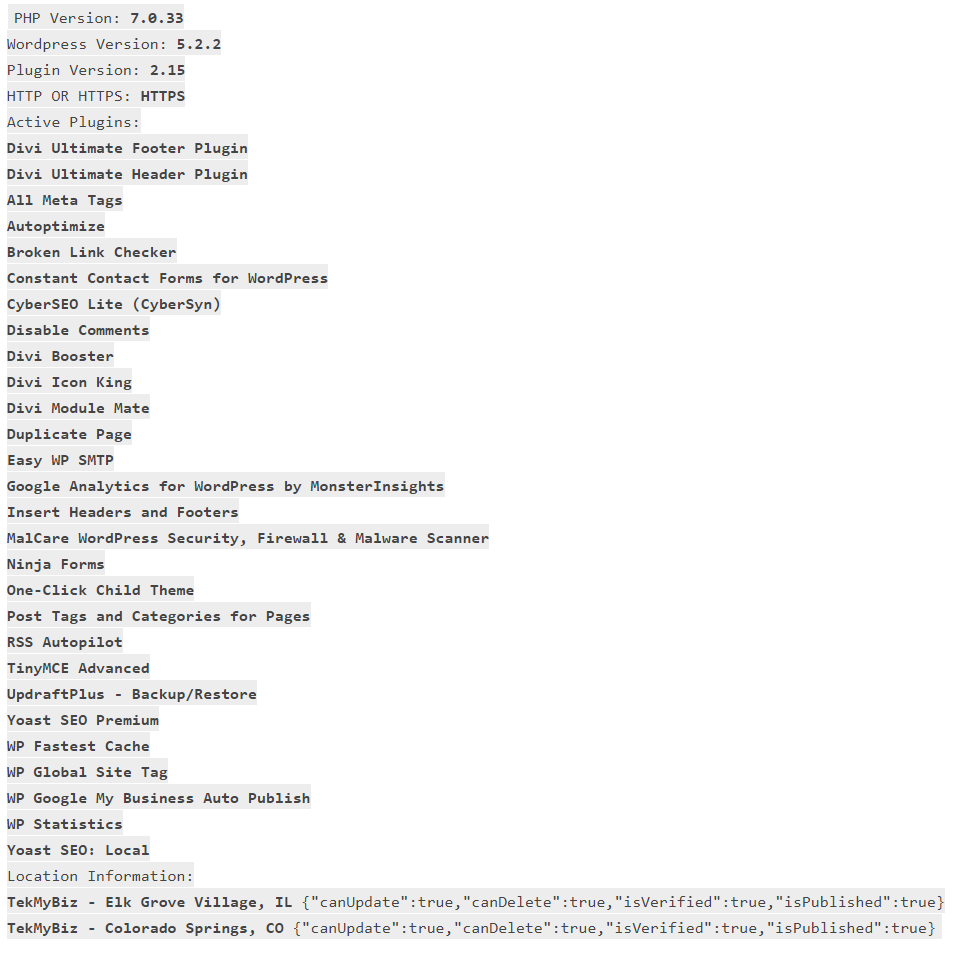
In reply to: [Auto Publish for Google My Business] Location not workingSry here is the link to the screenshot of blog info
https://tekmybiz.com/wp-content/uploads//2019/08/Auto-GMB-post-error.pngForum: Plugins
In reply to: [Auto Publish for Google My Business] Location not workingYou guys have done great work here.
But I am experiencing a problem.
All setups are good, connect, 2 locations good with checkmarks
When trying to post an existing blogpost, button is there in posts list,
but when clicked, it says no location selected for post to go to.
Both locations are default selected in setup.
What am I missing?