dragondefeu76

Forum Replies Created
-
Forum: Plugins
In reply to: [TI WooCommerce Wishlist] DIVI 5?Problem solved for the 1 but not the second one : “has been added to your cart” — shown in the popup when adding a product to cart from the wishlist page.
- This reply was modified 3 weeks, 4 days ago by dragondefeu76.
Forum: Plugins
In reply to: [TI WooCommerce Wishlist] DIVI 5?Hello,
I’m coming back to you again. I have two untranslatable strings in TI WooCommerce Wishlist (free version 6.9.4) that appear in English despite my French settings:
- “has been removed from the [wishlist name]” — shown in the popup when removing a product from the wishlist page. I have set “Texte de Produit retiré de la liste des favoris” to “Livre retiré de la liste” but this popup still shows in English.
- “has been added to your cart” — shown in the popup when adding a product to cart from the wishlist page.
I am using Divi 5, WooCommerce 10.7, PHP 8.2. The “Rename wishlist word” option is enabled with “Ma liste d’envies”.
Are these strings hardcoded in JS and not translatable in the free version? If so, what is the recommended solution?
Thank you.
Forum: Plugins
In reply to: [TI WooCommerce Wishlist] DIVI 5?EDIT : I have run some test, it works. I still have a question : how translate this sentence (the only which is not) “This product has been removed”, thank you.
Forum: Plugins
In reply to: [MoreConvert Wishlist for WooCommerce] DIVI 5?ok, thank you.
To be honnest, I disable the plugin and found another way. Anyway, thank you.
So I updated to Woo 10.7 and Divi 5.3.3—the latest versions—thinking that might fix the problem, but nothing is still showing up even in defaut mode
Thanks. Well, I tried it in default mode and it still doesn’t work; I can’t see anything. Maybe with short code ? But I dont know
Thank you !
Thank you so much for your answers. I’ll leave everything as is—it’s perfect.
Just one last question: I assume I shouldn’t delete the plugin, or else the feed would stop working, right?
I’ve given it a well-deserved 5-star rating. Thanks again.
Hello, thank you for this detailed response. You’re right—my site isn’t a physical store, but solely an online shop.
So technically, I can leave the products listed on Google this way. They’re just marked as “limited stock,” but ultimately, that’s not a big deal since the products are still showing up on Google.
Next, my second point: I went to Google Merchant Center > Settings > Add-ons, and I don’t see “Local Inventory Ads” or “Free Local Ads.” I don’t have those; I have “Free Product Listings” and “Promotions.” But maybe “Free Local Ads” = “Free Product Listings”?
Finally, I have one last question: the feed I created with your plugin is set to update once a week. Can you confirm that, as a result, if—for example—during the week, I add a product to my store, validate it, and publish it online, will Google automatically update and pick up the new product I’ve added to my store, or is there something I need to do with the feed itself—like click “refresh” or something like that?
Thank you. Sure, here it is:
https://editionslalchimiste.com/wp-content/uploads/rex-feed/feed-429003.xml
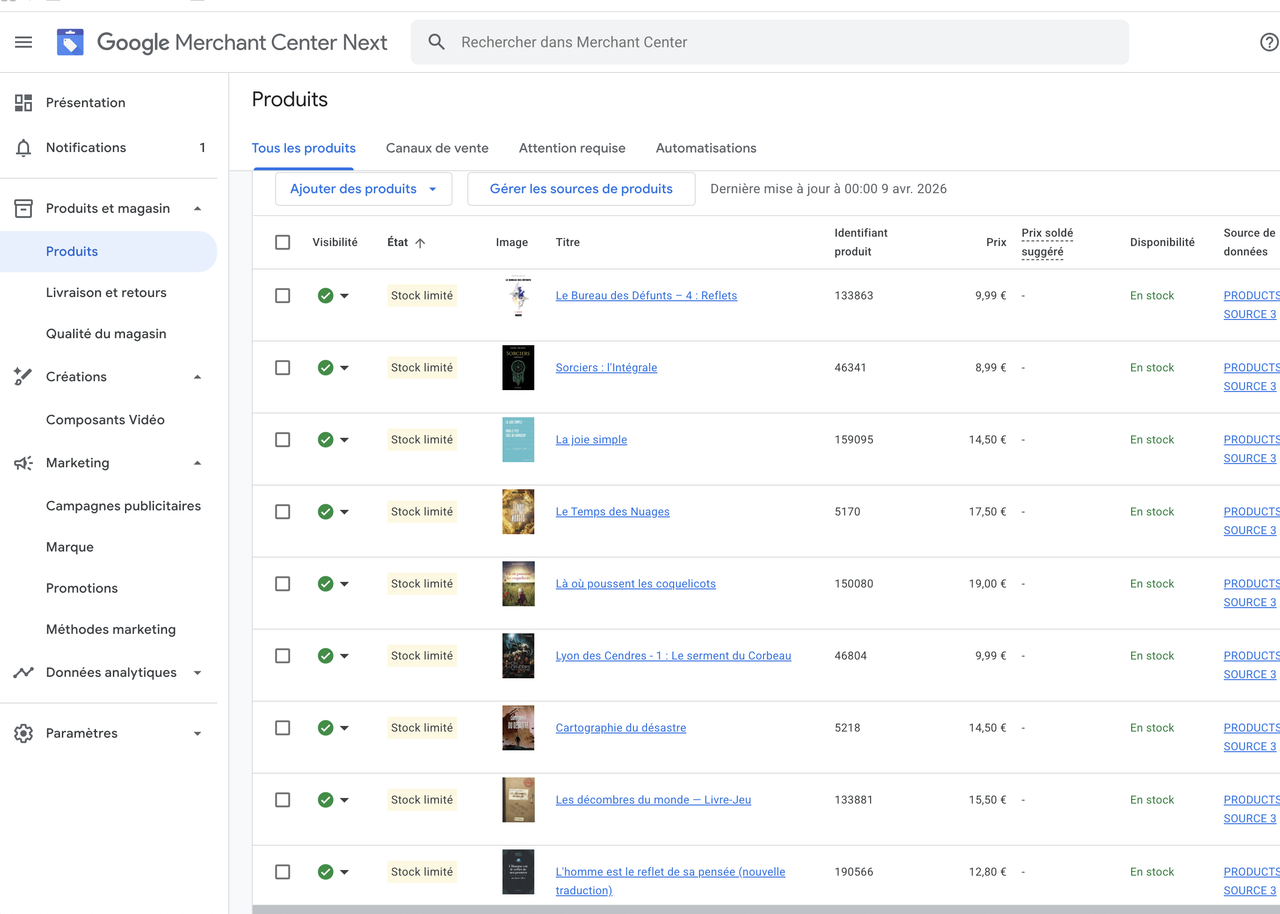
On the store’s website itself, the stock status is clearly marked as “in stock,” so I don’t understand why Google is showing an error. However, on Google Merchant Center, as you can see in the attached screenshot , the products (books, in this case) are listed as “limited stock.” But the green checkmark seems to indicate that the titles are still online and visible—is that correct? So the feed wouldn’t be causing a blockage…?
https://i.postimg.cc/7Zx959r8/Capture-d-e-cran-2026-04-09-a-15-39-49.png- This reply was modified 2 months ago by dragondefeu76.
Thank you! I use Snippet Code, but this is the same.
Best
Forum: Plugins
In reply to: [Ivory Search - WordPress Search Plugin] remove preview ?Sorry I mixed up the forms, it’s already set up. Thanks
Forum: Plugins
In reply to: [Local Google Fonts] After delete ?I don’t know what’s wrong with it. But if you look at the screenshots, you’ll see that if I leave the default font (OpenSans) and select “light,” it doesn’t work. It stays “regular.”
https://prnt.sc/uUV9mFhFXuhl
I have to go to “OpenSans Light” and select “light” again for it to display. And even then, sometimes it doesn’t work… https://prnt.sc/OqdHjZxWVnnS
Does this indicate a possible cause?Forum: Plugins
In reply to: [Local Google Fonts] After delete ?OK. I’m asking because there’s obviously a conflict that’s causing some fonts to no longer display. For example, on the home page, I need light fonts, and they don’t display in light unless I disable GLF.
It’s strange, but I’ve tested it several times, and that’s the problem, because as soon as I disable them, the font displays in the desired size.
I’m using DIVI, and Google Fonts is enabled (as recommended).