gale13

Forum Replies Created
-
Forum: Plugins
In reply to: [LiteSpeed Cache] About Disabling Image OptimizationHI again,
I’m having a big problem with the Page Optimization features on my site, happybakingdays.com. When I have them on, my site becomes unusably slow. Here’s what I’ve figured out:
- With LiteSpeed fully ON: My pages take over 12 seconds to load. The server waiting time (TTFB) is a massive 8+ seconds.
- When I deactivate the LiteSpeed plugin: The page load time drops to around 4 seconds, and the TTFB is a healthy 1 second.
How can I set it up so it actually makes my site faster instead of slower? I still deactivate the plugin at the moment.
Forum: Plugins
In reply to: [LiteSpeed Cache] About Disabling Image OptimizationThanks for your help. I have another issue. I’m experiencing extremely long execution times for
wp-cron.phpon my website, sometimes over 100 seconds. Using the WP Crontrol plugin, I see multiple LiteSpeed tasks (likelitespeed_task_css,litespeed_task_ucss,litespeed_task_lqip) are still being scheduled to run every minute. I’ve already created the crob job twice/hour, the next run is right, but the schedule is not (the picture https://postimg.cc/7JVn0xTT). How can I fix this?Forum: Plugins
In reply to: [LiteSpeed Cache] About Disabling Image OptimizationMy report number is: VCAPXHKQ
My issue is with high server CPU usage (100% CPU spikes), not website speed. These spikes often happen when Litespeed’s background image optimization is running at the same time as other heavy tasks (like me editing posts in the WordPress admin).
I want like to temporarily disable the features as a troubleshooting step, to see if it helps reduce the overall load. I also plan to upload the webp imgae to the site.
Forum: Plugins
In reply to: [AI Engine - The Chatbot, AI Framework & MCP for WordPress] PHP errorI’m sorry, the issue is still there, with the same error,
Forum: Plugins
In reply to: [AI Engine - The Chatbot, AI Framework & MCP for WordPress] PHP errorHi, I still cannot generate new content. The PHP error is still there.
Forum: Plugins
In reply to: [AI Engine - The Chatbot, AI Framework & MCP for WordPress] PHP errorHi,
- The issue is when I generate content, it shows a box like this: https://postimg.cc/bGgNvXWt
- Do you mean the PHP Error Logs on the Meow Apps Dashboard? If so, I see nothing there. I also tried to add this code on the wp-config.php. It didn’t work.
// Enable WP_DEBUG mode
define( 'WP_DEBUG', true );

// Enable Debug logging to the /wp-content/debug.log file
define( 'WP_DEBUG_LOG', true );

// Disable display of errors and warnings
define( 'WP_DEBUG_DISPLAY', false );
@ini_set( 'display_errors', 0 );
3. I tried to find the debug on the file, it shows like this:
[01-Aug-2025 04:51:58 UTC] PHP Warning: file_get_contents(/home/happybak/public_html/wp-content/plugins/ai-engine/ai-engine.php): Failed to open stream: No such file or directory in /home/happybak/public_html/wp-includes/functions.php on line 6900
[01-Aug-2025 04:51:58 UTC] PHP Warning: include_once(/home/happybak/public_html/wp-content/plugins/ai-engine/ai-engine.php): Failed to open stream: No such file or directory in /home/happybak/public_html/wp-settings.php on line 545
[01-Aug-2025 04:51:58 UTC] PHP Warning: include_once(): Failed opening ‘/home/happybak/public_html/wp-content/plugins/ai-engine/ai-engine.php’ for inclusion (include_path=’.:/opt/alt/php82/usr/share/pear:/opt/alt/php82/usr/share/php:/usr/share/pear:/usr/share/php’) in /home/happybak/public_html/wp-settings.php on line 545
[01-Aug-2025 04:51:58 UTC] PHP Notice: Function _load_textdomain_just_in_time was called incorrectly. Translation loading for thewp-recipe-makerdomain was triggered too early. This is usually an indicator for some code in the plugin or theme running too early. Translations should be loaded at theinitaction or later. Please see Debugging in WordPress for more information. (This message was added in version 6.7.0.) in /home/happybak/public_html/wp-includes/functions.php on line 6121
[01-Aug-2025 04:51:58 UTC] PHP Notice: Function _load_textdomain_just_in_time was called incorrectly. Translation loading for theupdraftplusdomain was triggered too early. This is usually an indicator for some code in the plugin or theme running too early. Translations should be loaded at theinitaction or later. Please see Debugging in WordPress for more information. (This message was added in version 6.7.0.) in /home/happybak/public_html/wp-includes/functions.php on line 6121
[01-Aug-2025 04:52:14 UTC] PHP Deprecated: Creation of dynamic property Meow_MWAI_Query_Text::$env is deprecated in /home/happybak/public_html/wp-content/plugins/ai-engine/classes/services/model-environment.php on line 78
[01-Aug-2025 04:52:14 UTC] PHP Deprecated: Creation of dynamic property Meow_MWAI_Query_Text::$_maxDepthConfigured is deprecated in /home/happybak/public_html/wp-content/plugins/ai-engine/classes/engines/core.php on line 52
[01-Aug-2025 04:52:15 UTC] PHP Fatal error: Uncaught TypeError: Unsupported operand types: int + array in /home/happybak/public_html/wp-content/plugins/ai-engine/classes/services/usage-stats.php:95
Stack trace: 0 /home/happybak/public_html/wp-content/plugins/ai-engine/classes/core.php(743): Meow_MWAI_Services_UsageStats->record_tokens_usage() 1 /home/happybak/public_html/wp-content/plugins/ai-engine/classes/engines/chatml.php(1157): Meow_MWAI_Core->record_tokens_usage() 2 /home/happybak/public_html/wp-content/plugins/ai-engine/classes/engines/chatml.php(1119): Meow_MWAI_Engines_ChatML->handle_tokens_usage() 3 /home/happybak/public_html/wp-content/plugins/ai-engine/classes/engines/core.php(81): Meow_MWAI_Engines_ChatML->run_completion_query() 4 /home/happybak/public_html/wp-content/plugins/ai-engine/classes/engines/chatml.php(714): Meow_MWAI_Engines_Core->run() 5 /home/happybak/public_html/wp-content/plugins/ai-engine/classes/core.php(228): Meow_MWAI_Engines_ChatML->run() 6 /home/happybak/public_html/wp-content/plugins/ai-engine/classes/rest.php(504): Meow_MWAI_Core->run_query() 7 /home/happybak/public_html/wp-includes/rest-api/class-wp-rest-server.php(1292): Meow_MWAI_Rest->rest_ai_completions() 8 /home/happybak/public_html/wp-includes/rest-api/class-wp-rest-server.php(1125): WP_REST_Server->respond_to_request() 9 /home/happybak/public_html/wp-includes/rest-api/class-wp-rest-server.php(439): WP_REST_Server->dispatch() 10 /home/happybak/public_html/wp-includes/rest-api.php(459): WP_REST_Server->serve_request() 11 /home/happybak/public_html/wp-includes/class-wp-hook.php(324): rest_api_loaded() 12 /home/happybak/public_html/wp-includes/class-wp-hook.php(348): WP_Hook->apply_filters() 13 /home/happybak/public_html/wp-includes/plugin.php(565): WP_Hook->do_action() 14 /home/happybak/public_html/wp-includes/class-wp.php(418): do_action_ref_array() 15 /home/happybak/public_html/wp-includes/class-wp.php(818): WP->parse_request() 16 /home/happybak/public_html/wp-includes/functions.php(1342): WP->main() 17 /home/happybak/public_html/wp-blog-header.php(16): wp() 18 /home/happybak/public_html/index.php(17): require(‘/home/happybak/…’) 19 {main}thrown in /home/happybak/public_html/wp-content/plugins/ai-engine/classes/services/usage-stats.php on line 95
Forum: Plugins
In reply to: [LiteSpeed Cache] Webp image doesn’t workYou were right, it was a caching issue. I’ve purged all caches and can now see the WebP image loading on my end.
Thanks for your help.
Forum: Plugins
In reply to: [LiteSpeed Cache] Webp image doesn’t work@litetim the report number is PXUPTWLZ. I resend the image that is transferred to webp on the media (https://postimg.cc/tYq2GRL3) and the link of the post that have the image: https://happybakingdays.com/papas-rellena-recipe/
@qtwrk these are all the files in that group: https://postimg.cc/jw7Wwfmp
Forum: Plugins
In reply to: [YARPP - Yet Another Related Posts Plugin] No Realted Posts on Every PostHi, I cleared the cached of the LightSpeed Cache plugin and the cache form YARPP. I didn’t work.
Forum: Plugins
In reply to: [YARPP - Yet Another Related Posts Plugin] No Realted Posts on Every PostHi, I haven’t heard anything from you. How can I fix this error?
Forum: Plugins
In reply to: [YARPP - Yet Another Related Posts Plugin] YARPP cause error papge.
- This reply was modified 1 year, 1 month ago by gale13.
Forum: Plugins
In reply to: [YARPP - Yet Another Related Posts Plugin] YARPP cause error papgeHi, I cleared the YARPP cache and it worked.
Thanks,
Forum: Plugins
In reply to: [YARPP - Yet Another Related Posts Plugin] YARPP cause error papgeHi,
- The YARPP version is 5.30.11
- PHP 8.2.28
- No, I haven’t deleted the YARPP cache
- I tried to clear the caches. It didn’t work until I deactivate the plugin
Hi, here are the names of the carousels I used on the page: https://postimg.cc/sBcbzczj
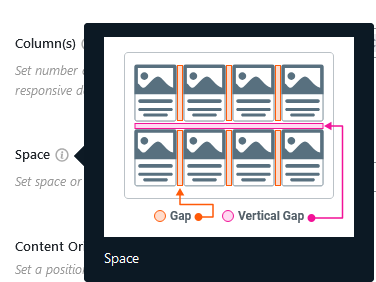
I think you misunderstand what I mean. Vertical gap is to set space or gap between items in the carousel. (If I get it right: https://i.postimg.cc/kgMMtLcD/gap.png). I want to change the gap between the button of the carousel to the paragraph (of the post) below. I changed as you said (even to 5px), and nothing changed. The space is still the same.