kerry1280

Forum Replies Created
-
Forum: Plugins
In reply to: [LearnPress - BuddyPress Integration] Customize templatesI haven’t yet, but I will do so now. Thanks!
Forum: Plugins
In reply to: [LearnPress - BuddyPress Integration] Customize templatesStill didn’t work 🙁 I also tried putting the above path in the /themes/eduma-child/learnpress folder with no luck.
Forum: Plugins
In reply to: [LearnPress - BuddyPress Integration] Customize templatesSure…thanks so much for the help!
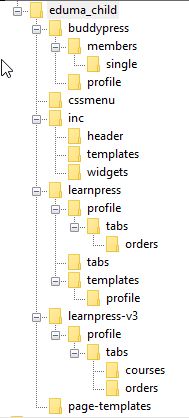
https://likeacajun.com/wp-content/uploads/2018/05/Eduma_child_theme_folder_structure.jpg
Forum: Plugins
In reply to: [LearnPress - BuddyPress Integration] Customize templatesThanks for the suggestion. That location also did not work. The original template that is being used is in the plugins/learnpress-buddypress/templates/profile folder. I tried placing the courses.php file into the /learnpress/templates/ as well as the /learnpress/templates/profile folders in my child theme, neither of which worked. The text at the top of the courses file reads the following:
/**
* Template for displaying BuddyPress profile courses page.
*
* This template can be overridden by copying it to yourtheme/learnpress/addons/buddypress/profile/courses.php.
*
* @author ThimPress
* @package LearnPress/BuddyPress/Templates
* @version 3.0.0
*/Forum: Themes and Templates
In reply to: Stop text from wrapping around featured imagei was able to fix it by editing the template file for a post (single.php). I moved the line <?php the_post_thumbnail(“large”); ?> outside of the div. I’m pretty new to wordpress, but I believe the template file will be overwritten when a new version of the theme is downloaded, so you may want to look into creating a custom template. They have some good instructions for that here: http://codex.ww.wp.xz.cn/Pages. Hope that helps!
Forum: Themes and Templates
In reply to: Stop text from wrapping around featured imageI’m having this problem also. It didn’t happen until my most recent blog post…all others seem fine. When I had this happen before, I adjusted the image size and that did the trick.