kleinerpirat

Forum Replies Created
-
Hi Mark,
I checked the website again today and the updates are running as usual. Crazy thing – I have no idea what caused the temporary problems. I hereby close the ticket. Thank you!
Hi Mark,
Thank you for the fast reply.
I have tried most of the points in the document you mentionend. But since there are no other problems with cron jobs and I haven’t changed anything in the aggregator configuration, I haven’t tried an external cron provider. I increased the timeout to 600 seconds. No change occurs, no performance issue with the site.
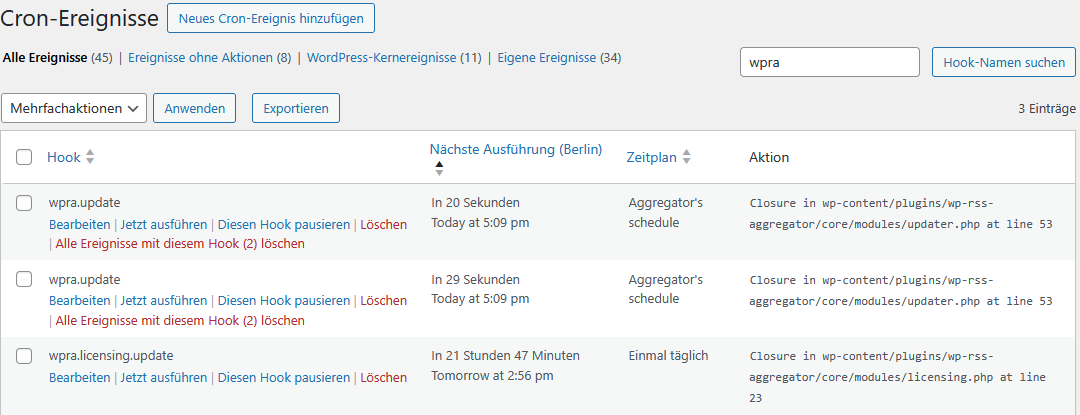
First: I’m no longer sure whether the jobs I showed in the screenshot are the right ones and not leftovers from version 4. I found 3 more events in Crontrol that I would assign to the aggregator. What are the correct jobs I have to look at for Vers. 5?
For these newly identified jobs “Closures” in aggregator modules are monitored.
Can you please take another look at the new screenshot to see if you can do something with the error message there?
https://wegezumwein.de/wp-content/uploads/cronjobs2.png
Thank you!
Hi Hendra, thanks for your support. You were right, my database used partially utf8mb3. I changed all collations to mb4. Now the import works.
Hi Thank you for your reply.
The image issue seems only to appear with Feeds I’ve added after Mirgration to v5. Example RSS: https://www.inweinwetrust.de/feed/
Example Feed Item: https://www.inweinwetrust.de/2025/08/11/besuch-der-rotkaeppchen-erlebniswelt/ RSS Aggregator imported all Images of the Item that are shown in the preview in my media library. In the Image Options of the source I cant change anything. No Checkbox is checked.
 Forum: Themes and Templates
In reply to: [Virtue] Comments no longer appear below the postHi, thanks for your reply. For several reasons I had to change my theme (had nothing to to with this issue). Thank you for your kind help.
Forum: Themes and Templates
In reply to: [Virtue] Comments no longer appear below the postHi, thanks for your reply. The problem still exists in the way I explained in my reply to your first comment.
I’ve activated the option “Break comments into pages with…”. Since then, the comments are showed correctly under the post, but If I click on “Ältere Kommentare”/”Older Comments” the sidebar slides to the bottom and “Neuere Kommentare”/”Newer comments” is shown in sidebar instead under the comments (see screenshot in my answer to your first comment).
Thank you!
Forum: Themes and Templates
In reply to: [Virtue] Comments no longer appear below the postHi, thank you. The url is attached to my first posting.
Forum: Themes and Templates
In reply to: [Virtue] Comments no longer appear below the postThank you for your reply – it’s great that there is support for the free version.
I have activated the option as explained in the video (it is still activated).
This improves the situation, as the two displayed comments are now displayed correctly. However, if I now click on “Older comments”, these are displayed correctly, but “Newer comments” is moved to the top right of the sidebar and the sidebar is then moved down again. This is slightly better than before, but not good either.
The problem also occurs if I have deactivated all plugins in troubleshooting mode and only activate the Virtue theme.
Do you have any additional idea, how to fix it?