linae

Forum Replies Created
-
Forum: Plugins
In reply to: [Smart Slider 3] Empty slides after updateAlright.
Thank you for your time.Best regards
Forum: Plugins
In reply to: [Smart Slider 3] Empty slides after updateHi,
I understood where the problem came from.
I unchecked “Optimize slide image” and it worked again, but I don’t know why.I tried to delete cache and disable my cache plugins but it didn’t fix it.
Thank you for your fast reply
I’ve found the solution : clear the cache !
I’ve just received it. Thank you.
Thanks for your fast response.
However, can you tell me what you mean ? If it’s to add these lines to my .htaccess, I have already done it :
<IfModule mod_expires.c>
ExpiresActive On
ExpiresByType image/jpg “access plus 1 year”
ExpiresByType image/jpeg “access plus 1 year”
ExpiresByType image/gif “access plus 1 year”
ExpiresByType image/x-icon “access plus 1 year”
ExpiresByType image/png “access plus 1 year”
ExpiresByType text/css “access plus 1 month”
ExpiresByType text/x-javascript “access plus 1 month”
ExpiresByType application/x-shockwave-flash “access plus 1 month”
ExpiresDefault “access plus 2 days”
</IfModule>Thank you
Forum: Plugins
In reply to: [ImageMapper] Solution: Make ImageMapper ResponsiveThank you very much you save me !
Forum: Plugins
In reply to: [Page Builder by SiteOrigin] Parallax problem on rows ?Hi alexgso,
Indeed, I have tested your solutions and it seems that leaving Sydney (child) for Twenty “fixed” it even though I always have worked with Sydney on this site.
Perhaps an update suppressed the option…
For the moment, I used the widget background to get a parallax background on the whole row and it works this way.Forum: Plugins
In reply to: [Page Builder by SiteOrigin] Parallax problem on rows ?Hi,
Thanks for your answers.
A screenshot of my row design settings below (there’s no “how the background image displays” which means that I can’t even set my background as a cover to avoid the parallax issue.
https://image.noelshack.com/fichiers/2018/07/3/1518614313-capture.jpg
I’ve tried to change the images, but depending on the screen I use (resolution), the problem occurs or not. I can’t make it work with every screen, that’s the most important.
Forum: Plugins
In reply to: [Page Builder by SiteOrigin] Parallax problem on rows ?Hi,
My parallax limit is 10. I have noticed that the more the resolution of the screen is low, the more the parallax fails for my example.
What should I do ?My image is large enough (800px) but the parallax focus looks to be too low because we only can see 1/4 of the height of my image.
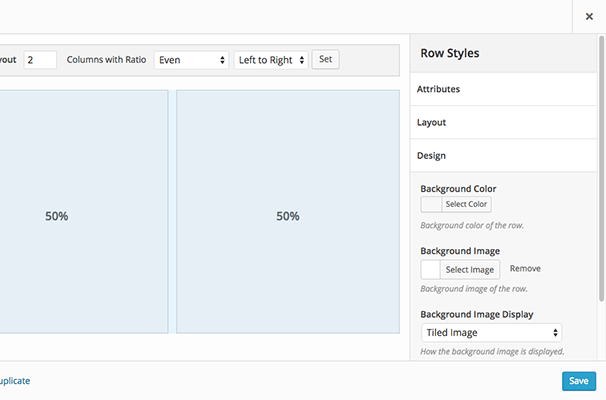
PS : Why don’t I have the option to choose how the background image is displayed anymore just like on the screen below ?
https://siteorigin.com/wp-content/themes/siteorigin-theme/pages/page-builder/images/row-styles.png
Forum: Plugins
In reply to: [Page Builder by SiteOrigin] Parallax problem on rows ?Up,
The problem occurs randomly and now affects the yellow and the blue image.
I don’t even know why the rows background are parallax because I don’t have this choice in the rows settings…Forum: Plugins
In reply to: [Page Builder by SiteOrigin] Parallax effectHi,
I also have a problem with parallax effect, there is a blank at the bottom.
Have you tried “Parallax” and “Parallax (original size)” ?Forum: Plugins
In reply to: [Page Builder by SiteOrigin] SiteOrigin tabsIndeed, that’s perfect now.
Thanks a lot !Forum: Plugins
In reply to: [TablePress - Tables in WordPress made easy] Conflict with another pluginDone
Forum: Plugins
In reply to: [TablePress - Tables in WordPress made easy] Conflict with another pluginThank you it worked !
You saved me from my long despair 🙂Forum: Plugins
In reply to: [Gallery by 2J] no gallery on pageI have the same problem !
Did you find the solution ?