Lock

Forum Replies Created
-
Forum: Plugins
In reply to: [Collapse-O-Matic] Versions 1.8.3 and 1.8.4 broke my drawers@jprest Yes, I opened the ticked just a couple of hours ago, and the developer is being very active trying to help. Anyway don’t worry, the plugin won’t change anything in the original document, it just renders the code in a different way. If you want to see what 1.8.5 does now, just open my website page (and compare it with the screenshots in the first post).
Maybe in the meanwhile you could rollback (there’s a WP plugin for that, with the same name) to 1.8.2, that still works perfectly with the old code.
Forum: Plugins
In reply to: [Collapse-O-Matic] Versions 1.8.3 and 1.8.4 broke my drawersWow, thanks, so fast! 🙂
I’ve copied the 1.8.5 in the plugin folder but, still, it seems something is wrong (html tags are still missing). You can see it live on the page.
- This reply was modified 2 years, 9 months ago by Lock.
Forum: Plugins
In reply to: [Collapse-O-Matic] Versions 1.8.3 and 1.8.4 broke my drawersYes, I use several elements, everyone with its CSS class, that’s the problem. Maybe adding a specific tag (better if global in the plugin option) to decide if treat the contents as html or plain text?
I don’t know anything about XSS injection, but my contents are read only, so I don’t think somebody can change them (or is it something to protect readers from bad websites?).
Anyway many thanks for your help. 🙂
- This reply was modified 2 years, 9 months ago by Lock. Reason: usual typos, sorry but english is not my native language. :)
Forum: Plugins
In reply to: [Collapse-O-Matic] Versions 1.8.3 and 1.8.4 broke my drawersThanks for your very quick answer.
Being just a personal blog I don’t have an alternative test website, but I can update the plugin to the last version so you can test it. No problem if some reader will find the page a bit weird.
Edit: the last version is online, here’s one of the pages:
https://www.lemonskin.net/io/i-libri-che-ho-letto/
- This reply was modified 2 years, 9 months ago by Lock.
Forum: Plugins
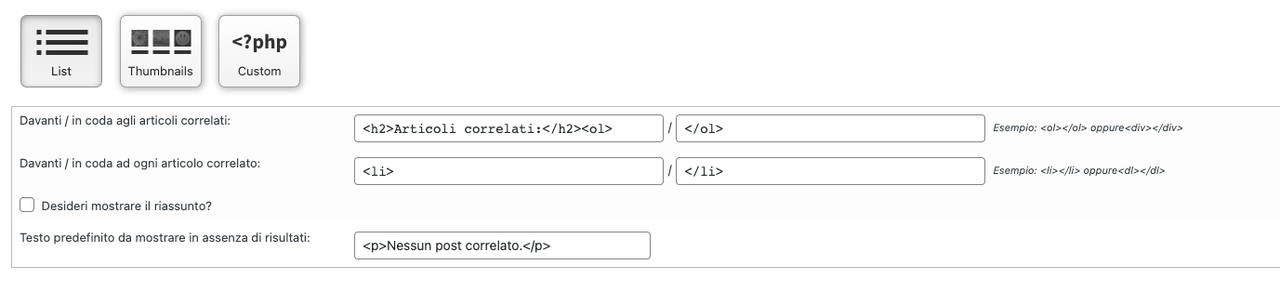
In reply to: [YARPP - Yet Another Related Posts Plugin] Any way to hide “affinity score”?Hmmm, how to use a custom template?
I was thinking this was a custom template:
Forum: Plugins
In reply to: [YARPP - Yet Another Related Posts Plugin] Any way to hide “affinity score”?Version 5.30.6
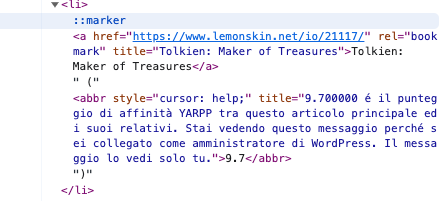
As you see, the brackets are outside the <abbr> tag, so they cannot be hidden. This problem appeared, I think, in the last update. I never had those values shown in my articles list.
https://i.postimg.cc/bJhbYVbV/Screenshot-7.png
- This reply was modified 2 years, 9 months ago by Lock.
Forum: Plugins
In reply to: [YARPP - Yet Another Related Posts Plugin] Any way to hide “affinity score”?I tried to hide it with CSS, but the brackets stay. Something like “Title ()”.
Forum: Plugins
In reply to: [YARPP - Yet Another Related Posts Plugin] Any way to hide “affinity score”?Is the plugin abandoned?
Forum: Plugins
In reply to: [Page scroll to id] Anchor is ignored in URLThank you. 🙂
Forum: Plugins
In reply to: [Page scroll to id] Anchor is ignored in URLDon’t worry Malihu, I already wasted a lot of your time, and your help was very precious. 🙂
I’m currently testing my poor CSS skills with the “new” web technologies, and see if I can find a solution without too many plugins. At the moment I’m using a mix of “scroll-behavior: smooth;” and “scroll-margin-top:” that seem to work pretty well (I’m sure they weren’t available many years ago, when I started using your plugin) and don’t seem interfering with the drawers plugin.
My deep thanks again for your help, I’m going to keep “Page scroll to id” (disabled for now) because I’m almost sure that soon or less my solution will explode and I’ll have to revert back to old, safe, methods. 🙂
Have a nice day,
Lock
Forum: Plugins
In reply to: [Page scroll to id] Anchor is ignored in URLEdit: Please ignore the previous post. Now everything works. 🙂
Forum: Plugins
In reply to: [Page scroll to id] Anchor is ignored in URLYeah, disabling that option, it works again! 🙂
I just discovered a smarter way to manage drawers anchors, as they support a specific tag for it (id), and that should do more precise offsets. It’s supposed to also open the drawer, that is a cool thing (https://plugins.twinpictures.de/plugins/collapse-o-matic/documentation/#kraftwerk).
When you plugin is active (even if ” Prevent other scripts from handling plugin’s links” is disabled), it only scrolls to the point.
I set up a very simple page to test it:
https://www.lemonskin.net/io/37965/
Curious thing is that, if I come from another page (or paste a link to URL) then the specific drawer opens (offset is wrong, however); but from that point, no more drawers are opened in the page:
https://www.lemonskin.net/io/37965/#drawer_2
It’s a mistery. 🙂
Forum: Plugins
In reply to: [Page scroll to id] Anchor is ignored in URLHmmm… I’m very confused now.
I edited two pages (the one with this year’s games, and the previous years one, that was the problematic one) to link each other. But I’m still getting the JS error I showed you yesterday (undefined toString) on both.
These are the two links:
https://www.lemonskin.net/io/i-videogiochi-a-cui-ho-giocato-gli-anni-scorsi/#2022_Portal_1
https://www.lemonskin.net/io/i-videogiochi-a-cui-ho-giocato/#2023_Portal_1
Forum: Plugins
In reply to: [Page scroll to id] Anchor is ignored in URLDisabled.
Forum: Plugins
In reply to: [Page scroll to id] Anchor is ignored in URL