Lock

Forum Replies Created
-
Forum: Plugins
In reply to: [Page scroll to id] Anchor is ignored in URLNo, I didn’t add that class. I usually just put the “id” only in the <a> tag:
<a id=”xxx”></a>
I’ve no idea why they’re there, but this is an old page that I already changed several times in the last 14 years, so there could be some leftovers from (maybe) old plugins.
Anyway I don’t need any class in my anchors.
- This reply was modified 3 years, 1 month ago by Lock.
- This reply was modified 3 years, 1 month ago by Lock.
- This reply was modified 3 years, 1 month ago by Lock.
- This reply was modified 3 years, 1 month ago by Lock.
- This reply was modified 3 years, 1 month ago by Lock. Reason: typo corrections (I'm so bad writing in english). :)
Forum: Plugins
In reply to: [Page scroll to id] Anchor is ignored in URLDone (sorry, I was away from phone):
https://i.postimg.cc/XXMwSwwX/Schermata-2023-04-26-alle-17-44-43.png
Forum: Plugins
In reply to: [Page scroll to id] Anchor is ignored in URLYes, I’m using some custom fields so I can add customized text for CSS and Javascript in any article or page.
Many thanks for your support, I appreciate it a lot.
(you mean “disable” the option? I can leave it on because, so far, I don’t have links that points to “internal” anchors; my purpose is being able to do it for the future). 🙂
- This reply was modified 3 years, 1 month ago by Lock.
Forum: Plugins
In reply to: [Page scroll to id] Anchor is ignored in URLYes, I did, bot nothing changes.
There’s a really strange behaviour in the page. As you said this link works:
https://www.lemonskin.net/io/i-videogiochi-a-cui-ho-giocato-gli-anni-scorsi/#anno_2018
But this not:
https://www.lemonskin.net/io/i-videogiochi-a-cui-ho-giocato-gli-anni-scorsi/#2018_BOTW
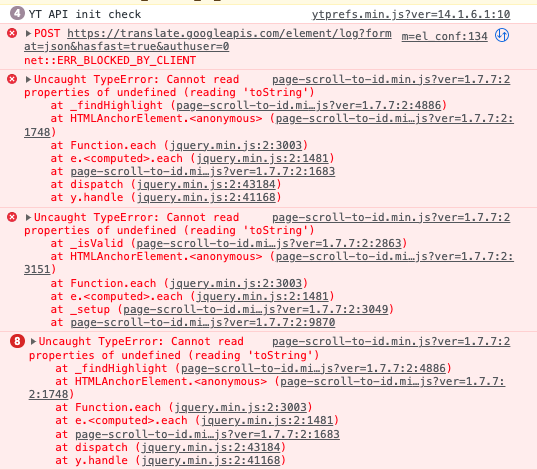
The error that appears is this (no errors on previous one):
https://i.postimg.cc/15f0kRLh/Schermata-2023-04-26-alle-14-06-38.png
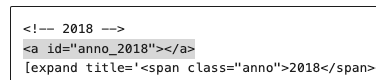
The difference in the two links is that the first anchor is outside any “container”:
https://i.postimg.cc/yNg8Kt7N/Schermata-2023-04-26-alle-14-12-45.png
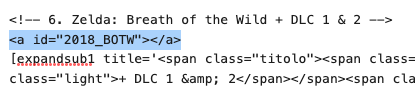
While the second is “one level” inside (you can understand from the “expandsub” tag, more you go in and more number suffixes appear):
https://i.postimg.cc/tR2QrDHv/Schermata-2023-04-26-alle-14-13-58.png
I would say that, when the page is loaded, your plugin can’t detect the anchor, because it’s hidden or maybe the plugin that “draws” the structure” still have to create the block. But it seems when the page loads, all the structure is “open”. Only later the plugin (it’s name is Collapse-O-Matic) contracts everything.
Anyway I’ve made sure that all the anchors are always accessible (I never put them in a close “drawer”), so they always work.
As I said, if I disable “Page Scroll to ID”, the anchors always work, so maybe there’s something in the structure that confused it. Maybe it’s trying to convert “toString” something it can’t find? Sorry, I’m not good at all in JavaScript.
I set the delay up to 5000 ms but, once the anchor disappears from the URL, it never returns. 😐
Forum: Plugins
In reply to: [Page scroll to id] Anchor is ignored in URLThanks for the suggestion, Maluhu. I already tried, but it seems the page is immediately loaded two times (this explains the URL bar changing quickly). The second time anchor is lost, so nothing happens.
A possible delay could work on the “first load”, the one that still has the anchor. Unfortunately the second “reload” kills it. 🙁
- This reply was modified 3 years, 1 month ago by Lock.
Forum: Plugins
In reply to: [Page scroll to id] Anchor is ignored in URLEdit: I’m looking inside other topics and trying all the suggestions.
Following a thread I disabled this option:
[ ] Enable different pages scrolling on all links (even the ones that are not handled by the plugin)
With this unchecked the anchor works on the new page, but it seems the smooth scroll is gone. Even if I try some internal anchors. This persists until the page is manually reloaded (but I guess it’s working as intended, even if it’s not a perfect solution for me). 🙂
- This reply was modified 3 years, 1 month ago by Lock.
Forum: Everything else WordPress
In reply to: WP URL optionsSorry but I’m very new to WP, I didn’t understand anything. :\
Forum: Fixing WordPress
In reply to: Cannot add images to comments anymoreThanks George, that is very interesting and it’s exactly what’s happening here.
I was editing a comment from an user that tried without success to add an image inside. 🙂So, I guess, the only way to overcome this issue is to create myself a comment with his data (name, email, etc.)? Or is there any plug-in that can solve the problem, maybe assigning some privileges to an user or a comment?
Forum: Fixing WordPress
In reply to: Cannot add images to comments anymoreHonestly I’ve no idea, I don’t think.
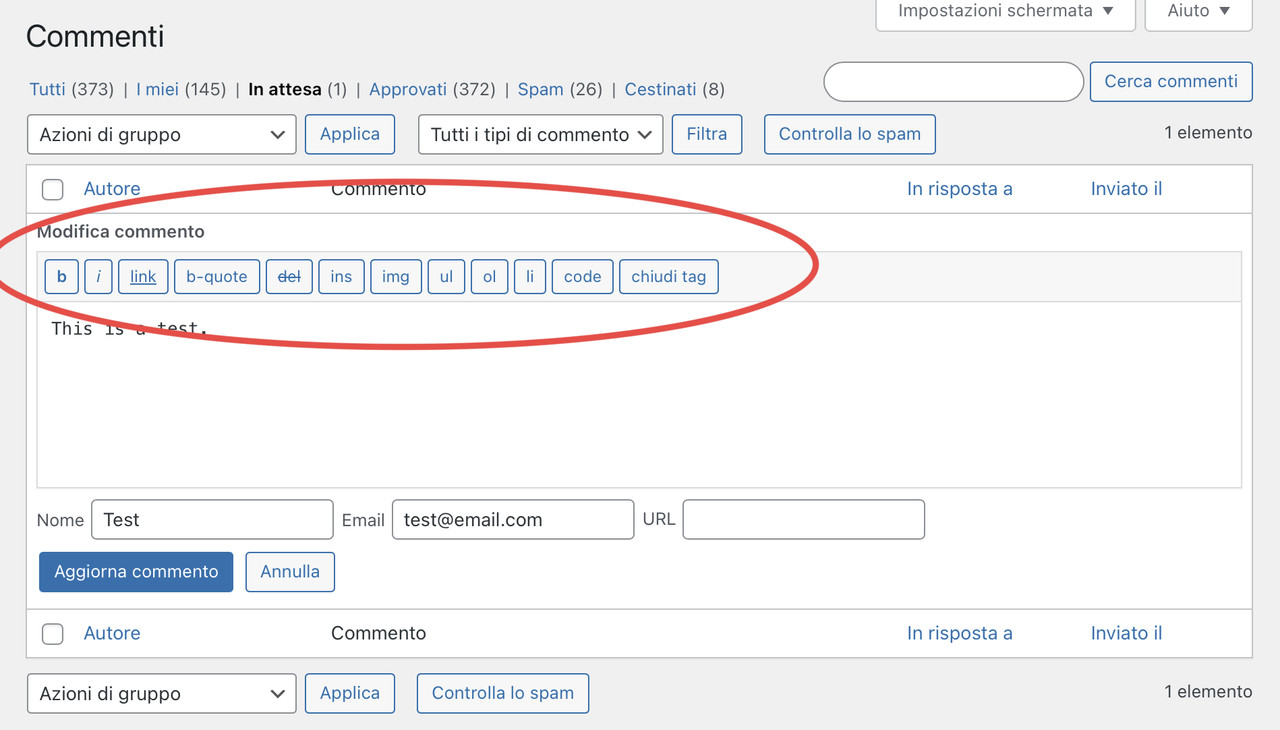
When I edit a comment I’ve always seen this toolbar:https://i.postimg.cc/bJLDmjnb/F548-A17-F-0-A95-4-DDA-B37-A-AADCDF6-A41-F1.jpg
And I think it’s the standard one (or, at least, I’ve always seen it this way).
But most of the HTML code I can add with the buttons is now stripped away when I save the comment. I can add an hyperlink but not an image.
Any idea?
Forum: Plugins
In reply to: [Gutenberg] Please, give back the right [+] near new paragraphsOh, right. Sorry. 🙂
Forum: Plugins
In reply to: [Gutenberg] Please, give back the right [+] near new paragraphsUpdate: @kathryn , I updated WP (and disabled the Gutenberg RC1) and now the backoffice look is back to normal. So I think it was some issue in the RC1. 🙂
But I noticed there are problems with comments now. If I add an image, or a class in an HTML tag, they’re are automatically removed on saving the comment.
It’s weird, considered that there are specific buttons to add these codes.
Forum: Plugins
In reply to: [Gutenberg] Please, give back the right [+] near new paragraphsSure, you could definitely try creating an editor stylesheet in your child theme which would reflect what you prefer to see in the editor. Here’s a resource to point you in the right direction:
That’s very interesting, many thanks. 🙂
Forum: Plugins
In reply to: [Gutenberg] Please, give back the right [+] near new paragraphsOh… ehm… I’ve just learned to use Health-Check a bit better (thanks). 😛
I confirm that FolioPress (it’s an old theme, no more updated since a few years) changes its behave when the Gutenberg RC1 is installed. Maybe WP modified the way the editor uses the editor CSS?
Is there a specific article about aligning frontend and backoffice theme? Maybe I can bypass the problem directly on my theme CSS.
Thanks.
Forum: Plugins
In reply to: [Gutenberg] Please, give back the right [+] near new paragraphsThank you for all the info, Kathryn. I’ve just learned how to use the diagnostic mode. 🙂
There’s almost no difference in the editor using Twenty Thirteen theme and activating/deactivating Gutenberg RC1 (just a different distance between images and text, but something like 1-2 pixels).But I cannot activate a different theme (In diagnostic mode, I mean), so I cannot do further tests (I wanted to try Foliopress alone). For sure the RC1 (and, now, the 14.5.4) behave differently with my child theme when I’m editing an article. But I can’t say why. I know I can edit my CSS to change the look of blocks, but maybe it’s not that important. 🙂
Forum: Plugins
In reply to: [Gutenberg] Please, give back the right [+] near new paragraphs– Is the issue present with all your plugins temporarily deactivated, except Gutenberg? You can use the Health Check plugin for this, which will not change your live site – https://ww.wp.xz.cn/plugins/health-check/
Yes, no difference. It’s the RC1 (and, now, the 14.5.4) that changes the behaviour.
I have health-check installed, but I forgot how to use, so I manually disabled all the plugins. 🙂– Is the issue still present running the latest stable version of Gutenberg (14.5.4 as of today) instead of the RC?
Yes, same problem. And [+] disappeared again. So I’m going to reinstall the RC1 (is there a way to install it from server, instead of manually upload it via ftp?).
– Is the issue present with a default theme like Twenty Twenty-Three? Again, you can use the Health Check plugin for this.
I’m a bit scared to test other themes, because (I dont’ know why) when I change them, I sometimes get the sidebar widgets reset (well, some of them disappears); and, since some are personalised HTML, I need to re-do them from scratch (unless Health-Check can avoid the problem, but I’m not sure how to use it correctly).
I suspect that the new Gutenberg changed something, and it’s no more getting the Foliopress CSS (it never worked perfectly, so it wasn’t a 1:1 visual ratio).