nitrospectide

Forum Replies Created
-
Forum: Fixing WordPress
In reply to: Can’t locate something coming out of wp_footer()I located it. It was a few lines buried in the middle of something else in the functions.php. Easy to miss.
Forum: Fixing WordPress
In reply to: Can’t locate something coming out of wp_footer()I should have mentioned that the Show Current Template plugin was enabled to replace this legacy functionality we’re trying to remove. They are separate, redundant things.
Forum: Plugins
In reply to: [Admin and Site Enhancements (ASE)] Logout to 404 instead of login screenChange Login URL is enabled. Redirect after logout is not enabled.
I get the 404 when the logout drops me here: /mylogin?loggedout=true&wp_lang=en_us
This is happening across multiple WordPress installations.
——
` wp-core

version: 6.9.4
site_language: en_US
user_language: en_US
timezone: America/Chicago
permalink: /%year%/%monthnum%/%day%/%postname%
https_status: true
multisite: false
user_registration: 0
blog_public: 1
default_comment_status: undefined
environment_type: production
user_count: 9
dotorg_communication: true wp-paths-sizes

wordpress_path: /home/mysite/public_html
wordpress_size: 1.21 GB (1296794247 bytes)
uploads_path: /home/mysite/public_html/wp-content/uploads
uploads_size: 587.22 MB (615749074 bytes)
themes_path: /home/mysite/public_html/wp-content/themes
themes_size: 175.05 MB (183551409 bytes)
plugins_path: /home/mysite/public_html/wp-content/plugins
plugins_size: 183.88 MB (192807261 bytes)
fonts_path: /home/mysite/public_html/wp-content/uploads/fonts
fonts_size: directory not found
database_size: 113.95 MB (119488512 bytes)
total_size: 2.24 GB (2408390503 bytes) wp-dropins (1)

advanced-cache.php: true wp-active-theme

name: Understrap Child (understrap-child-1.1.0)
version: 1.1.0
author: the Understrap Contributors
author_website: https://github.com/understrap/understrap-child/graphs/contributors
parent_theme: Understrap (understrap)
theme_features: core-block-patterns, widgets-block-editor, automatic-feed-links, title-tag, menus, html5, post-thumbnails, customize-selective-refresh-widgets, post-formats, custom-background, custom-logo, responsive-embeds, editor-styles, align-wide, editor-color-palette, widgets, editor-style
theme_path: /home/mysite/public_html/wp-content/themes/understrap-child-1.1.0
auto_update: Disabled wp-parent-theme

name: Understrap (understrap)
version: 1.2.4
author: Howard Development & Consulting
author_website: https://howarddc.com
theme_path: /home/mysite/public_html/wp-content/themes/understrap
auto_update: Disabled wp-themes-inactive (3)

Twenty Twenty-Five: version: 1.5, author: the WordPress team, Auto-updates disabled
Twenty Twenty-Four: version: 1.5, author: the WordPress team, Auto-updates disabled
Twenty Twenty-One: version: 2.8, author: the WordPress team, Auto-updates disabled wp-plugins-active (21)

Admin and Site Enhancements (ASE): version: 8.8.1, author: wpase.com (latest version: 8.8.2), Auto-updates disabled
Advanced Access Manager – Access Governance for WordPress: version: 7.1.2, author: VasylTech LLC [email protected], Auto-updates disabled
Advanced Custom Fields PRO: version: 6.8.2, author: WP Engine (latest version: 6.8.3), Auto-updates disabled
Advanced Query Loop: version: 4.4.0, author: Ryan Welcher, Auto-updates disabled
Anti-Spam by CleanTalk: version: 6.80, author: CleanTalk - Anti-Spam Protection [email protected], Auto-updates disabled
Asset CleanUp: Page Speed Booster: version: 1.4.0.4, author: Gabe Livan, Auto-updates disabled
Debloat: version: 1.3.0, author: asadkn, Auto-updates disabled
FileBird Lite: version: 6.5.4, author: Ninja Team, Auto-updates disabled
Fluent Forms: version: 6.2.4, author: Contact Form - WPManageNinja LLC, Auto-updates disabled
Fluent Forms Pro Add On Pack: version: 6.2.4, author: Fluent Forms, Auto-updates disabled
FluentSMTP: version: 2.2.95, author: FluentSMTP & WPManageNinja Team, Auto-updates disabled
HexaStreamline: version: 1.0.4, author: Jay McDonald at Hexatrope, Auto-updates disabled
Kadence Blocks — Page Builder Toolkit for Gutenberg Editor: version: 3.7.3, author: Kadence WP (latest version: 3.7.5), Auto-updates disabled
Permalink Manager Pro: version: 2.5.3.4, author: Maciej Bis, Auto-updates disabled
Public Post Preview: version: 3.1.0, author: Dominik Schilling, Auto-updates disabled
Rank Math SEO: version: 1.0.271.1, author: Rank Math SEO, Auto-updates disabled
Redis Object Cache: version: 2.8.0, author: Till Krüss, Auto-updates disabled
Relevanssi: version: 4.27.0, author: Mikko Saari, Auto-updates disabled
Slider Revolution: version: 7.0.8, author: ThemePunch, Auto-updates disabled
Super Page Cache: version: 5.3.1, author: Themeisle, Auto-updates disabled
WordPress Backup & Security Plugin - BlogVault: version: 6.47, author: Backup by BlogVault, Auto-updates disabled wp-media

image_editor: WP_Image_Editor_GD
imagick_module_version: Not available
imagemagick_version: Not available
imagick_version: Not available
file_uploads: 1
post_max_size: 128M
upload_max_filesize: 128M
max_effective_size: 128 MB
max_file_uploads: 20
image_format_transforms: image/heic → image/jpeg, image/heif → image/jpeg, image/heic-sequence → image/jpeg, image/heif-sequence → image/jpeg
gd_version: 2.3.3
gd_formats: GIF, JPEG, PNG, WebP, BMP, AVIF, XPM
ghostscript_version: 9.27 wp-server

server_architecture: Linux 4.18.0-553.109.1.lve.el8.x86_64 x86_64
httpd_software: LiteSpeed
php_version: 8.2.31 64bit
php_sapi: litespeed
max_input_variables: 1000
time_limit: 300
memory_limit: 768M
max_input_time: -1
upload_max_filesize: 128M
php_post_max_size: 128M
curl_version: 8.20.0 OpenSSL/1.1.1w
suhosin: false
imagick_availability: false
pretty_permalinks: true
htaccess_extra_rules: true
static_robotstxt_file: true
current: 2026-06-03T15:32:48+00:00
utc-time: Wednesday, 03-Jun-26 15:32:48 UTC
server-time: 2026-06-03T10:32:47-05:00 wp-database

extension: mysqli
server_version: 10.6.19-MariaDB-cll-lve
client_version: mysqlnd 8.2.31
max_allowed_packet: 536870912
max_connections: 1000 wp-constants

WP_HOME: undefined
WP_SITEURL: undefined
WP_CONTENT_DIR: /home/mysite/public_html/wp-content
WP_PLUGIN_DIR: /home/mysite/public_html/wp-content/plugins
WP_MEMORY_LIMIT: 500M
WP_MAX_MEMORY_LIMIT: 768M
WP_DEBUG: false
WP_DEBUG_DISPLAY: false
WP_DEBUG_LOG: false
SCRIPT_DEBUG: false
WP_CACHE: true
CONCATENATE_SCRIPTS: undefined
COMPRESS_SCRIPTS: undefined
COMPRESS_CSS: undefined
WP_ENVIRONMENT_TYPE: undefined
WP_DEVELOPMENT_MODE: undefined
DB_CHARSET: utf8mb4
DB_COLLATE: undefined wp-filesystem

wordpress: writable
wp-content: writable
uploads: writable
plugins: writable
themes: writable
fonts: does not exist
mu-plugins: writable acf

version: 6.8.2
plugin_type: PRO
update_source: ACF Direct
activated: true
activated_url: https://www.mysite.com
license_type: Personal
license_status: active
subscription_expires: 1788795792
ui_field_groups: 27
php_field_groups: 0
json_field_groups: 0
rest_field_groups: 2
post_types_enabled: true
ui_post_types: 24
json_post_types: 0
ui_taxonomies: 1
json_taxonomies: 0
ui_options_pages_enabled: true
ui_options_pages: 0
json_options_pages: 0
php_options_pages: 0
rest_api_format: light
registered_acf_blocks: 0
blocks_per_api_version:
blocks_per_acf_block_version:
blocks_using_post_meta: 0
blocks_using_auto_inline_editing: 0
preload_blocks: true
admin_ui_enabled: true
field_type-modal_enabled: true
field_settings_tabs_enabled: false
shortcode_enabled: true
registered_acf_forms: 0
json_save_paths: 1
json_load_paths: 1
ai_enabled: false
schema_support: false
schema_ready_objects:
blocks: 0
post_types: 0
datastore_enabled: false kadence-blocks

version: 3.7.3
last_updated: 1780072958
previous_version: 3.6.7
pro_active: No
deactivated_blocks: None
block_defaults: No
block_visibility: No
custom_colors: No
recaptcha_key: No
maps_key: No
mailerlite_key: No
cloud_connect: No
Forum: Plugins
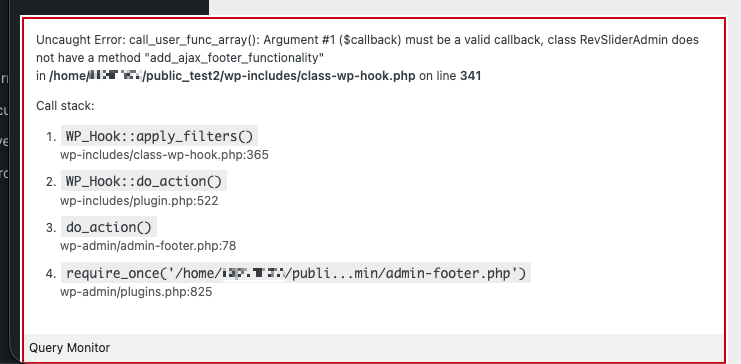
In reply to: [Query Monitor] PHP Fatal ErrorYes, it only happens when I enable Query Monitor, and it shows up in a Query Monitor notice:
https://download.hexatrope.com/error-query-monitor.pngForum: Plugins
In reply to: [Relevanssi - A Better Search] Relevanssi breaking a custom WP_QueryThat did it. Thank you!
Forum: Developing with WordPress
In reply to: Creating admin bar link with nonceThank you all for each of your contributions. All of you were right. @colordraws: Your detailed spelling out of the issue was the key to unlock my understanding. I appreciate it.
Forum: Fixing WordPress
In reply to: Warning: Attempt to read property “ID” on stringThe var_dump is of $primaryListItem.
The ID is on that:
foreach( $primaryList as $primaryListItem ):
$theImage = get_the_post_thumbnail( $primaryListItem->ID, 'full' );
Forum: Fixing WordPress
In reply to: Warning: Attempt to read property “ID” on stringThe output starts with:
object(WP_Post)#7237 (24) { [“ID”]=> int(8522) [“post_author”]=> string(1) “2” [“post_date”]=> string(19) “2024-12-30 13:06:08” [“post_date_gmt”]=> string(19) “2024-12-30 19:06:08”It appears to be an object.
Forum: Plugins
In reply to: [Admin and Site Enhancements (ASE)] post removedI made a suggestion, but then wanted to think about it more. Unfortunately, I couldn’t delete the post.
Forum: Developing with WordPress
In reply to: get_posts with meta_query and include arrayWhat you present is what I initially tried, but it actually returned no posts. I thought that maybe it was because setting it up this way makes it look for the intersection of these two things: a post that is one of those two listed, AND that matches the meta query. Maybe not, but it seemed to explain why no posts were returned.
If I go the other route, can I just merge the two arrays? Any tips on getting them interleaved as if they came out as the result of one query, rather than the ‘include’ ones just being glommed on at the beginning or end?
We are still getting a bunch of real emails blocked. I went in again and marked them as not spam. Why is this happening?
FYI: There is a section in WPRocket where it lists plugins it recognizes for exclusions, and yours is in there.

- This reply was modified 6 months, 1 week ago by nitrospectide.
I’m sorry, I didn’t see your reply come through.
It won’t let me add the folder to that field. It seems to only let me add individual files.
I just tried marking submissions as Not Spam, but it only says it has whitelisted the user. That doesn’t help me with other users.
Forum: Developing with WordPress
In reply to: Inject HTML into Media Library UII have tried expanding the code the way it’s set up in that Stack Exchange example:
// Ensure the wp.media object is set, otherwise we can't do anything.
if ( wp.media ) {
    wp.media.view.Modal.prototype.on( "ready", function() {
        console.log( "media modal ready" );
        wp.media.view.Modal.prototype.on( "open", function() {
            console.log( "media modal open" );
        });
    });
});
But none of this ever fires. So I tried something else:
wp.media.frame.on('all', function(e) { console.log(e); });(from: https://wordpress.stackexchange.com/questions/240802/list-of-available-events-for-wp-media)
But still, nothing showed in the console.