pol

Forum Replies Created
-
Forum: Reviews
In reply to: [Broken Link Notifier] Great idea, missing url filterOh great, I had missed that… that’s even better then !
Thanks for your prompt reply,
Pascal.
Forum: Plugins
In reply to: [Max Mega Menu] Performance : scripts & styles not minifiedHi Tom,
Thans for your prompt reply ! And glad to hear that you can do something there… I can confirm that my server doesn’t compress files by itself.
Therefore a minified version of the css and js files will be more than useful to the performance and SEO rankings.
Regarding your concern in your first message, you can maybe make that optional in the settings, so that people with debug concerns can choose which version to output.
Regards,
Pascal.
Hi,
Thanks for your akward comparison, but I maintain that’s it’s not a fair commercial practice to break a functionality without any technical reason.
I understand that I cannot upload new versions of the premium plugin anymore, but limiting the functionality of the current version installed on my website, although it doesn’t require neither processing nor memory space on your end, is not right.
- This reply was modified 2 years, 6 months ago by pol.
Forum: Plugins
In reply to: [Name Directory] Feature request : add pictureHi Jeroen,
Actually I was referring to something a bit more automated as plain
insertion. Images are just an example, but to make the plugin really scalable and matching different use cases (buttons, etc…) it would be good to add wordpress filters and actions within, both on admin and front-end sides.
Example in file shortcode.php, function name_directory_show_directory :
Line 306 : $print_description = apply_filters( ‘name-directory-description’, html_entity_decode(stripslashes($entry[‘description’])), $entry, $directory );
Line 321 (after the echo) : do_action( ‘name-directory-in-loop’, $entry, $directory);
I hope you see what I mean there,
Regards,
Pascal.
Forum: Plugins
In reply to: [GDPR] Where are the .po files for French ?Bonjour,
J’ai depuis mis à jour les traductions sur mon site, et effectivement les messages du plugin apparaissent depuis en Français !
Merci pour votre réponse et pour ces informations utiles, c’est un aspect de WordPress que je ne connaissais pas encore… je vois que la langue française est bien représentée chez WordPress en tous cas !
Bonne journée,
Pascal.
P.S. Ravi que goûtu.org vous ouvre l’appétit, il me donne pas mal de travail après le boulot 🙂
Forum: Plugins
In reply to: [Search Everything] Conflict with WP Ultimate Recipe search widgetLatest update !
I tried the following hotfix proposed @marsuby on this forum, since this issue seems to be known already :
//TODO: Hotfix! with empty search params, se_search_default()='()’
// leading to an invalid where clause … AND ((()))
if ( $searchQuery != ” && $searchQuery != ‘()’ ) {
$where = ‘ AND ((‘ . $searchQuery . ‘)) ‘;
}… and it was successful.
Hope you’ll be able to incorporate a fix soon in the plugin.
Regards,
Pascal.
Forum: Plugins
In reply to: [Search Everything] Conflict with WP Ultimate Recipe search widgetUpdate to this post : I investigated a bit more, using the Query Monitor plugin, and it appears that there is a SQL error whenever the faceted search runs with Search Everything activated. You can find the details of the issue in the attached screen capture :
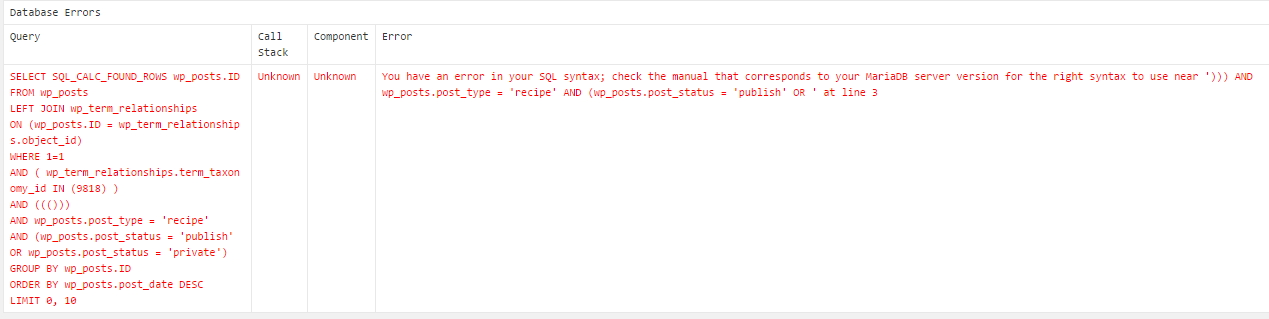
Looking at it, the issue seems to be related to the string “AND ((()))” in the middle.
Thanks for your support there,
Regards,
Pascal.
Hi Jack,
Thanks for your prompt response. I am indeed using the notification “user role changed -f or user”, however I don’t find how to only trigger it when the new role is “author” for instance.
If the pluging’s user interface doesn’t allow it, would there be a hook I could use to further refine the trigger condition there ?
Something like “before_notification_trig” for instance…
Thanks,
Pascal.
Sorry,
Just saw that I didn’t use a proper post duplicator plugin. When using this one, which supports custom post types it’s working now.
Regards,
Pascal.