Daniel K.

Forum Replies Created
-
Forum: Plugins
In reply to: [Rich Showcase for Google Reviews] Plugin dosent display recent reviewsHi @agentnew,
Thank you for your topic.
To investigate this question, please send:
1. Direct link to your website page where we can see and reproduce the issue;
2. Debug information from the page in wp-admin: Google Reviews / Settings / Advance tab. You need to click the ‘Copy Debug Information‘ button, paste copied to this reply and send it to us.
For the debug info, please use ‘Pastebin’ service.
Thansk!
Forum: Plugins
In reply to: [Rich Showcase for Google Reviews] Disable review updatesHi @alusza,
Thank you for your topic.
You can also remove the Google API key from the Settings page. This will ensure that the reviews are no longer updated automatically.
Thanks!
Forum: Plugins
In reply to: [Rich Showcase for Google Reviews] Network ErrorHi @mon777herdl,
Thank you for your topic.
Are you sure that you’re using the latest version 6.9.4.4? Could you please send a screenshot with this error?
Thanks!
Forum: Plugins
In reply to: [Rich Showcase for Google Reviews] Depecated warningHi @wigglypoppins,
Thank you for reporting this issue.
The fix has been included in the next release.
Thanks!
Forum: Plugins
In reply to: [Rich Showcase for Google Reviews] Plugin errorHi @greyturtle,
Thank you for your topic.
I found two issue.
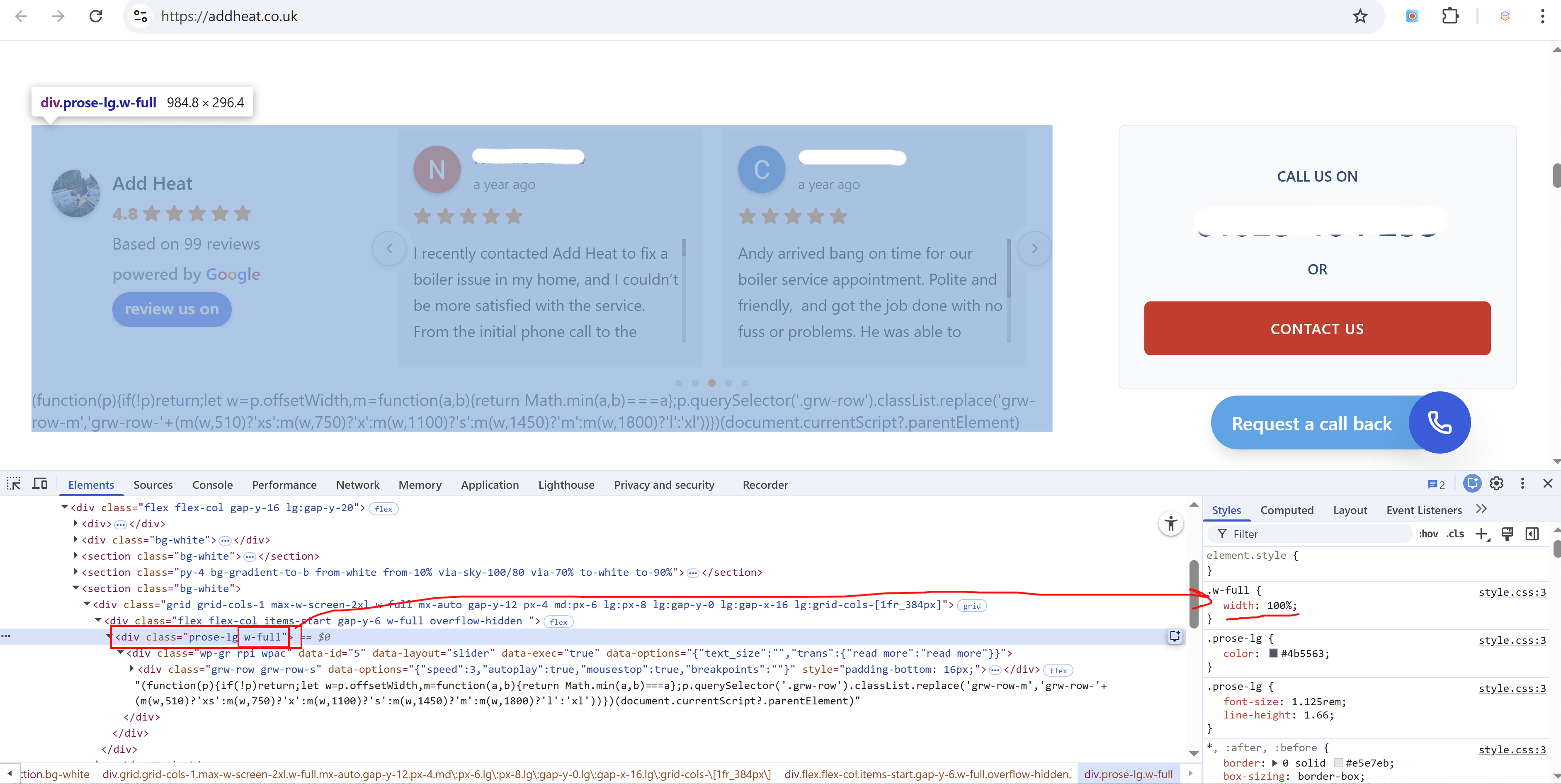
- Current reviews parent container does not have width and since the Slider is a flex based layout it uses whole available width. Please look at the screenshot below, the parent container prose-lg without width and it’s a problem:

Once added a w-full class (width: 100%) it instantly fixed the issue:
2. The second issue, it seems you’re using wrong row for the shortcode for the Slider in your page builder. JavaScript is showing like a plain text. Please make sure that you’re using a shortcode element or HTML especially to show it correctly.
Please let us know how it goes.
Thanks!
Forum: Plugins
In reply to: [Rich Showcase for Google Reviews] Console ErrorPlease send it to support [at] richplugins.com
Thanks!
Forum: Plugins
In reply to: [Rich Showcase for Google Reviews] Console ErrorHi @fesarlis,
Thank you for your topic!
Are you sure that you’re using the latest version 6.9.4.4?
If so, please send a link to the page where we can reproduce it.
Thanks!
Forum: Plugins
In reply to: [Rich Showcase for Google Reviews] number of imported reviewsHi @dlune,
Thank you for your question.
We would like to clarify that our plugin retrieves reviews exclusively through the official Google API. Because of this, we cannot guarantee that new reviews will be systematically available every day, even when an API key is configured. The availability of reviews depends entirely on when and how Google provides them through their API.
However, if you use your own API key and configure the plugin to use the legacy Google Places API (Use old Places API option in the plugin Settings), then in practice new reviews usually appear in the plugin after they are published on Google – typically in next 2-3 days. This is still subject to Google making the review available via their API.
In summary, the plugin does not control the timing or availability of new reviews; it simply displays the data provided by Google.
Please let us know if you have any further questions.
Thanks!
Forum: Plugins
In reply to: [Rich Showcase for Google Reviews] number of imported reviewsHi,
Thank you for your question.
At the initial connection stage, the plugin uses two Google Places APIs (the legacy Places API and the new Places API).
- The legacy Places API returns the 5 most recent reviews.
- The new Places API returns the 5 most relevant (popular) reviews.
This is why, during the first import, you may see up to 10 reviews in total.
However, sometimes Google includes some of the same reviews in both groups (for example, a review can be both recent and popular). In such cases, duplicates are automatically filtered out, and the total number of imported reviews may be lower – typically 7–9 reviews instead of 10.
After installation, the plugin user can create and add their own Google API key in the plugin settings. This is free of charge, but Google requires adding a payment method in Google Cloud Console for verification purposes.
Once a personal API key is added:
- The plugin can request data from Google daily.
- It can retrieve more new reviews over time. The number of reviews is not limited by the plugin – it depends only on how many reviews Google provides via the API.
If you need any further clarification, I’ll be happy to help.
Thanks!
Forum: Plugins
In reply to: [Rich Showcase for Google Reviews] Reviews not updatingCould you temporary add my own IP address to check your Google API key? If it’s possible, could you send email to support [at] richplugins.com and I will answer with my IP.
Thanks!
Forum: Plugins
In reply to: [Rich Showcase for Google Reviews] Reviews not updatingHi @markmck,
Thank you for your topic!
Could you please send debug information from the page in wp-admin: Google Reviews / Settings / Advance tab. You need to click the ‘Copy Debug Information‘ button, paste copied to this reply and send it to us.
Please use ‘Pastebin’ for the debug info.
If you already added this, please let us know the password.
Thanks!
Forum: Plugins
In reply to: [Rich Showcase for Google Reviews] SchemaHi @wppraesenz,
Thank you for your topic!
We understand your point of view and why it might seem like a good idea to allow users to optionally enable product schema for reviews. However, we’ve made a deliberate decision to not include Rich Snippets support in the plugin and we’d love to explain why.
Since Google’s update in September 2019, Rich Snippets for review markup are no longer supported for LocalBusiness or Organization schema types, unless the reviews are published on third-party listing or aggregator websites (like Yelp, Facebook, etc.). Even if the correct schema markup is present, Google simply ignores it when it’s shown on a business’s own site. As a result, Google no longer shows review stars in search results for such cases.
Here is the link to the original post: https://webmasters.googleblog.com/2019/09/making-review-rich-results-more-helpful.html
We’ve chosen not to include a workaround (such as using Product schema for Google reviews), because:
- Google clearly discourages this approach, as Product schema is meant to describe specific items – not services or business profiles.
- Using such workarounds may be flagged as “spammy structured data” (source doc https://developers.google.com/search/docs/appearance/structured-data/sd-policies#quality-guidelines), which can lead to a penalty or complete exclusion of the page (or whole site) from search results.
- If this happens through our plugin, we risk serious reputational damage and potential disputes with clients – something we work hard to avoid.
Also, if we included a feature that we know won’t work as expected (due to Google restrictions), it would very likely result in numerous support requests from users asking why Rich Snippets are not showing. This would create more confusion and disappointment, rather than value.
In short, our priority is to protect our users from potential SEO risks and ensure the plugin is aligned with best practices recommended by Google.
We truly appreciate your understanding, and if you have any further questions or concerns, please don’t hesitate to reach out!
Thanks!
Forum: Plugins
In reply to: [Rich Showcase for Google Reviews] stars have drop shadowsHi @bway2larj,
Please update the plugin to the version 6.9.4.1. We made a micro-patch to fix this.
Thanks!
Forum: Plugins
In reply to: [Rich Showcase for Google Reviews] stars have drop shadowsHi @bway2larj,
Could you please send debug information to support[at]richplugins.com. You can find this info on the Settings page of the plugin.
Thanks!
Forum: Plugins
In reply to: [Rich Showcase for Google Reviews] Style is no more removableHi @kittmedia,
Thank you for taking the time to write this – you are absolutely right, and we fully agree with your point.
HTML classes are effectively a public API, and changing or removing them is a breaking change. From a SemVer perspective, this should not happen as part of a regular feature update, and your frustration in this situation is completely understandable – especially when the widget is used across hundreds of websites.
In our case, the 6.9.4 update was influenced by some long-standing technical constraints in the plugin that date back to around 2016. Unfortunately, those legacy decisions made it impossible to fully preserve the original markup and class structure in its entirety while moving forward with the new design structure.
That said, we were very careful not to remove everything:
- The core and main classes were kept intact.
- Flex containers were added on top of existing structures, not replaced wholesale.
- Only a small number of very old classes were removed — specifically:
- the global hard reset class wpac, and
- a few legacy layout helpers (wp-google-left / wp-google-right) that predated proper flexbox support and were effectively emulating it.
We also want to highlight that the visual changes you noticed are very likely related to the removal of the global hard CSS reset (wpac). This reset forced the widget to look identical on all sites, but over time it became a major source of conflicts and layout issues, which ultimately made its removal necessary.
None of this is meant as an excuse – you are still absolutely correct. We take full responsibility for the impact this had, and we completely agree that this kind of change should be handled with extreme caution.
Going forward, we will make a strong effort to avoid removing or changing public classes and to treat the markup much more strictly as a stable API, precisely to prevent situations like this in future releases.
Thank you again for the clear and constructive feedback – it’s genuinely appreciated!