wpDataTables

Forum Replies Created
-
Hi @pracko,
You’re welcome, we are happy to advise.
@007me, If we align both premium and Lite versions to have exactly the same number and they already have the same slug name, this would cause even more complications and confusion amongst our users and most probably the Security Plugins and Auto-Update Plugins – the Auto-Update Plugin could ‘reroll’ the Premium user’s installation to the Lite version, which would again cause new issues;
So, sadly we are unable to achieve that at this time, but we sent your feedback to our management.
The developers also tried assigning different numbers for the version on the Lite/free Plugin, but sadly, that caused other issues so they reverted it.
They are doing their best to devise a working solution as soon as possible, but we are unable to provide an exact ETA on it.
Sorry for the inconvenience.
Kind regards.Hello again,
We just wish to write a public note here, for other users to be aware of, if they encounter the same issue.
In this case, in short, one of the Tables on the Page has too many rows for WordPress and the Hosting server to handle with our Free Plugin version.
Jeff had multiple tables on the same page, all tables are linked from an Excel source file from the WordPress Library.
We started isolating each table one by one, and right away, the first Table’s Excel source, we discover it has almost 10 thousand rows.
So please note for other users :
If you use the free/Lite version of the Plugin and if your source Excel or CSV file has around a couple thousand rows, you can try our Cache and Auto-Update Cache Feature;
This can help with performance, but only up to around 5 to 6 thousand rows.
If your file gets larger than that, and if you reach the limits of your Hosting Server ( such as extremely slow load or crash of the Page), then you would need to try the premium Plugin’s server-side processing, there is no other way to solve that specific issue.
The reason is, with non-server-side tables, all the rows are loading at the same time via the HTML of the browser Page;
compared to server-side processing Tables, they use an AJAX call to only load one Table’s page at a time, which is useful for very large tables, but that would require you to move to SQL-based Tables and import your Excel/CSV data in the Database.
We are unable to go into further detail about that here since this Forum is only for the Lite Plugin Support.
If any user needs more details about that, please open a ticket on our main Support platform here and one of our Agents will respond as quickly as possible.If you don’t have a licence (or if it expired), please open a pre-purchase ticket which doesn’t require a purchase code.
Premium products are not supported in these forums, as per this comment by ww.wp.xz.cn moderators.
Thank you for understanding.
Kind regards.
Hello,
Thank you for sharing your feedback. We understand the inconvenience multiple updates can cause, if you need to backup the Site and database before each update.Our development team is continuously striving to enhance the functionality of our plugin based on valuable user feedback and requests. While we aim to deliver regular updates to introduce new features and improvements, our QA team works diligently to catch major bugs before any release.
However, we acknowledge that during this particular short time period, there were several updates in quick succession.
This is not reflective of our usual release schedule, but rather a unique situation where rapid updates were necessary to address specific issues and incorporate urgent user requests.
We apologize for any disruption this may have caused.We are committed to providing a stable and reliable plugin experience. We encourage you to judge our product based on your overall experience over a longer time period rather than this brief period of frequent updates, which we never had before.
Additionally, our support team is here to assist you with any issues you encounter and we are more than happy to help with any concerns you may have.
We hope you might reconsider your review and possibly change this rating in the future as we continue to improve wpDataTables.
Kind regards.
Hi everyone,
We apologize for the delayed response to this post and appreciate your patience.
First, to clarify for @pracko, this report is slightly different but pertains to the same vulnerability mentioned in the pinned post above.
If you examine the description of the flag on the link you sent (https://www.wordfence.com/threat-intel/vulnerabilities/wordpress-plugins/wpdatatables/wpdatatables-tables-table-charts-premium-631-unauthenticated-sql-injection), you will see it flags the premium wpDataTables versions 6.3.1 or lower. Here are some screenshots illustrating this:


In summary, the report indicates that wpDataTables Premium versions 6.3.1 and below have an unauthenticated SQL injection vulnerability. The free/Lite version does not have, and has never had, any SQL capabilities, so it is completely safe from such vulnerabilities. Only our premium versions were affected, but we have released new versions (the current one is 6.5.1), and all versions after 6.3.1 have been fixed.
Regarding @dig49’s suggestion to align the version numbering of the Lite and Premium plugins, our developers tried this, but it caused other issues. They are now exploring alternative solutions.
Finally, addressing @007me’s original question: Our developers and management are aware that many of our Lite version users are frustrated by this false vulnerability flag. This issue arises because security plugins cannot differentiate between our Lite and Premium versions, as they share the same slug name. Our developers are working diligently to find a resolution as soon as possible, though we cannot provide an ETA at this time.
Thank you for your understanding.
- This reply was modified 2 years ago by wpDataTables.
Hello,
Since you’re using the Premium version of the plugin, please open a ticket on our main Support platform here,
and one of our Agents will respond as quickly as possible.
If you don’t have a licence (or if it expired), please open a pre-purchase ticket which doesn’t require a purchase code.
Premium products are not supported in these forums, as per this comment by ww.wp.xz.cn moderators.
Thank you for understanding.
Kind regards.
Hello,
Firstly, I would like to sincerely apologize for the delayed response as we have been experiencing an unusually high number of tickets. I am sorry that it has taken longer than usual to respond to your concern and your patience is highly appreciated.
It seems you managed to resolve this issue, but if you have any additional questions, since you’re using the Premium version of the plugin, please open a ticket on our main Support platform here,
and one of our Agents will respond as quickly as possible.
If you don’t have a licence (or if it expired), please open a pre-purchase ticket which doesn’t require a purchase code.
Premium products are not supported in these forums, as per this comment by ww.wp.xz.cn moderators.
Thank you for understanding.
Kind regards.
Hello,
We are unable to reproduce that error.
Can you double-check are you using our latest Lite version 3.4.2.16?
If not, please update and refresh the Page, can you still see the issue.
If you can still see the same issue, the error seems to be pointing to a piece of code in regards to using our column filters.
That is strange, because in the free/Lite version of our Plugin, advanced column filters are not available.
Can you please confirm are you using our free/Lite wpDataTables or do you perhaps have the premium/full Plugin version and do you have some advanced column filters set up in that case?
If you have the full/premium version, please open a ticket on our main Support platform here, and one of our Agents will respond as quickly as possible.If you don’t have a licence (or if it expired), please open a pre-purchase ticket which doesn’t require a purchase code.
Premium products are not supported in these forums, as per this comment by ww.wp.xz.cn moderators.
Or, if you are using the Lite Version, it is still best to open a ticket on the main Support platform there, so our Agents will ask you additional questions and we can inspect more details, which we won’t be able to achieve via this public post.
Kind regards.
Hello,
The error seems to be pointing to a piece of code in regards to using our column filters.
That is strange, because in the free/Lite version of our Plugin, advanced column filters are not available.
Can you please confirm are you using our free/Lite wpDataTables or do you perhaps have the premium/full Plugin version and do you have some advanced column filters set up in that case?
If you have the full/premium version, please open a ticket on our main Support platform here, and one of our Agents will respond as quickly as possible.If you don’t have a licence (or if it expired), please open a pre-purchase ticket which doesn’t require a purchase code.
Premium products are not supported in these forums, as per this comment by ww.wp.xz.cn moderators.
Or, if you are using the Lite Version, it is still best to open a ticket on the main Support platform there, so our Agents will ask you additional questions and we can inspect more details, which we won’t be able to achieve via this public post.
Kind regards.
Hello,
This falls under custom solutions, so our Support is limited to only basic advice with examples.
If you need to completely hide the entire table for mobile screens, yes, this is possible with custom CSS.- For Simple tables, you can use this CSS to hide the table and the table title :
@media only screen and (max-width: 600px) {

  table#wpdtSimpleTable-28 {
    display: none !important;
}

#wdt-table-title-28 {
display : none !important;
}

}
Just make sure to change the id of 28 to your actual table ID and you need to add one CSS line for each table ( if you got multiple tables on page).
Custom code needs to be applied to the page where the booking form is. Depending on what you’re using (Gutenberg blocks, or some page builder), adding the CSS or JS can be done in a few different ways.
If you need help with adding custom CSS to the page, please take a look at this article.
You can also define what will be the ‘max width’ for this CSS media query breakpoint.
In this example, this will activate the CSS for any screen that has width less than 600 pixels, but you can edit that and you can also add multiple ‘breakpoints’ with different styles.
If you wish to learn more on CSS media queries, please check it out here.
2. For other dataTable types on any screen width less than 600px, you can do this CSS :@media only screen and (max-width: 600px) { .wpdt-c .wpDataTables.wpDataTablesWrapper { display: none !important; } }I hope it helps.
Kind regards- This reply was modified 2 years ago by wpDataTables.
Hello,
Just a small follow-up.
We found the ticket, our main Support will keep following up there as quickly as possible until they isolate the issue for you.
Thank you.Hello again,
Just a small follow up to check how it went.
It is no problem at all, we are happy to advise.
If you tried all the troubleshooting steps as shown and still can’t isolate the issue, our main Support can try to help in more details.
If that happens, please open a private ticket on our main Support platform here, write what you tried so far and one of our Agents will respond as quickly as possible.If you don’t have a licence (or if it expired), please open a pre-purchase ticket which doesn’t require a purchase code.
Thank you.Hello,
Could you please show us some screenshots so we can see the difference how the said characters should look coming from the source CSV and a compared screenshot how it renders on your Table?
If you can also send us your CSV file here, so we can try to reproduce the issue on our Test site and try to isolate the issue?
If the CSV contains any sensitive data, then it is best to send this to our main Support, since this is a public Forum.
If that is the case, please open a PRIVATE ticket on our main Support platform here, and one of our Agents will respond as quickly as possible.If you don’t have a licence (or if it expired), please open a pre-purchase ticket which doesn’t require a purchase code.
Kind regards.
- This reply was modified 2 years ago by wpDataTables.
Hello,
The output as 0 will always show in the browser when you manually run our Auto Update Cache Function as http://your.Domain/wp-admin/admin-ajax.php?action=wdtable_update_cache&wdtable_cache_verify=3ea3086bad753fb84239e5172d8a9d6c6c4db8bf5ff4We can confirm the process and functionality for our Auto Update Cache feature is still the same and we are unable to reproduce any issues.
For example, if we try with our test JSON sample from the Documentation and save this as a dummy JSON file on my LocalHost Site, here are my detailed steps from this test with screenshots.At first, the “Name” column in the first row of this JSON looks like this :
“Name”: “Ivana Chen”, as on the screenshot :


Now, If we edit this cell on the source JSON and change it to anything, like the Name to “Milos Test”, and Gender to “Male”, when I manually run the Auto Update function via the Browser, it still throws the response as “0” in the browser, but if I refresh the connected table ( without hitting “Save Changes”), the table correctly updates it with the new data.


We also did another test when we just let the automated Cron Job, which we setup via WP Crontrol as per the instructions from the Documentation and we can confirm the automated cron works for us to update the data, too.
So, the 0 response is basically normal, can you just check does the connected table update the data when you edit something on the source JSON, then run that manual browser command, refresh your table without hitting “Save Changes” and see does it update the data in the table?
Can you also check, are you copying and pasting the right URL as it shows under your “Cache settings” tab from the Main Plugin settings?
For example, on my LocalHost Site, it shows “http://localhost/lite/wp-admin/admin-ajax.php?action=wdtable_update_cache&wdtable_cache_verify=3ea3086bad753fb84239e5172d8a9d6c6c4db8bf5ff4” but make sure to use your actual Site URL as it shows on your Settings.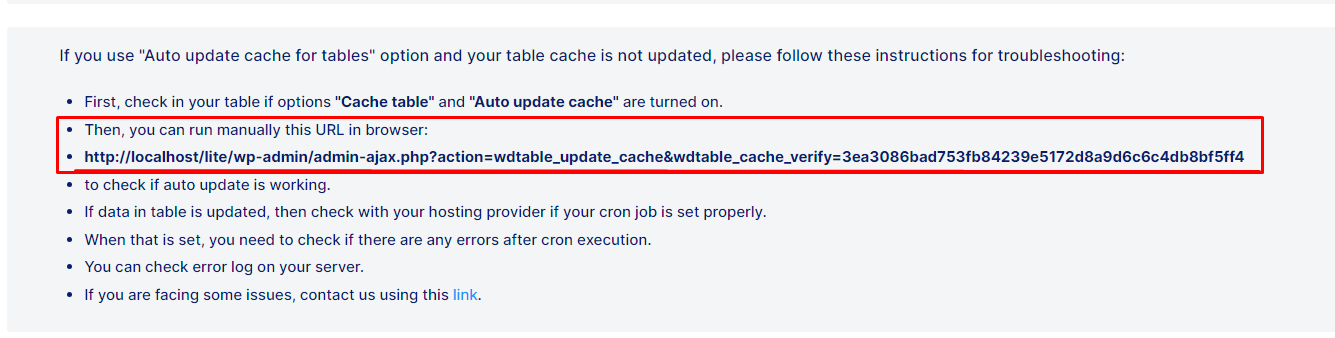
If your table updates the edited data with the manual command, then the issue is not coming from our Plugin but rather the Cron Job on your Site is not ‘firing’ correctly.
If that is the case, if you set up the cron directly on the Hosting server, please check with the Hosting Support what is the configuration on their server and try to modify it accordingly.
You can try our suggested variations as from the Documentation advise :*/15 * * * * your.website.url/wp-admin/admin-ajax.php?action=wdtable_update_cache&wdtable_cache_verify=your.cache.verify.stringIf that doesn’t work, please try these as well:
this*/15 * * * * wget -q -O – "your.website.url/wp-admin/admin-ajax.php?action=wdtable_update_cache&wdtable_cache_verify=your.cache.verify.string"or this
*/15 * * * * /usr/local/bin/php ~/public_html/wp-cron.php –action='wdtable_update_cache' –wdtable_cache_verify='your.cache.verify.string'or this
GET 'your.website.url/wp-admin/admin-ajax.php?action=wdtable_update_cache&wdtable_cache_verify=your.cache.verify.string' > /dev/null
or try with the WP Crontrol as per our instructions from the Documentation and from the “Cache” tab in the Plugin settings.Let us know if that helped.
Thank you.
Hello,
We are unable to reproduce this error, and at this time it seems you are the first/only user who reports this kind of error.
– If we understood, this happens on your front end Page(s) where you have our DataTables?
– Can you tell us which table types are you using on the page with the issue?
– Can you please also check, for each of the tables from that Page, are those specific tables loading correctly on their back-end table preview in WP-Admin, or are they also throwing some error to load at the back end?
The quickest way for us to isolate why this happens on your Site, as it seems to be an isolated incident, we would need to take a look at more details of your setup, which we can not proceed on this public Forum, so if you can please open a PRIVATE ticket on our main Support platform here, and one of our Agents will respond as quickly as possible.If you don’t have a licence (or if it expired), please open a pre-purchase ticket which doesn’t require a purchase code.
Thank you for understanding.
Kind regards.
Hello again.
What you’re trying to achieve can be accomplished only with the use of Filters (hooks). Here’s how it can work:
function filterColumnIDValue( $columnIDValue, $columnKey, $rowID, $columnID, $table_id){
    // For specific table id - in your case 26
    if ($table_id == 26) {
        // Filter for specific name of the column that contains unique values (origin header* of the column) - in your case 'JUPAS Code'
        if ($columnID == 'JUPAS Code') {
            // Filter for specific column ( origin header* of the column)- in your case 'Course Name' if this is the orig header
            if ($columnKey == 'Course Name') {
                $columnIDValue = do_shortcode("[post_title]");
            }
        }
    }

    return $columnIDValue;
}

add_filter('wpdatatables_cell_filter_column_id_value','filterColumnIDValue', 10, 5);
Please let us know if that helps.