wpDataTables

Forum Replies Created
-
Hello again,
Apologies for not catching your reply here earlier.
Thank you for these details and the screenshot of the Table.
Since you use the free version, this is then a ‘table linked from Excel file source’.
And you are using our ‘second variant’ of the Single Cell Shortcode for dataTables.
So, as we have shown in the Documentation, if you go for this format as :
[wpdatatable_cell table_id=”1″ column_key=”column_name” column_id=”custom_id_column” column_id_value=”custom_id_column_value”]
That means that the column_key will be the Column in which your cell you need to render is located.
In this case, that is correct, you need a cell from ‘Course name’, right?
Just make sure to check what is the ‘origin header name’, go in the Column Display settings and use the origin header ( in case if you have a different display header name).
Now, the ‘column_id‘. It is the name of the column that contains unique values (origin header name* of the column)
Then, the column_id_value – is the value from column_id column which tells the table which row to look for.
So you need to give it a unique value in column_id_value to pinpoint which row from Column “Course Name” you need in your single cell value.
Let’s say if we wanted to pull cell value in your table from Column Course Name to be this row which has “Anthropology” ( and some special letters which I can not write due to language barier) showing on your screenshot, I will highlight it in my image :
In this case, your Single Cell Shortcode will be :
[wpdatatable_cell table_id=”26″ column_key=”Course Name” column_id=”JUPAS Code” column_id_value=”JS4006″]
And that would pull up the “Anthropology” cell value in your Shortcode.
Let us know if this points you in the right direction to solve the issue?
If you still can’t solve it, can you show us a screenshot when you have the value/row you need showing in the table and how it looks;
What is the value for that specific row in “JUPAS Code” and what is the value in “Course Name”?
You can also send us your source Excel file so we can make a table from it to show you an example how to pull the specific cell you need.Hello @riflefish1,
We are just following up to make sure everything stayed fixed, happy to see that.
If anything new comes up, please don’t hesitate to open a new Post.
Thank you.Hello,
Can you please confirm is the value from this shortcode rendering properly/as expected in the cell of the source table back-end preview?
– Can you confirm what is the Table type ( of the source table which the value is being pulled from)?
– Are you using our Lite(free) or Premium Plugin version?
– If you can please show us more details how does the table render the value in the cell on back-end with a screenshot or a Video? ( we are not sure how you constructed the table exactly, etc)
Just make sure not to show any sensitive data here since this is a Public Support forum.
If you need to show any sensitive data from your Site, then we suggest to open a private ticket on our main Support platform.
If that is the case, or if you use the Premium Plugin version, please open a ticket on our main Support platform here, and one of our Agents will respond as quickly as possible.If you don’t have a licence (or if it expired), please open a pre-purchase ticket which doesn’t require a purchase code.
Premium products are not supported in these forums, as per this comment by ww.wp.xz.cn moderators.
Thank you for understanding.
Kind regards.
Hello,
Firstly, I would like to sincerely apologize for the delayed response as we have been experiencing an unusually high number of tickets. I am sorry that it has taken longer than usual to respond to your concern and your patience is highly appreciated.Since you’re using the Premium version of the plugin, please open a ticket on our main Support platform here, and one of our Agents will respond as quickly as possible, they will go in full details to help you troubleshoot this issue.
If you don’t have a licence (or if it expired), please open a pre-purchase ticket which doesn’t require a purchase code.
Premium products are not supported in these forums, as per this comment by ww.wp.xz.cn moderators.
Thank you for understanding.
Kind regards.
Hello,
Firstly, I would like to sincerely apologize for the delayed response as we have been experiencing an unusually high number of tickets. I am sorry that it has taken longer than usual to respond to your concern and your patience is highly appreciated.Since you’re using the Premium version of the plugin, please open a ticket on our main Support platform here, and one of our Agents will respond as quickly as possible, they will go in full details to help you troubleshoot this issue.
If you don’t have a licence (or if it expired), please open a pre-purchase ticket which doesn’t require a purchase code.
Premium products are not supported in these forums, as per this comment by ww.wp.xz.cn moderators.
Thank you for understanding.
Kind regards.
Hello,
As we pointed out on this Documentation about Tables linked from JSON source;
The JSON should be available via an URL that wpDataTables can access.
Yes, if you wish to make any table linked from a JSON source file, inside the Input file path or URL, you have to insert the full URL path to the source file, including the domain name.
For the time being, we don’t have a way to use a ‘relative path’ to a file without the domain name.
For example, if we insert a JSON file in the root folder of a website, on this test we will use a LocalHost on a computer, and if the full URL path is : http://localhost/lite/employees.json.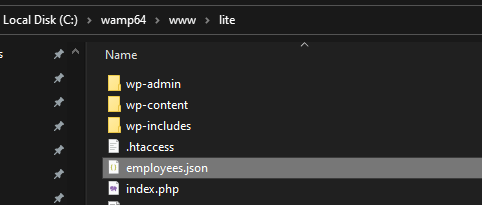

We can remove the https:// part and just leave the domain name followed by the path on the FTP/the site folder where the file is stored as :
localhost/lite/employees.json and that will work.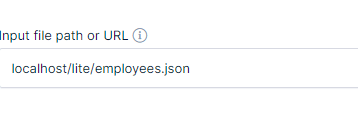
But if we remove the domain name completely, at the moment, that will not work.
If you wish to see the ability to use ‘relative path’ without the need to insert the full URL to the file source including the domain name, you can make a development suggestion.
Please feel free to search on our suggestions page, to see if someone may be already suggested this feature. If you can’t see it, feel free to add your suggestion there, and as more people vote, the feature will move higher on the priority list. You can certainly follow our changeLog if you’d like, where we state any changes/new features/bug fixes during updates;and our newsletter, so you’re informed about new features, bug fixes, freebies, etc.
Regarding the way we named the ‘input file path or URL’ field in the Table back-end settings, we will pass your feedback to our management and the developers.
They will do their best to update the way how we named that field and the tooltip for improved clarity for our users.
Let us know if you have any additional questions.
Thank you.Hello,
Apologies for replying to this so late, thank you for your patience.
Yes, basically the advanced column filtering from the paid version is going to allow you to have a lot more filtering flexibility and you can use our dynamic Placeholders such as the ‘currently logged user ID’ which can be used as a dynamic filter value.
The column filters are not available in the Lite Version.
Our premium support can provide more details, so it is best if you can open a Pre-Purchase ticket there and if you can try to elaborate with an example in more details so they will do their best to advise you how it can be done.
Thank you.- This reply was modified 2 years, 1 month ago by wpDataTables.
Hello,
Firstly, I would like to sincerely apologize for the delayed response as we have been experiencing an unusually high number of tickets.
I am sorry that it has taken longer than usual to respond to your concern and your patience is highly appreciated.
We are unable to reproduce that issue and so far, you are the only user who has an issue like that.
If we understood, the Table on the front End Page seems to be loading OK and you can see the Table load in the back-end preview in WP-Admin;
but when you try to edit the Page in your Page Builder/editor, it is throwing that error 404 there?
This could be a conflict, maybe something from a Theme or another Plugin could be having a conflict with the functionality of our Plugin, to cause that error;
or it could be a bad security setting on the Hosting server’s end, or the firewall, or a Security Plugin setting which is causing this.
Can you please check if it might be a conflict with these steps?
Change the theme and see if the issue is resolved.
If not, then please deactivate all other plugins except for our plugin, refresh the page where the issue is, and see if it is resolved (it should be).
If it is, then start activating other plugins one by one, and after each activation refresh the page to see if the issue reoccurred.
Once it does reoccur, you will have found the plugin causing the issue.
Let me know if you isolate a conflict with these steps.
If that does not help, can you reach out to the Hosting Support and have them check is there any security setting that could be blocking this functionality;
or firewall/ or a Security Plugin?
If none of that helps, we will need to take a more detailed look, but for that, please open a ticket on our main Support platform here,
and one of our Agents will respond as quickly as possible.
If you don’t have a licence (or if it expired), please open a pre-purchase ticket which doesn’t require a purchase code.
Kind regards
Hello,
Our sincere apologies for replying so late.
Thank you for your patience.If you can see the table load on the back end in WP-Admin, as you wrote in the table preview, but does not load on front end, it indicates you might have a conflict on the Site.
wpDataTables is a WYSIWYG (What You See Is What You Get) concept-based plugin.
This means that the table should look the same both in the back-end and in the front-end.
If your front-end table looks and behaves differently than in the back-end, this usually implies that there is another plugin (or the current theme) that’s changing the behavior of our plugin.
Can you please change the theme and see if the issue is resolved?
If not, then please deactivate all other plugins except for our plugin, refresh the page where the issue is, and see if it is resolved (it should be).
If it is, then start activating other plugins one by one, and after each activation refresh the page to see if the issue reoccurred.
Once it does reoccur, you will have found the plugin causing the issue.
Let me know if you isolate a conflict with these steps.
If you still can not isolate the issue for front end loading of the table, please open a ticket on our main Support platform here, and one of our Agents will respond as quickly as possible to go in more detailed troubleshooting with you.
If you don’t have a licence (or if it expired), please open a pre-purchase ticket which doesn’t require a purchase code.
Kind regards.
Hello,
Just a follow up to confirm our QA Team flagged this as a bug.
Our developers isolated the bug, and they’ll add it to their queue for fixing.They will do their best to build a fix as soon as possible. We don’t have an ETA on when the fix will be available, but please keep a lookout on our wpDataTables Lite changeLog and the Forminator integration changeLog.
It will be stated there during updates which bug fixes have been implemented at each update. If they create a fix in between updates, I will make sure to send it to you.
Thank you for reporting this.Hello,
Can you please confirm are you using the Lite or Premium Plugin version and which table types do you have?
Did you try to reinstall our Plugin, then purge all cache of your Site and try again?
Are the tables loading on the back-end in the WP-Admin preview?
We will do our best to advise you what the next step could be depending on these details.
Thank you.- This reply was modified 2 years, 1 month ago by wpDataTables.
Hello,
Sorry to disappoint you, but there is no built-in way to create a use-case where we would filter the table to only show the rows for the currently logged user, because in our Lite Version, you don’t have any column filters.
We only have our advanced column filtering available in the premium version.
If you wish to know more details about filtering options in the full version, please open a ticket on our main Support platform here, and one of our Agents will respond as quickly as possible.If you don’t have a licence (or if it expired), please open a pre-purchase ticket which doesn’t require a purchase code.
Premium products are not supported in these forums, as per this comment by ww.wp.xz.cn moderators.
Thank you for understanding.
Kind regards.
Hello,
Firstly, we would like to extend our sincere apologies for the delayed response. We were facing a higher volume of inquiries than usual, which has caused this delay.
We regret any inconvenience this may have caused you, and appreciate your patience during this time.Thank you for reporting this behaviour.
We are able to reproduce it on a test/dummy Forminator Form and linked to our Table.Just a couple of screenshot that demonstrates how the submissions from the Form are rendering which ones are “pm” and which ones are “am”

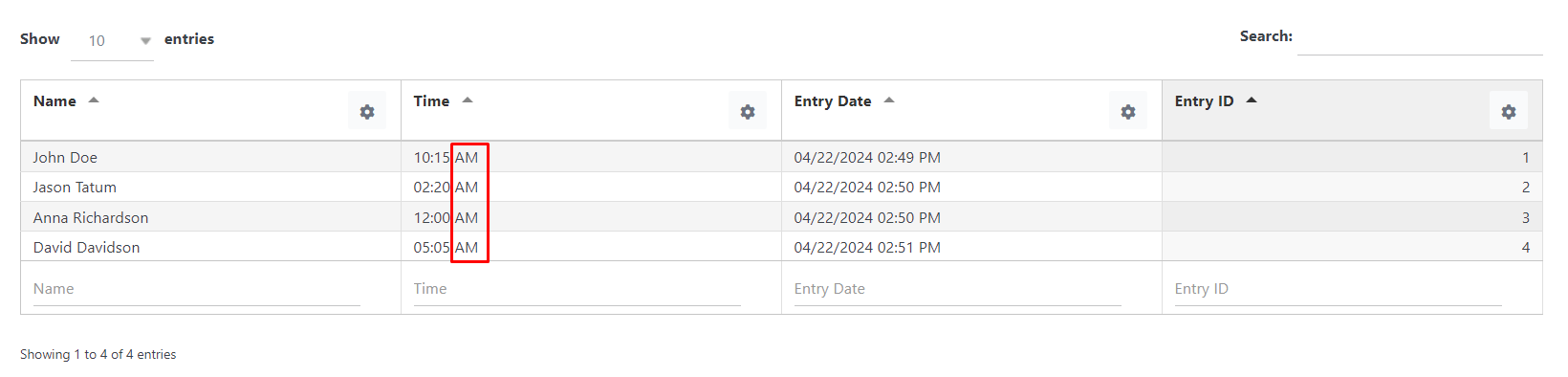
We tried changing the WP time format from the general settings to see if that can help, but for now, we can’t seem to find a workaround solution, our developers need to get involved in debugging it.

We are sending this to our QA Team, just to get the official confirmation, but it seems this is definitely a bug from our end for our integration.
As soon as we get more information and to confirm if we have any kind of a temporary fix, we will report back right away.
For now, if it is possible for your use-case to temporarily switch to 24 hours time format until we work on fixing it.
Thank you for all your patience.
Hello,
We currently do not have any ‘data validation’ as an ‘out of the box’ feature.
There can be a custom workaround for SQL based tables in our premium Plugin version for editable tables, where you would set a Unique constraint in MySQL through your Database Tool directly;
but on this Forum we only discuss features for our Lite Plugin version.
So, if you wish to ask more details about this, please open a ticket on our main Support platform here, and one of our Agents will respond as quickly as possible.If you don’t have a licence (or if it expired), please open a pre-purchase ticket which doesn’t require a purchase code.
Premium products are not supported in these forums, as per this comment by ww.wp.xz.cn moderators.
Thank you for understanding.
Kind regards.
Hello,
It is possible to edit data imported from Excel;
but editing is not available in our Lite Plugin version.
Since you’re using the Premium version of the plugin, please open a ticket on our main Support platform here, and one of our Agents will respond as quickly as possible.If you don’t have a licence (or if it expired), please open a pre-purchase ticket which doesn’t require a purchase code.
Premium products are not supported in these forums, as per this comment by ww.wp.xz.cn moderators.
Thank you for understanding.
Kind regards.