alexsev

Forum Replies Created
-
Thank you! Our plugin’s social icons aren’t placed on that page. Actually the plugin doesn’t seem to be active/installed. Could you please add the icons so that we can check the sharing functionality?
As we didn’t hear any reply in last weeks, I can assume that you resolved the issue.
Please feel free to open a new topic if I am wrong!
Thank you 🙂The icons show when checking from our end, please see here. Could you please clear your browser’s cache? Does that solve the issue?
Thanks for checking. The developers applied another fix in this version https://drive.google.com/file/d/1NYROt3fNRiY-ykQj5dNkIuu4MTwnpNYO/view?usp=sharing. Does that solve the issue?
We’ll release a new version in the next couple of weeks.
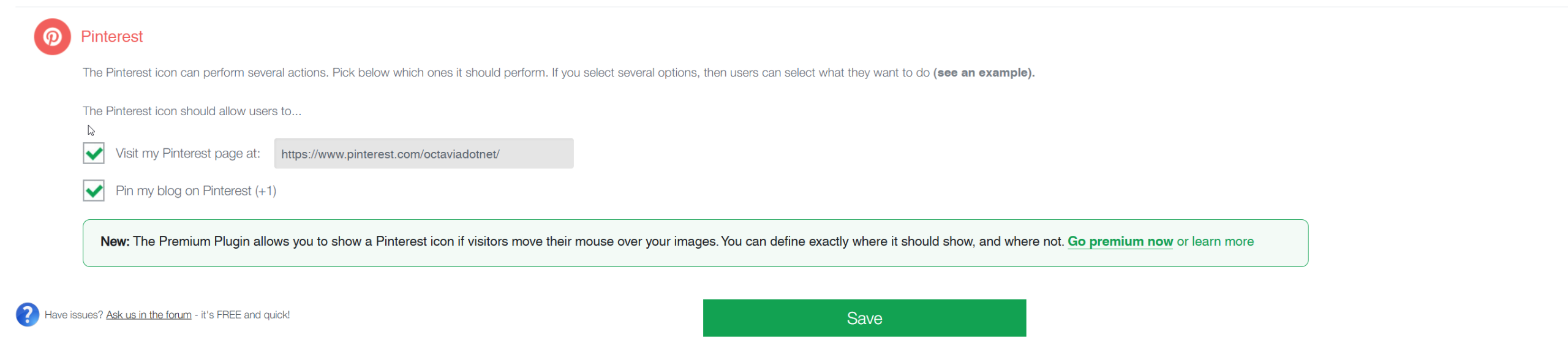
Thanks for reaching out @jonathanofvisby! We’ll fix this issue in the next version of the plugin. In the meantime you can select both Pinterest options under question number 2 in the plugin here.
Is that an acceptable workaround solution for you?
@erizzo could you please update the plugin to the latest version? Does that fix the issue?
The plugin shares the Open Graph properties of the specific URL being shared. I checked one URL, and in this particular case, these properties are either not set up on your site or access is blocked, meaning Facebook cannot retrieve them. Please see:
With this plugin: ultimatelysocial.com/usm-premium, you can define exactly what information gets shared, such as the title, description, and image.
Hi @erizzo
Thanks for reporting this – we’ll check it on our side.
Appreciate you bringing it to our attention!
Since the plugin worked perfectly initially the current behavior indicates an issue specific to your setup, such as a specific CSS/JS conflict introduced during the theme changes for example.
We are happy to check your site in more detail and resolve these theme conflicts directly. This hands-on troubleshooting, including fixing theme compatibility issues, is something we handle as part of this plugin https://ultimatelysocial.com/usm-premium/.
Forum: Plugins
In reply to: [Social Media Share Buttons & Social Sharing Icons] Log file PHP WarringHi @demetrioffr ,
Thank you for reaching out.
From the log you shared, there are two separate issues:
- PHP memory limit exhausted. Your server currently has a memory limit of 128MB, and WordPress is running out of available memory. Please try increasing the WordPress memory limit. You can do this by adding the following line to your wp-config.php file: define(‘WP_MEMORY_LIMIT’, ‘256M’);
- Undefined array key warnings. The warnings like “Undefined array key “sfsi_plus_copylinkIcon_order” typically occur when some plugin settings are missing or were not fully saved after an update. Could you please try clicking the green “Save All Settings” button from at the bottom of the plugin’s settings page? Does that solve the issue?
This usually happens due to a CSS conflict with the theme, especially if it started after activating the child theme.
Could you please try the following quick checks:
- Temporarily switch to the parent theme and see if the issue still happens.
- Disable any custom CSS added in the child theme and test again.
Thanks for your question, @jenmn. Do the counts appear if you reinstall the previous plugin version? You can download v2.9.6 from the bottom of this page:
https://ww.wp.xz.cn/plugins/ultimate-social-media-icons/advanced/Thanks for the report. Since this is a multisite setup and it works on the main site, the most likely cause is a subsite-specific difference. Could you please try the following on the affected subsite?
- Please confirm whether the plugin is Network Activated or activated only on individual sites, and that it’s active on this subsite as well.
- Temporarily disable any JS optimization (minify/merge/defer/delay) and clear all caches (plugin/server/CDN), then re-test.
- If possible, temporarily switch the subsite to a default theme (…e.g. Twenty Twenty-Four) and check if the issue persists.
Forum: Plugins
In reply to: [Social Media Share Buttons & Social Sharing Icons] Remove MouseoverThanks for your question @at88studio! We’ve implemented this solution in this plugin https://ultimatelysocial.com/usm-premium.