discoariet

Forum Replies Created
-
Forum: Plugins
In reply to: [Price Based on Country for WooCommerce] modified urlthanks, SOLVED 🙂
Forum: Plugins
In reply to: [WooPayments: Integrated WooCommerce Payments] Payments – empty pageSOLVED!
I restored a backup and did the plugins updates again.
Forum: Plugins
In reply to: [PW WooCommerce Gift Cards] not show the gift card imageit was a conflict with theme, so I ‘ve unistalled your plugin.
Forum: Plugins
In reply to: [WooPayments: Integrated WooCommerce Payments] Setting hidden after updatenow all fields are visible…
Forum: Plugins
In reply to: [WooPayments: Integrated WooCommerce Payments] Setting hidden after update### WordPress Environment ### WC Version: 6.1.1 REST API Version: ✔ 6.1.1 WC Blocks Version: ✔ 6.5.2 Action Scheduler Version: ✔ 3.4.0 WC Admin Version: ✔ 3.0.3 Log Directory Writable: ✔ WP Version: 5.9 WP Multisite: – WP Memory Limit: 768 MB WP Debug Mode: – WP Cron: ✔ Language: it_IT External object cache: ✔ ### Server Environment ### Server Info: Apache PHP Version: 7.4.27 PHP Post Max Size: 256 MB PHP Time Limit: 120 PHP Max Input Vars: 3000 cURL Version: 7.66.0 OpenSSL/1.1.1l-fips SUHOSIN Installed: – MySQL Version: 5.7.32-35-log Max Upload Size: 256 MB Default Timezone is UTC: ✔ fsockopen/cURL: ✔ SoapClient: ✔ DOMDocument: ✔ GZip: ✔ Multibyte String: ✔ Remote Post: ✔ Remote Get: ✔ ### Database ### WC Database Version: 6.1.1 WC Database Prefix: lww_ ### Security ### Secure connection (HTTPS): ✔ Hide errors from visitors: ✔ ### Active Plugins (24) ### ### Settings ### API Enabled: – Force SSL: – Currency: EUR (€) Currency Position: right_space Thousand Separator: . Decimal Separator: , Number of Decimals: 2 Taxonomies: Product Types: external (external) grouped (grouped) simple (simple) variable (variable) Taxonomies: Product Visibility: exclude-from-catalog (exclude-from-catalog) exclude-from-search (exclude-from-search) featured (featured) outofstock (outofstock) rated-1 (rated-1) rated-2 (rated-2) rated-3 (rated-3) rated-4 (rated-4) rated-5 (rated-5) Connected to WooCommerce.com: – ### WC Pages ### ### WooCommerce PayPal Payments ### Onboarded: ✔ Shop country code: IT WooCommerce currency supported: ✔ PayPal card processing available in country: ✔ Pay Later messaging available in country: – Webhook status: – Vault enabled: ✔ Logging enabled: – Reference Transactions: – Used PayPal Checkout plugin: – ### WooCommerce Payments ### Version: 3.6.0 Connected to WPCOM: Sì ### Action Scheduler ### Complete: 1.165 Oldest: 2022-01-11 14:57:10 +0100 Newest: 2022-01-26 16:01:17 +0100 Pending: 1 Oldest: 2022-01-26 17:52:29 +0100 Newest: 2022-01-26 17:52:29 +0100 ### Status report information ### Generated at: 2022-01-26 16:21:39 +01:00- This reply was modified 4 years, 4 months ago by discoariet.
Forum: Plugins
In reply to: [WooPayments: Integrated WooCommerce Payments] Setting hidden after updateno sensitive info
- This reply was modified 4 years, 4 months ago by discoariet.
- This reply was modified 4 years, 4 months ago by discoariet.
Forum: Plugins
In reply to: [YITH WooCommerce Product Add-Ons] order + image add-ons + quantitysolve, there was a conflict with plugin FileBird
Forum: Plugins
In reply to: [YITH WooCommerce Product Add-Ons] order + image add-ons + quantityconsole show me en error:
Uncaught TypeError: this._addClass is not a function at e.<computed>.<computed>._create (sortable.min.js?ver=1.12.1:9) at e.<computed>.<computed>._create (jquery-ui.min.js?ver=5.6.2:6) at e.<computed>.<computed>._createWidget (jquery-ui.min.js?ver=5.6.2:6) at new e.<computed>.<computed> (jquery-ui.min.js?ver=5.6.2:6) at HTMLUListElement.<anonymous> (jquery-ui.min.js?ver=5.6.2:6) at Function.each (jquery.min.js?ver=3.5.1:2) at s.fn.init.each (jquery.min.js?ver=3.5.1:2) at s.fn.init.e.fn.<computed> [as sortable] (jquery-ui.min.js?ver=5.6.2:6) at HTMLDocument.<anonymous> (yith-wapo-admin.min.js?ver=1.5.35:1) at e (jquery.min.js?ver=3.5.1:2)Hi @champsupertramp,
yes, I tried and it works well!!!!
I solved!
Check “Display the code in loop” in Product GTIN Settings/Show Code GTINme too…and also in front-end
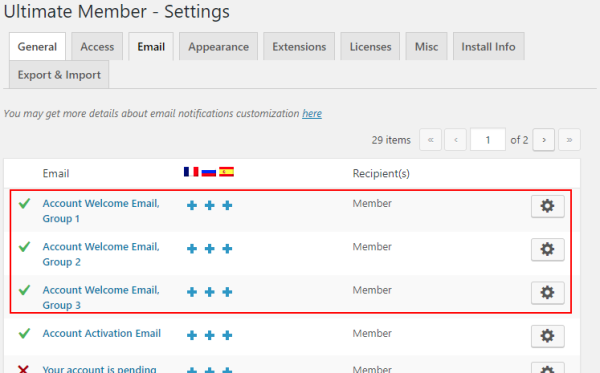
I noticed that in the code example there are only custom welcome templates: https://d33v4339jhl8k0.cloudfront.net/inline/27673/9c7651597c80d487eb5a29464bf2ea7796dfee97/cf83e680595ed7ea15e824716a573e4821fefafc/UM-Email-custom-email-templates.png
one for every role; and there isn’t default welcome template.Maybe the solution can be to specify in function.php which roles use default welcome template?
Hi!!!! 🙂
Custom welcome email: http://discoariet.netsons.org/um/emailCustom.png
Default welcome email: http://discoariet.netsons.org/um/defaultEmail.png
Settings: http://discoariet.netsons.org/um/img1.pngI add the code https://docs.ultimatemember.com/article/1515-how-to-add-and-use-custom-email-templates in wp-content/theme/theme-child/functions.php
- This reply was modified 5 years, 4 months ago by discoariet.