DWUser

Forum Replies Created
-
Forum: Reviews
In reply to: [EasyRotator for WordPress - Slider Plugin] installs something on your pcHi @thepeppi,
Thanks for writing, and I’m sorry the plugin hasn’t met your needs. Rotators can be edited from any computer, so I think that might be a point of confusion – sorry about any confusion there. Regarding having to install an external editor application, I’ve shared in other posts our philosophy on that:
The external editor application allows for more efficient and powerful editing features; for example, images can be resized and optimized before being uploaded to the web. This saves uploading time and allows for quicker development. Obviously, not every plugin is perfect for every use case. EasyRotator for WordPress is well maintained and offers extensive functionality. Many other plugins are more limited and/or don’t receive regular maintenance. While the up-front setup usually takes a minute or two (as mentioned clearly in the plugin description), we believe that the long-term benefits outweigh the initial investment.
This requirement is mentioned in the plugin requirements; if you disagree with having to install an external editor we certainly respect your opinion, but we do humbly request that you not bash the plugin when reading the requirements could have allowed you to effectively prejudge the plugin’s merits for your situation.
As you may have noticed, many other users find the plugin experience to be notably superior to the alternatives, so I’m sorry you didn’t proceed to the point of actually using the plugin.
Please let me know if there’s any other way we may provide clarification or assistance. Thanks!
Sincerely,
Drew O’NeillForum: Plugins
In reply to: [EasyRotator for WordPress - Slider Plugin] Doesn't work on Google ChromeIf you’re wanting to proceed any further with this (I understand if you choose not to), please open a support ticket at http://www.dwuser.com/ and send a screenshot of what you see -and/or- temporary WordPress login credentials so I can attempt to reproduce the issue.
Sincerely,
Drew O’NeillForum: Plugins
In reply to: [EasyRotator for WordPress - Slider Plugin] Doesn't work on Google ChromeHi,
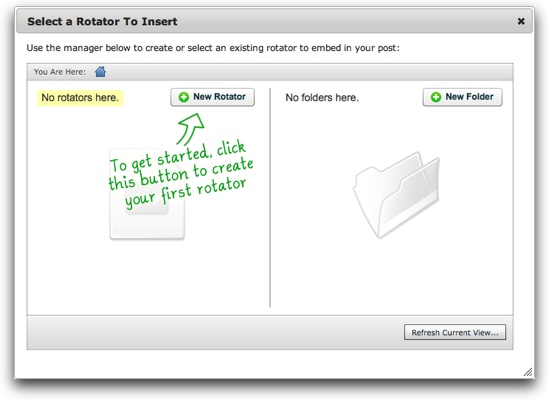
You should see the option to click the “New Rotator” button like this:
[Image link: http://www.dwuser.com/images/products/easyrotator/support/erwp/posts_pages/insert_dialog1.jpg ]
(Detailed instructions here: http://www.dwuser.com/support/easyrotator/wordpress/#insert )
Sincerely,
Drew O’NeillForum: Plugins
In reply to: [EasyRotator for WordPress - Slider Plugin] Doesn't work on Google ChromeHi Daniel,
Again, I’m sorry for any inconvenience or wasted time; I definitely understand that’s annoying! It sounds like you’re on the cusp of getting things running if you change your mind – you should only need to go to your Applications folder and right-click (command+click) on the EasyRotator application and select Open. You’ll then be given the option to continue and the “unidentified developer” error won’t appear again in the future. This error can appear depending on how the app is installed.
Sincerely,
Drew O’NeillForum: Plugins
In reply to: [EasyRotator for WordPress - Slider Plugin] Doesn't work on Google ChromeHi Daniel,
Thanks for checking out EasyRotator, and I’m sorry you’re experiencing trouble. No configuration changes are needed in Chrome; can you please confirm the specific error message you’re receiving?
Sincerely,
Drew O’NeillForum: Plugins
In reply to: [EasyRotator for WordPress - Slider Plugin] Black Title line covers photosThanks for the update! Feel free to get in touch again in the future if you experience any other issues.
Sincerely,
Drew O’NeillForum: Plugins
In reply to: [EasyRotator for WordPress - Slider Plugin] Black Title line covers photosHi,
It looks like this template originally had a category selector, which has resulted in the extra space at the top. You’ll want to make the following adjustments to the layout code ( http://www.dwuser.com/support/easyrotator/kb/customize-layout/ ):
On the first line, adjust the top value to be 0:
<div class="erimgMain" style="position: absolute; left:0;right:0;top:40px;bottom:70px;" ...
Becomes:
<div class="erimgMain" style="position: absolute; left:0;right:0;top:0;bottom:70px;" ...Then, a few lines later, adjust the bottom value for the image display:
<div class="erimgMain_img" style="position: absolute; left: 0; right: 0; top: 0; bottom: 0;"></div>
Becomes:
<div class="erimgMain_img" style="position: absolute; left: 0; right: 0; top: 0; bottom: 40px;"></div>That should adjust the image position so that overlap is avoided in mobile view.
Sincerely,
Drew O’NeillForum: Plugins
In reply to: [EasyRotator for WordPress - Slider Plugin] Black Title line covers photosHi Adalinka,
Thanks for using EasyRotator! Some layouts may appear better on mobile devices if small adjustments are made to the layout code. Can you please send the URL of your page so I can make recommendations?
Sincerely,
Drew O’NeillHi @kkuivi,
Can you please open a new thread specific to your issue? It’s good etiquette to start new threads for new issues. Thanks!
Sincerely,
Drew O’NeillI’m glad the product has been helpful to you, and we’re happy to help! Best of luck with your project!
Sincerely,
Drew O’NeillForum: Plugins
In reply to: [EasyRotator for WordPress - Slider Plugin] Multiple editor of slidersHi Tanya,
Yep – the plugin will automatically prompt your client to use the EasyRotator editor auto-installer, just as you were prompted.
Sincerely,
Drew O’NeillForum: Plugins
In reply to: [EasyRotator for WordPress - Slider Plugin] Full image in the film stripHi Keith,
Thanks for using EasyRotator. To avoid the default scaling and cropping, re-apply the template in the Layout/Presentation section of the editor and be sure to select the Scale Down mode for thumbnail scaling.
Sincerely,
Drew O’NeillForum: Reviews
In reply to: [EasyRotator for WordPress - Slider Plugin] Worked First TimeThanks for the positive feedback!
Sincerely,
Drew O’NeillForum: Plugins
In reply to: [EasyRotator for WordPress - Slider Plugin] Multiple editor of slidersHi Tanya,
Thanks for using EasyRotator for WordPress. Any number of editors can modify rotators; if a new person makes an edit, the appropriate files will be downloaded to her computer. Whenever a new person attempts to make an edit, the latest version will be downloaded to avoid any accidental overwrites of changes.
Sincerely,
Drew O’NeillHi @pinkeyegraphics,
Thanks for the honest feedback! I’m sorry the installation process wasn’t more straightforward for you; in contrast with other users, your experience wasn’t typical. Nevertheless, I trust that the inconvenience will be made up for by the usefulness of the plugin!
Please let me know if you have any other questions as you get started with it.
Sincerely,
Drew O’Neill