Password Protect WordPress Page Support

Forum Replies Created
-
Hi @mohhamedion,
Thanks for reaching out to us last night.
It looks like you’re using the NGINX server. That’s why our rewrite rules and file protection aren’t working at the moment.
To assist you better, please provide us with:
- Some screenshots of your PDA settings page.
- The hosting server you’re using.
For faster assistance from our team, please drop us an email at hello(at)preventdirectaccess.com.
We look forward to hearing from you soon.
Forum: Plugins
In reply to: [PPWP - Password Protect Pages] Not working in CPTJust to update, the issue is resolved via direct email exchange with the user.
If you’re using Elementor template for your CPT, please add the following code snippet to your (child) theme’s functions.php for our password protection to work properly.
add_action('elementor/theme/before_do_single', 'ppwp_before_do_single', 16);
function ppwp_before_do_single( $slug ) {
    if ( post_password_required() ) {
        echo get_the_password_form();
        echo get_footer();
        exit();
    }
}
If you’re happy with our plugin and support, can you leave us a kind review, please @lukcomunicacion?
https://ww.wp.xz.cn/support/plugin/password-protect-page/reviews/Hi @spotlightlocal,
Thanks for reaching out to us last night.
Our PPWP Free works perfectly with the W3 Total Cache plugin without any extra configurations.
It could be a cache issue with Cloudflare though.
Can you please drop us an email at [email protected] with the following information so that we can assist you faster?
- Passwords of test page
- Screenshots of the page’s Edit screen on your WordPress back-end
We look forward to your email.
Forum: Reviews
In reply to: [PPWP - Password Protect Pages] Protect one page = $179/yr = NO.Hello @alldigitall,
Did you get our last response?
Please give us just 5 minutes. I believe we can get everything up and running for you without having to pay anything.
Forum: Reviews
In reply to: [PPWP - Password Protect Pages] Protect one page = $179/yr = NO.No worries, @alldigitall.
I believe our UI might have caused some confusion for you.
Actually, our Free version allows you to protect both Pages & Posts with unlimited & role-bassed passwords by default.
If I’m not wrong, there is no existing solution (whether free or paid) offering that unlimited and role-based passwords. And we provide it on our Free version.
Only when you need to protect Custom Post Types should you need our PPWP Pro.
That’s what the “?” tooltip is all about.I’ve already gave your feedback to our UI/UX team. We will improve that notice on the upcoming version of our Free version.
Meanwhile, please give our PPWP Free/Lite version another try.
You may want to go to our chat support located at the bottom of our website or drop us an email so that we can quickly assist you getting the protection up and running.
Thousands of users are happy with just our PPWP Lite version.
Awaiting your reply, @alldigitall.
Forum: Reviews
In reply to: [PPWP - Password Protect Pages] Protect one page = $179/yr = NO.Hello @alldigitall,
Thanks for your feedback.
Just to clarify, it’s $178.80 per year and not per month.
Anyway, you will only need the PPWP Pro version for advanced and complex use cases.
Have you tried our Free version yet?
There are also offers available especially when you only need to protect one page.
Can you please drop us a quick email to hello(at)preventdirectaccess.com now?
Please allow us to help. I am sure you won’t get disappointed.
Elena
Forum: Plugins
In reply to: [PPWP - Password Protect Pages] Are protected posts hidden in archive pages?Hi @dejudicibus,
Thanks for reaching out to us.
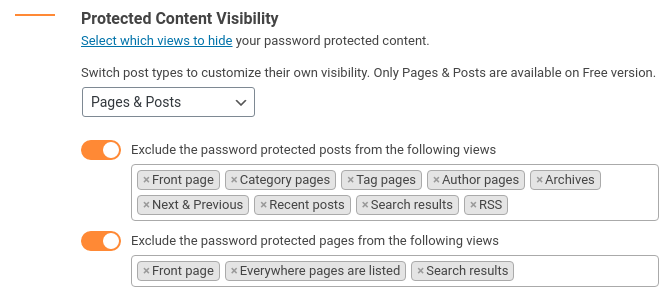
Yes, we do provide an option for you to exclude/hide your password protected posts in archive pages.
Please refer to our documentation on how to control your protected content’s visibility.
To assist you better, do you mind sharing with us what you want to achieve with our plugin in more detail, e.g. your use case?
You might also want to drop us an email at hello(at)preventdirectaccess.com for faster response from our team.
We look forward to your reply.
Forum: Plugins
In reply to: [Prevent Direct Access - Protect WordPress Files] Non downloadable PDFHi @thalagraphics,
Thanks for reaching out to us last night.
Yes, you can protect your PDF files against download with our PDA Gold and Watermark WordPress Files plugins.
Our plugins will auto-generate private expiring links to display the PDF files into the content.Here is a demo on how to protect WordPress PDF Files.
To assist you better, may we know:
- Where are you hosting your files now and what’s the average file size?
- Who do you want to grant file access to?
- Which membership plugin are you using?
- Do you plan to display multiple PDF files on one page?
Please send us a sample file URL to take a look at.
You might also want to drop an email at hello(at)preventdirectaccess.com for faster response from our team.
Thanks for your reply, @victormattosvm. It really helps.
We haven’t supported the “Offload to S3” feature for variable products at the moment, unfortunately.
That’s why the button doesn’t work.
That said, our team will consider developing this feature in the upcoming versions.
We will keep you posted on any updates.
By the way, if you’re happy with our plugin features and support so far, do you mind leaving us a kind review on WordPress, please?
It would mean a lot to us and will encourage us to work harder in the future.
Thanks for your kind words!
Forum: Plugins
In reply to: [PPWP - Password Protect Pages] Videos dont play within restricted contentHi @akabeard,
Thanks for reaching out to us last night.
It looks like a JavaScript conflict.
To assist you better, could you please send us the password to access your protected section to double-check?
You might want to drop us an email to hello(at)preventdirectaccess.com for faster assistance from our team.
We look forward to your reply.
Hi @victormattosvm,
Thanks for reaching out to us.
Our plugin will display the error message in the debug.log file.
To assist you better, please enable debug mode and send us the log.
You might want to drop us an email at [email protected] for faster assistance.
We look forward to your reply.
Forum: Plugins
In reply to: [PPWP - Password Protect Pages] Failed to load resource error on login pageThanks for your reaching out to us.
It is a warning message related to Divi theme and should not be the reason for the UI broken.
To protect a part of content built by Divi, you need to enable “Use Shortcode within Page Builder” option on our settings page.
Please refer to our Divi Integration documentation for more information.
Let us know if you have any questions.
You might want to drop us an email at [email protected] for faster assistance.
We look forward to your reply.
Forum: Plugins
In reply to: [PPWP - Password Protect Pages] Custom Button Color in Elementor WidgetHi Filip,
Thanks for reaching out to us.
It looks possible to achieve that with our plugin. You can style your password form using WordPress Customizer or directly on your page builder.
To assist you better, may we know:
- Are you using our PPWP Free or Pro version?
- Which type of content do you want to protect, e.g. the entire site, single pages/posts, partial content?
- A sample page URL where you’d like to customize the password form will be best
Please share with us what you want to achieve in more detail so that we can assist you better.
You might also want to drop an email at [email protected] for faster assistance from our team.
We look forward to your reply.
- This reply was modified 5 years ago by Password Protect WordPress Page Support.
Forum: Plugins
In reply to: [PPWP - Password Protect Pages] Cookie nonce is invalid ErrorHope you’re doing well.
Our team has double-checked the PPWP function with the Astra Pro theme. Everything is working well on our side.
It looks like a caching issue since it disappeared after we excluded the protected page from the Ezoic’s cache.
By the way, if you’re happy with our plugin features and support so far, do you mind leaving us a kind review on WordPress, please?
Your kind words would mean a lot to us and will encourage us to work harder & support you even better in the future.
Thanks a lot for your kind words!
- This reply was modified 5 years ago by Password Protect WordPress Page Support.
Forum: Plugins
In reply to: [PPWP - Password Protect Pages] Password not updatingHi @karinaisp,
Thanks for reaching out to us last night.
It looks like you’re protecting content using our [ppwp] shortcode. If so, you can change the passwords via the “passswords” attribute like this.
[ppwp passwords= "password1 password2 custom-password3"] Your content [/ppwp]You can refer to our PCP documentation for more information.
As suggested by @jlmiller, please try to log into the WordPress dashboard then send us a screenshot of your editor page in the back-end.
You might want to drop an email at [email protected] for faster assistance.
We look forward to your reply.