Shahin

Forum Replies Created
-
Forum: Themes and Templates
In reply to: [OceanWP] Critical Error in CustomizerHello @sunsta,
Thank you for reaching out.
I fully examined the issue you described but was unable to replicate it on my end.
Also, WooCommerce store notice is working fine on my end in all version of PHP: https://postimg.cc/zybssf95.Regarding the Critical Error, since you’re seeing a general “critical error” message. Please enable WordPress debug mode by following the steps here: https://ww.wp.xz.cn/documentation/article/debugging-in-wordpress/.
Once enabled, share the exact error message here as code (you can paste it or upload to Pastebin site or Gist site (GitHub). That will help us pinpoint what’s going wrong on your website.To help us investigate further, please also provide:
1. When did you first notice the issue, after a specific update, on a particular device, etc.? and what are the exact steps that trigger it? Screenshots or a short video are very welcome (Loom, Postimages, Google Drive, Dropbox, etc).
2. Explain to us step by step how we can reproduce the issue so we can recreate it somewhere other than your website.
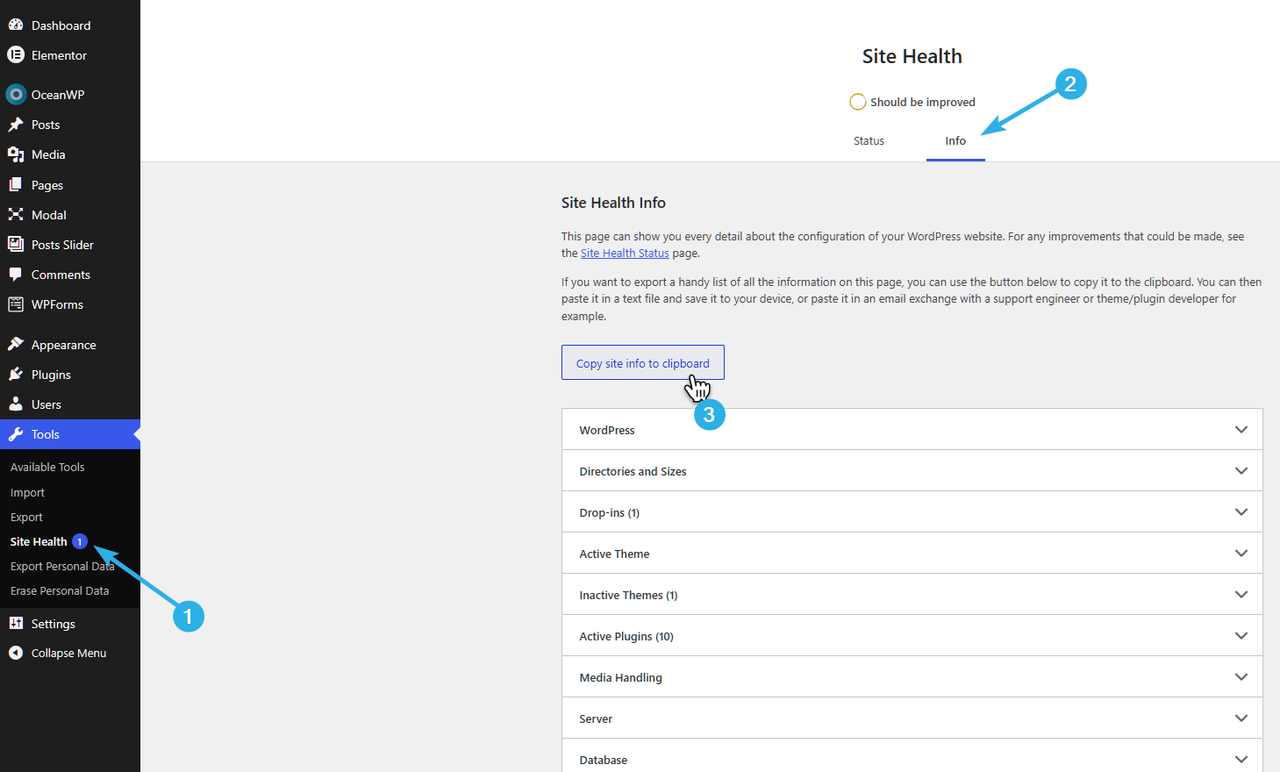
3. Your system environment info: go to WP Dashboard > Tools > Site Health > Info tab and click “Copy site info to clipboard”. Paste it here as code or share via https://pastebin.com or https://gist.github.com (you can remove your email from the content).
Before sending these, please make sure that:
Everything on your website is running the latest versions (WP, theme, plugins).
If possible, perform a basic troubleshooting checkup method and make sure the issue is related to our theme or plugin(s). To do this, deactivate all other plugins then activate them one by one and check for this issue. Continue doing this until you find what product is causing a conflict with our product. Then provide the details as explained above.Note: If you have a caching plugin or server-level cache (CDN, browser cache, etc.), please clear it or disable it so your changes take effect properly.
Please keep us posted.
Thank you,
Best RegardsForum: Themes and Templates
In reply to: [OceanWP] WP7 Update – Captions changed to left alignedHello @reiseabenteuerlich,
Thank you for the update.
This topic has been forwarded to the developer team,
and we’ll get back to you with the information once it is available.I appreciate your patience.
Best RegardsForum: Themes and Templates
In reply to: [OceanWP] WP7 Update – Captions changed to left alignedHello @reiseabenteuerlich,
Thank you for reaching out.
I fully tested the previous and latest WordPress and OceanWP updates but was unable to replicate the issue. By default, if an image block has no specific alignment set in the editor, aligns of the caption set to the left side.
Also, looking at the link you provided, I noticed that no alignment has been set for the image blocks, which means they are currently using the default layout: https://postimg.cc/XrVr1VpD.
You can use the CSS below in Customizer > Custom CSS/JS to center the default image captions:
figure:not(.alignleft, .alignright) .wp-element-caption {
  margin-left: auto;
  margin-right: auto;
  max-width: fit-content;
}
Regarding the font change in the editor, it is likely a caching conflict.
Please try these steps:
I. Clear your website/server cache and CDN.
II. If you use Elementor, go to Elementor > Tools and click Regenerate Files & Data.
III. Perform a hard refresh: (Win: Ctrl+Shift+R / Mac: Shift+Cmd+R).Hope it helps,
Best RegardsForum: Themes and Templates
In reply to: [OceanWP] Font Awesome in the OceanWP theme – problemHello @marcinek28,
Thanks again for reaching out, and for the patience.
I’m sharing the reply I got from our dev team in full.
We understand the desire to chase the perfect scores. However, it’s important to understand that those results are recommendations and suggestions, and not an absolute source of truth.
#1 OceanWP avoids using ‘swap’ for icons on purpose
Leaving out the ‘swap’ when it comes to Font Awesome icons was done on purpose, and this is not the case just with OceanWP, but there’s a reason for it.
Google’s PageSpeed is nothing more than an automated simulation that uses general scanning rules.
If the tool sees web font file formats, such as ‘.woff2’, it will automatically add a suggestion (or warning if you wish), that it must use ‘swap’ in order to remain visible while the text is loading.
However, icons are NOT text, and such tools don’t know the difference between a regular font like Roboto and an icon font like FontAwesome.
When you use the ‘swap’ rule in combination with regular fonts, your browser is using your own system fonts as a replacement until your actual font is loaded, so that the text is visible until the stylesheets are loading in the background.
But, when it comes to icons, the browser has absolutely nothing to swap the icons with since it’s not text.
#2 Available options
Basically, you have 3 options at your disposal:
1. You can continue using Font Awesome as is, with a better understanding how tools like PageSpeed operate and why this is “flagged” in the first place. And you can ignore the suggestion entirely.
2. Instead of using Font Awesome, you can opt-in for OceanWP SVG Icons, that you can enable via Customize > Site Style & Settings > Site Icons, then select OceanWP SVG Icons from the dropdown. Ensure this stylesheet is not disabled via Customize > Performance.
3. If you want to continue using Font Awesome icons, but only “remove” PageSpeed suggestions, you can apply the following snippet to your child theme’s functions.php file:
/**
 * Force font-display: swap for OceanWP Font Awesome
 *
 */
function oceanwp_master_fa_font_display_swap() {
    // All FA variants.
    $custom_css = "
        /* Font Awesome 6 - Regular & Solid */
        @font-face { font-family: 'Font Awesome 6 Free'; font-style: normal; font-weight: 400; font-display: swap; }
        @font-face { font-family: 'Font Awesome 6 Free'; font-style: normal; font-weight: 900; font-display: swap; }
        @font-face { font-family: 'Font Awesome 6 Brands'; font-display: swap; }

        /* Font Awesome 5 - Regular & Solid */
        @font-face { font-family: 'Font Awesome 5 Free'; font-style: normal; font-weight: 400; font-display: swap; }
        @font-face { font-family: 'Font Awesome 5 Free'; font-style: normal; font-weight: 900; font-display: swap; }
        @font-face { font-family: 'Font Awesome 5 Brands'; font-display: swap; }

        /* Legacy & v4 Compatibility Fonts */
        @font-face { font-family: 'FontAwesome'; font-style: normal; font-weight: 400; font-display: swap; }
        @font-face { font-family: 'FontAwesome'; font-style: normal; font-weight: 900; font-display: swap; }
        @font-face { font-family: 'FontAwesome'; font-display: swap; }
    ";

    // Inline style injection via WordPress handles.
    $handles = array('font-awesome', 'fontawesome', 'oceanwp-font-awesome');
    foreach ( $handles as $handle ) {
        if ( wp_style_is( $handle, 'enqueued' ) ) {
            wp_add_inline_style( $handle, $custom_css );
        }
    }

    // Force late header printing to prevent caching plugins from stripping the rules.
    echo "<style id='oceanwp-fa-master-swap'>" . $custom_css . "</style>";
}

// Hook into enqueue and header printing lines to ensure entire coverage.
add_action( 'wp_enqueue_scripts', 'oceanwp_master_fa_font_display_swap', 999 );
add_action( 'wp_head', 'oceanwp_master_fa_font_display_swap', 9999 );
#3 Important disclaimer about using the step 3. ie. applying the PHP snippet
We need you to understand that if you choose to enforce the PHP snippet in order to remove the PageSpeed recommendations, the following may happen:
– some FA stylesheets may still load due to legacy FA versions, as well as older FA versions which are still kept for compatibility with other plugins.
– during page load, your icons may be displayed as boxes, or boxes with ‘text’, or the actual icon code may be displayed, until the stylesheets are loaded in full.
– this method may not only affect your users experience (seeing weird ‘text’ in place of icons) but it can also affect your CLS scores.Crucial: after applying the snippet, you must clear cache on ALL levels: CDN, website (via hosting and/or caching plugins), and browser. You must also regenerate Critical CSS or Unused CSS if you have optimization plugins installed and are using these features.
Our recommendation in this case would be to either ignore the suggestions or use OceanWP SVG Icons instead of Font Awesome.
However, the final decision rests with you.
Best Regards
Forum: Themes and Templates
In reply to: [OceanWP] Top bar logo & text won’t stay centeredHello @phoenixblue,
Thank you for the update.
Glad to hear that. When the header is built inside a page builder, all the styling and alignment settings come from there. For better results, it’s recommended to use widgets that are specifically designed for headers, as they follow header standards by default.
However, I’m glad you were able to resolve that.
Best RegardsForum: Themes and Templates
In reply to: [OceanWP] Font Awesome in the OceanWP theme – problemHello @marcinek28,
Appreciate your update.
This has been escalated to the developer team, and we’ll get back to you with more information as soon as it’s available.
Thank you for your patience.
Best RegardsForum: Themes and Templates
In reply to: [OceanWP] Font Awesome in the OceanWP theme – problemHello @marcinek28,
Thanks for your feedback.
This topic has been forwarded to the developer team, and we’ll get back to you with the information once it is available.
As a temporary solution, you can use this method and add the following code into the child theme > functions.php
add_action('wp_head', function() {
    echo '<style>
        @font-face {
            font-family: "Font Awesome 5 Free";
            font-weight: 900;
            font-display: swap;
            src: url("' . get_template_directory_uri() . '/assets/fonts/fontawesome/webfonts/fa-solid-900.woff2") format("woff2");
        }
    </style>';
}, 10);
OceanWP Child Theme: https://docs.oceanwp.org/article/90-sample-child-theme.
Alternatively, you can use this plugin: https://ww.wp.xz.cn/plugins/host-webfonts-local/ (OMGF Plugin).
Hope it helps, and thank you for using OceanWP.
I appreciate your patience.
Best Regards- This reply was modified 2 weeks ago by Shahin.
Forum: Themes and Templates
In reply to: [OceanWP] Top bar logo & text won’t stay centeredHello @phoenixblue,
Thank you for reaching out.
Unfortunately, the information provided is insufficient to understand or troubleshoot the issue you are facing.
Would you please provide us live URL from the issue.
Also, share some screenshots or short video of the issue you faced step by step?You can upload your files to one of the following online services:
https://drive.google.com
https://wetransfer.com
https://dropbox.comOnce you have those details, let us know and we’ll take it from there.
Please keep us posted.
Best RegardForum: Themes and Templates
In reply to: [OceanWP] Conflict between the OcenaWP theme and WordPress 7.0.You are welcome,
I’m glad that you were able to find that.Hello @aduwow,
Thank you very much for taking the time to submit a compatibility report about this deprecation notice, as well as providing a potential solution for the compatibility patch.
We understand you already know this is a warning and will not cause a fatal error, but for anyone else reading this thread, it is worth noting that this is a notice for a change that will eventually become a stricter error in future PHP versions.
While PHP 8.5 was released at the end of last year, it is still considered very ‘fresh’ and hasn’t been adopted by the majority of hosting providers just yet.
We currently recommend keeping production sites on PHP 8.3 or 8.4, as this is the safest bet for ensuring a stable environment right now. Of course, testing with PHP 8.5 on staging or test sites is absolutely welcome (and appreciated).
Proactive reports like yours are incredibly valuable and help us future-proof all our plugins.
I have passed this along to our dev team for evaluation, and we will definitely include a fix for this in one of our upcoming releases.
If you notice any additional warnings or potential issues, feel free to reach out any time.
Thanks again for your contribution.
Best RegardsForum: Themes and Templates
In reply to: [OceanWP] Conflict between the OcenaWP theme and WordPress 7.0.Hello @marcinek28,
Thank you for reaching out.
I wasn’t able to replicate this on my end, and no similar reports have come in from other users so far.
Updating OceanWP to the latest version should give you full compatibility with WordPress 7. However, based on what you’ve described, the issue is more likely tied to your hosting configuration or a plugin conflict rather than a theme compatibility problem.
To help us investigate, we need a couple of things from you:
1. Please provide your system environment details so we can dig deeper. Go to WP Dashboard > Tools > Site Health > Info tab, then click “Copy site info to clipboard”. Screenshot: https://i.postimg.cc/V6Z6hQ3V/image.png. You can paste it here as a code block, or share it via Pastebin or GitHub Gist (feel free to remove your email address before sharing).
2. We’d like you to repeat the plugin troubleshooting with a specific method, as the order matters. Deactivate all plugins first, confirm the issue is gone, then activate Ocean Extra plugin, and after that reactivate other plugins one by one, testing after each activation until the white screen returns.
Once you have those details, let us know and we’ll take it from there.
Thank you.
Best RegardsForum: Plugins
In reply to: [Ocean Extra] registration bug ocean extraHello @vanbrel,
Thank you for reaching out.
I have fully examined the issue you raised but was unable to replicate it on my end. Additionally, no similar issues have been reported by other users so far.
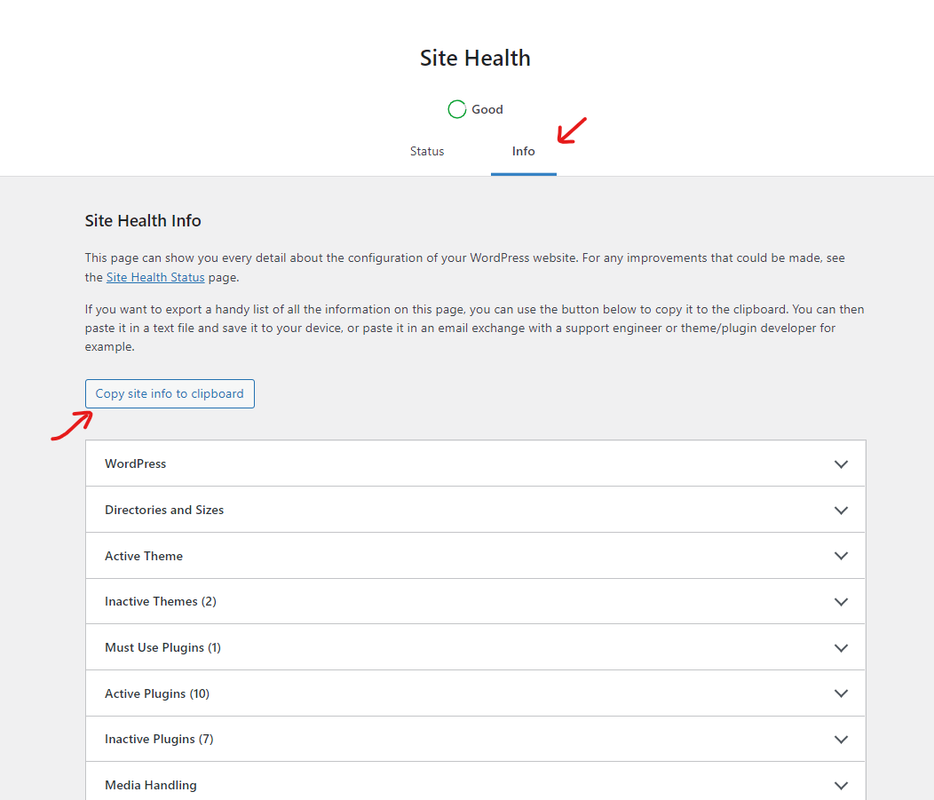
To help us better understand your website’s setup and the exact issue you are encountering, could you please provide us with your system environment information? You can easily find this by navigating to your WP Dashboard > Tools > Site Health, selecting the Info tab, and clicking the “Copy site info to clipboard” button. You can paste that information directly here as code, or upload it to Pastebin site or GitHub Gist site and share the link with us (feel free to remove your email address from the content before sharing). Here is a quick visual guide to help you find it: https://i.postimg.cc/fbjtkFyJ/image.png
Please note that, these are just warnings and notices; they will not harm your website or affect its functionality. If you’d like to hide them from your visitors, you can simply turn off the WordPress debugger by following this guide: https://ww.wp.xz.cn/support/article/debugging-in-wordpress/#wp_debug. Alternatively, you can configure the debugger to log errors into a private debug.log file instead of displaying them on the front end of your website.
Once we have this information, we will be able to proceed with more targeted troubleshooting.
Please keep us updated.
Thank you.
Best Regards- This reply was modified 2 weeks, 6 days ago by Shahin.
Forum: Themes and Templates
In reply to: [OceanWP] Logo don’t displayedHello @aipe,
Thank you for getting back.
The URL you shared contains
customize_autosaved=on, which strongly suggests the “display: none” rule is coming from an autosaved Customizer draft, not the theme’s core. This can happen when a change is made in the Customizer (sometimes by a plugin like Elementor) and auto saved but never published or discarded.Please try the following:
- Go to Appearance > Customize > Additional CSS and check for any leftover “display: none” rules
- Discard any pending autosaved draft in the Customizer
- Clear your cache after saving
And regarding Elementor, yes, a conflict is possible. If the issue persists after the steps above, try deactivating Elementor temporarily to rule it out.
Also, could you please share your live site URL? Without it, we can only make assumptions, and we’d rather pinpoint the exact cause for you with dev and inspecting tools.
Hope it helps,
Best RegardsForum: Themes and Templates
In reply to: [OceanWP] Logo don’t displayedHello @aipe,
Thank you for reaching out.
While “max-width: 3000px” may not be technically invalid,
it is not a standard practice and we generally avoid using such values.This seems to stem from your previous customizations.
If possible, please provide a live URL where the issue is occurring so we can investigate further.Additionally, if the CSS you mentioned is present in Customizer > Custom CSS, please remove it and clear your cache.
Hope it helps.
Best RegardsForum: Themes and Templates
In reply to: [OceanWP] Link in mobile menu don’t work correctHi @dswebnew,
I understand your point in this topic, but currently, there is no built in option for styling the active/current link specifically for the mobile menu. All available customization settings are located under Customizer > Header > Mobile Menu.
From a technical standpoint, while the
current-menu-itemclass is indeed a standard WordPress class, the mobile menu and desktop menu in OceanWP use different HTML structures and CSS selectors to ensure better responsiveness and performance. Since they are treated as two distinct components, the desktop styling doesn’t automatically apply to the mobile view (you can find it with using inspect elements).Even if an option were to be added in the Customizer, it would ultimately generate the same CSS. Therefore, using the CSS snippet provided in my previous reply is currently the most efficient way to achieve this result
I hope that helps.
Best Regards