thomaswild

Forum Replies Created
-
Hello @craigmckee,
I have notified our development team about this issue. They will work on implementing a fix in a future version of our plugin. Unfortunately I cannot provide you with an estimate as to when this might be.
Thank you for reporting this issue!Hello @aaronaudseo,
I would like to ask you for the following:
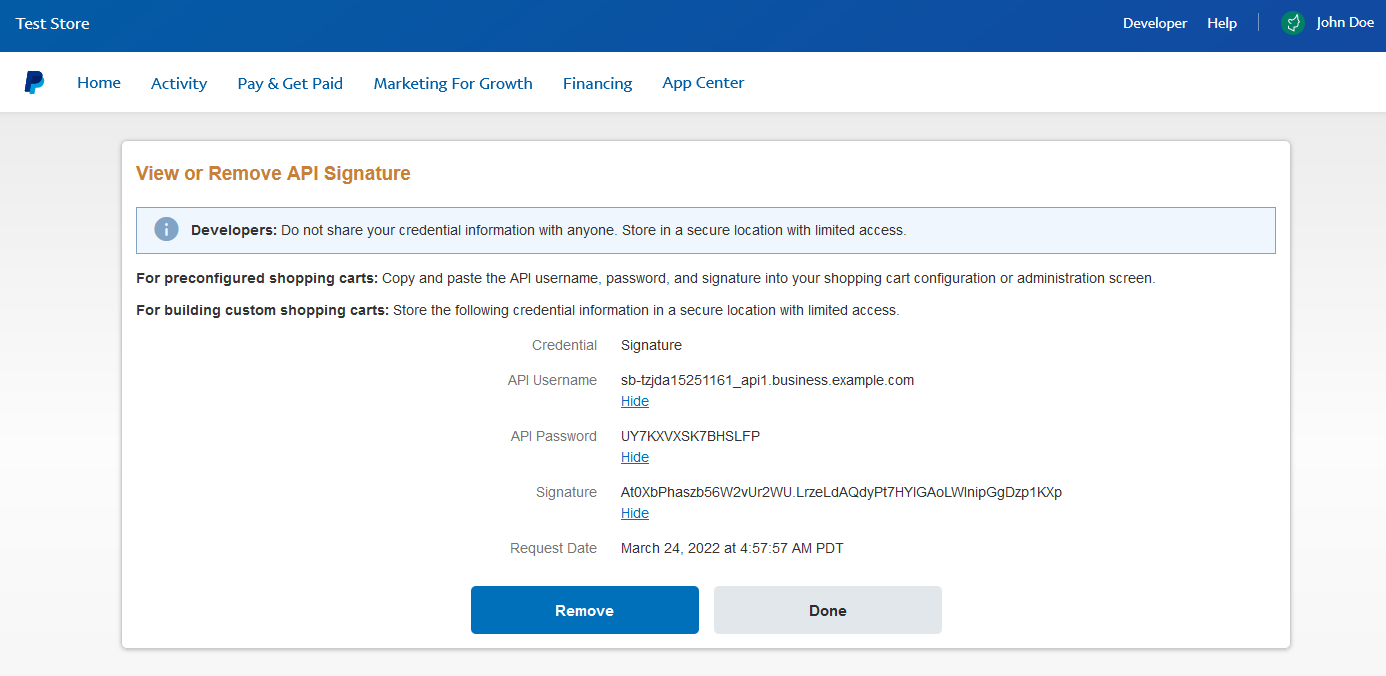
1. Please log in to your PayPal Business account and check your PayPal API Credentials. The page should look something like this. Please double-check that you have the credentials added correctly to your site.
2. Could you please share a screenshot of how the IPN is set up in your PayPal account? You can read more about this here.
3. From your PayPal Business account could you please check if the “Encrypted website payments” setting is turned OFF, please also send a screenshot from there. You can read more about this here.
4. Could you please go to your site’s Dashboard -> Paid Member Subscriptions -> Settings -> Payments -> Gateways -> and send a full screenshot from there (make sure all the settings from that page can be seen)?
Note: You can use a site like https://snipboard.io/ to share the screenshots.
Note 2: Since this is a public forum, please make sure any sensitive/personal data in the screenshots are blurred/hidden.
Hello @mbv
Could you also check to see if the pages appear in the Post Types tab under Private Pages?
I have attached a screenshot of this to help you locate this tab: https://snipboard.io/iVu1T5.jpgHello @craigmckee,
Could you provide some additional information regarding the issue?
1. Could you send me a screenshot with our plugin from the Dashboard -> Plugins -> Installed Plugins page. Please make sure the version is visible.
2. If I understood correctly, you have enabled the 2FA feature that Wordfence provides and the security code field is not showing up on your login form (that was created with profile builder). Is this correct?
3. Could you also send a screenshot of the error in question?
You can use a site like https://snipboard.io/ to share the screenshot.Hello @elementsevenx,
I would like to ask you to send me some additional information:
1. Could you send me the exact link to the registration page in question?
2. A screenshot of the Plugins page at Dashboard -> Plugins -> Installed Plugins. Please make sure that all of our plugins as well as their versions are visible.
You can use a site like https://snipboard.io/ to share the screenshot.
Note: The Update Credit Card details functionality is available only for the automatically recurring subscription plans that were purchased with Stripe. If a user purchases an automatically recurring plan with PayPal, then a workaround will be for them to press on the Cancel button (from the PMS Account form) and then manually renew their plan with the newly chosen payment method or newly chosen PayPal account.
Are the users in question in the above mentioned situation?Hello @littlesnow,
A users role will be removed once their subscription expires. In case the subscription expired and the role was not removed instantly, the user still won’t be able to access any restricted content. This is because we are checking the expiration date instead of the subscription status.
Note: If the user used PayPal Standard recurring subscriptions and their subscription was canceled, the expiration could be delayed (+36 hours)Hello @marufsarkar,
When attaching a subscription plan to a WooCommerce product, you are relinquishing the subscription/payment features from Paid Member Subscriptions and instead opt in to use the WooCommerce Checkout for payments.
Any user that purchases the product that has a membership attached to it, will pay through WooCommerce and will only pay the amount you are charging for the product.
You can read about all the features we offer (for free) in regards to WooCommerce on this page: https://www.cozmoslabs.com/docs/paid-member-subscriptions/integration-with-other-plugins/woocommerce/Hello @zoruska,
Could you tell me what payment gateway the users with this issue are using? In case of PayPal, the payments could take a few minutes to process. This could be the reason why your clients are not able to see their upgraded/downgraded subscriptions show up immediately.Hello @mbv,
If you take a look at the create post type function:function cp_create_post_type() {
$labels = array(
'name' => _x( 'Private Pages', 'post type general name', 'client-portal' ),
'singular_name' => _x( 'Private Page', 'post type singular name', 'client-portal' ),
'menu_name' => _x( 'Private Page', 'admin menu', 'client-portal' ),
'name_admin_bar' => _x( 'Private Page', 'add new on admin bar', 'client-portal' ),
'add_new' => _x( 'Add New', 'private Page', 'client-portal' ),
'add_new_item' => __( 'Add New Private Page', 'client-portal' ),
'new_item' => __( 'New Private Page', 'client-portal' ),
'edit_item' => __( 'Edit Private Page', 'client-portal' ),
'view_item' => __( 'View Private Page', 'client-portal' ),
'all_items' => __( 'All Private Pages', 'client-portal' ),
'search_items' => __( 'Search Private Pages', 'client-portal' ),
'parent_item_colon' => __( 'Parent Private Page:', 'client-portal' ),
'not_found' => __( 'No Private Pages found.', 'client-portal' ),
'not_found_in_trash' => __( 'No Private Pages found in Trash.', 'client-portal' )
);
$args = array(
'labels' => $labels,
'description' => __( 'Description.', 'client-portal' ),
'public' => true,
'publicly_queryable' => true,
'show_ui' => true,
'show_in_menu' => false,
'query_var' => true,
'capability_type' => 'post',
'has_archive' => false,
'hierarchical' => true,
'supports' => array( 'title', 'editor', 'author', 'thumbnail', 'revisions' ),
'exclude_from_search' => true,
'show_in_rest' => true
);
if( !empty( $this->options['page-slug'] ) ){
$args['rewrite'] = array( 'slug' => $this->options['page-slug'] );
}
else{
$args['rewrite'] = array( 'slug' => $this->defaults['page-slug'] );
}
if( !empty( $this->options['support-comments'] ) && $this->options['support-comments'] == 'yes' )
$args['supports'][] = 'comments';
register_post_type( 'private-page', $args );
}There is an argument called show_in_menu. Setting that to true might solve the issue you are facing.
Hello @maureenh,
Thank you for your review and for the kind words!Hello @clementlanoe,
The feature you mentioned is a paid only feature and we are not allowed to talk about the paid versions here. In case you would like to have that conversation please open a support ticket using our site https://www.cozmoslabs.com/support/Hello @aquariusadolescent,
Unfortunately the feature you are asking about is a paid only feature and we are not allowed to talk about the paid versions here. In case you would like to have that conversation please open a support ticket using our site https://www.cozmoslabs.com/support/Hello @jmoutsounis,
You mentioned using WP All Import to migrate the data from your other website.
You will first need to make sure you migrate your media files. I found the following on WP All Import documentation page that might help you with the process: https://www.wpallimport.com/documentation/import-images-from-media-library/
The way we store profile pictures is by storing a meta key for each user called:metronet_image_id
This key stores the ID of the attachment from WordPress.Hello @edirama666,
To solve this, please navigating to Paid Member Subscriptions -> Settings -> Content Restriction -> scroll down to the Misc section -> enable the setting Include Restricted Posts in Queries. Don’t forget to save your settings.Hello @vincents95,
Thank you for your review. We are happy to see that you find our product helpful!